28
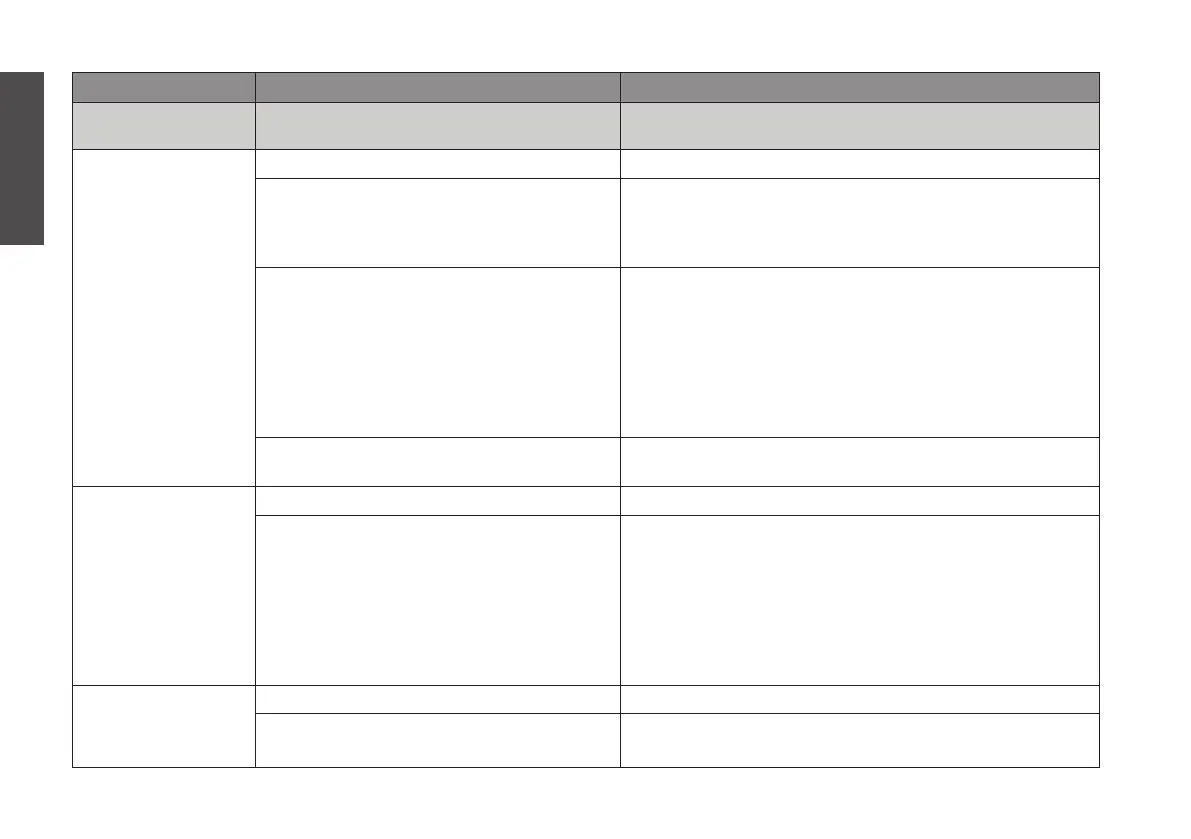
PROBLEM POSSIBLE CAUSE ACTION
ERROR MESSAGE ON
THE DISPLAY
ADD WATER No water in the water tank (A3) Fill the water tank
The floating magnet (A14) is stuck at the
bottom of the tank
1. Remove the metal cover (A20)
2. Remove the floating magnet
3. Descale the water tank (see p. 24)
4. Put everything back together
The metal cover (A20) fell off and the
floating magnet (A14) is not in place
1. Find the floating magnet and metal cover in the wa-
ter tank
2. Remove the water from the water tank
3. Put the floating magnet back in place (orientation
not important)
4. Put the metal cover back in place (orientation not
important)
5. Fill the water tank (A3) with water
If the information above is not clear Consult the help page on our website or customer sup-
port (see p. 30)
PLACE CHAMBER Glass brewing chamber (A11) not detected Install the glass brewing chamber (see p. 12 - step 14)
Chamber sensor is defect Turn off the chamber check function. See p. 22 –
chamber check. This is the only instance in which turn-
ing of chamber check is recommended. Please be sure
after turning off chamber check that the glass brewing
chamber (A11) is in place whenever you brew.
Using the machine without an installed glass brewing
chamber is not allowed, and any damages as a result of
such will not be covered by the warranty.
CLOSE LID Machine lid (A8) is opened Close the machine lid
If the machine lid is closed but the error
still appears
Contact customer support (see p. 30)
English


 To Next Page