191VAN Evolution™ Extreme Variable Speed Air Conditioner: Installation Instructions
Manufacturer reserves the right to change, at any time, specifications and designs without notice and without obligations.
20
Status Codes
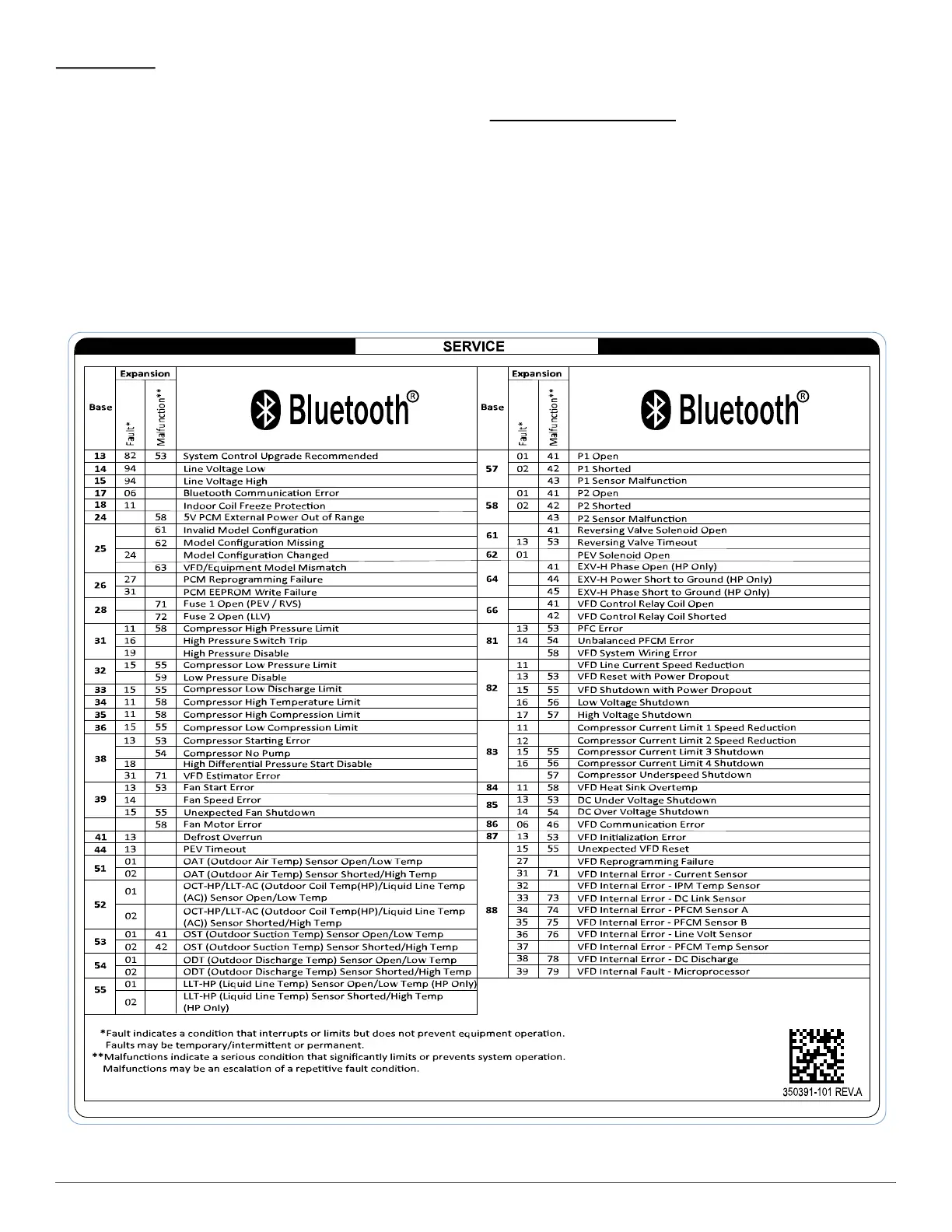
Table 11 shows the status codes flashed by the amber status light. Most
system problems can be diagnosed by reading the status code as flashed
by the amber status light on the control board.
The codes are flashed by a series of short and long flashes of the status
light. The short flashes indicate the first digit in the status code,
followed by long flashes indicating the second digit of the error code.
The short flash is 0.25 seconds ON and the long flash is 1.0 second ON.
Time between flashes is 0.25 seconds. Time between short flash and first
long flash is 1.0 second. Time between code repeating is 2.5 seconds
with LED OFF.
Codes are easily read from Evolution™ Connex™ System Control or
the 5x7 LED display on the PCM.
EXAMPLE:
3 short flashes followed by 2 long flashes indicates a 32 code. Table 11
shows this to be low pressure switch open.
Status Code Recall Mode
Active status codes are stored in memory even when power is absent.
The most recent flashing status code (highest priority active) can be
recalled from memory via Status Code Recall Mode is accessed by
shorting (use a clip wire) the "force defrost" connector (labeled J2 on the
board, see Fig. 25) and then power ON the unit.
Please make sure the unit is turned OFF before shorting the pins. Status
Code Recall Mode will continue as long as the "force defrost" terminals
remain shorted. The unit will not attempt to cool while the terminals
remain shorted. Once the status code is read, power-down the unit and
remove the short.
Table 11 – Diagnostic Code Table



 To Next Page