To
listen to
SOURCE
programs
1.
To listen to the LINE input sources, first select the program
-
phono, tuner etc. -on your stereo
system.
2.
Before starting to use the equalizer, set the tape monitor switch of the preamplifier, integrated amplifier,
or
receiver
to
on
and set the loudness switch and low/high frequency fitters (if
any)
to
off.
Note. If your preamplifier etc. is equipped with a
REC
OUT
selector, first set the input selector on
the
preamplifier
etc. to the tape (monitor) position, and set the
REG
OUT
selector to the position which selects the program source
you desire to make
an
equalization.
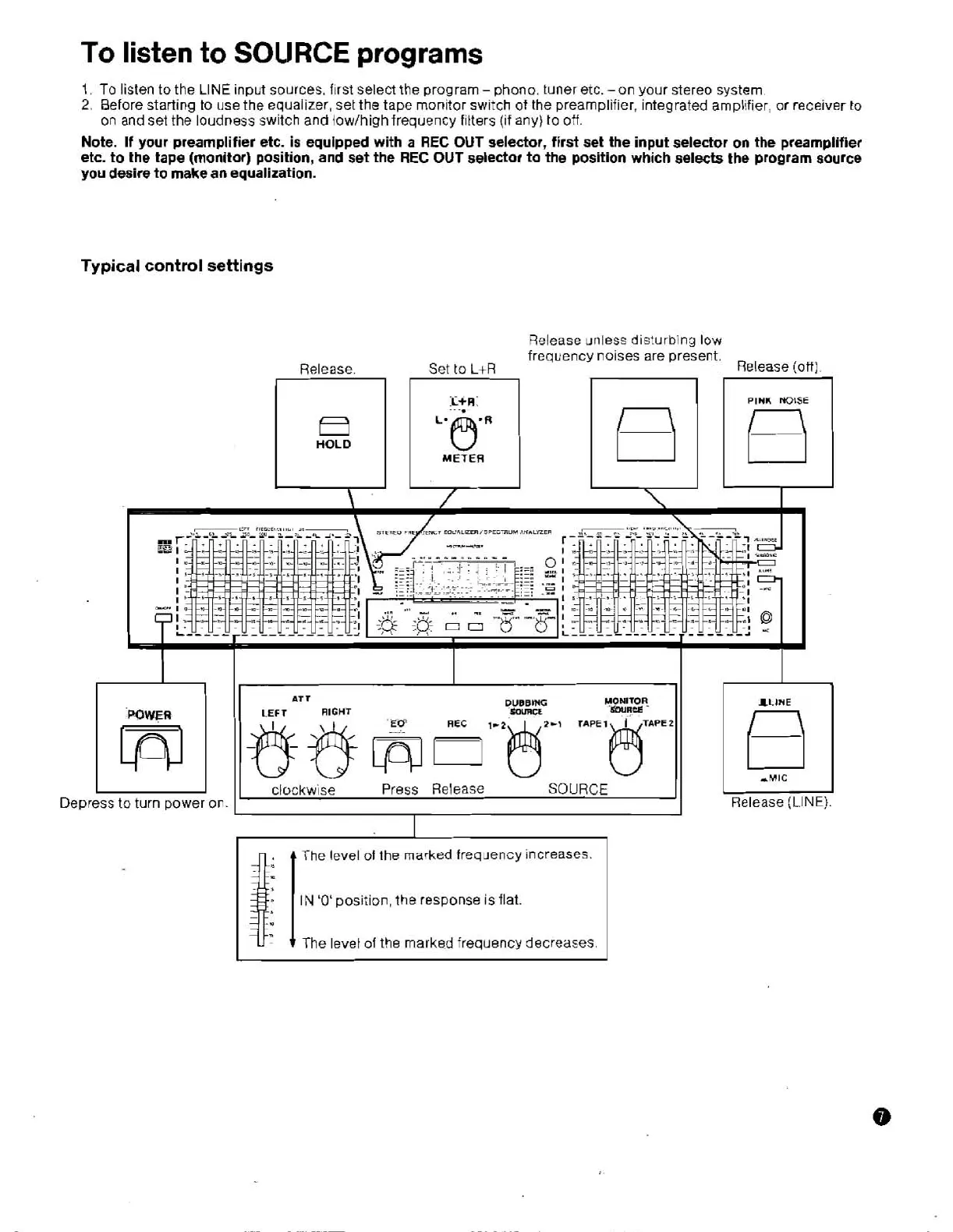
Typical control settings
Release unless disturbing low
frequency noises are present.
Release. Set
to
L+R
Release (oft).
AT
T
DUBBING
MONITOR
SWR&
lLlWE
POWER
LEFT
RIGHT
clockwse
Press
Release
SOURCE
Depress
to
turn power on.
Release (LINE)
I
4':
t
The level
of
the
marked
frequency increases.


 To Next Page