Using
the
SPECTRUM
ANALYZER
Real-time analysis
of
a
program
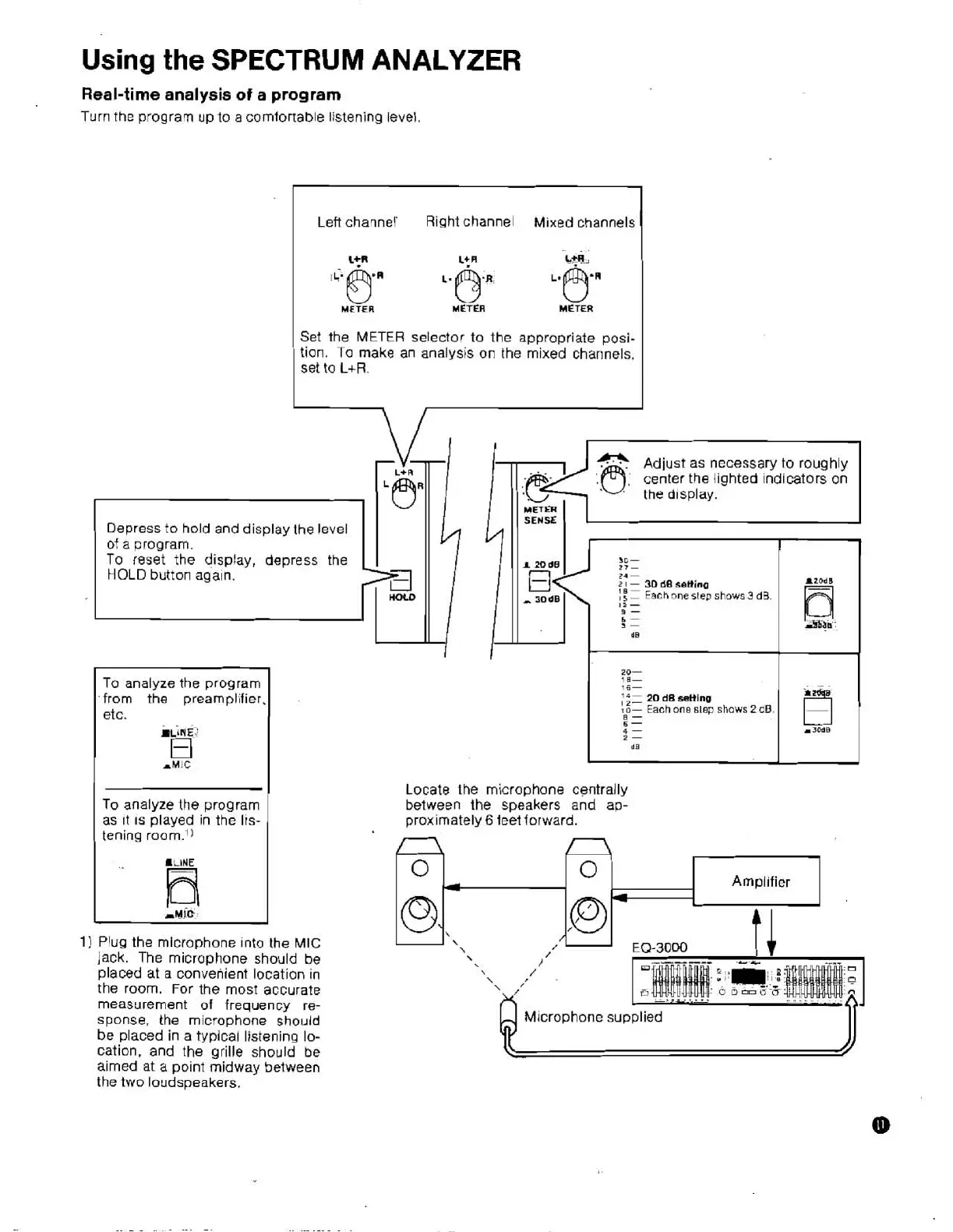
Turn the program up to a comfortable listening level.
Left channel' Right channel
Mixed
channels
I
L:R
Lt
R
Lm
METER
Ben
L.
METER
0..
METER
I
Set the
METER
selector to the appropriate posi-
tion.
To
make
an analysis on the mixed channels,
set
to
L+R.
Depress to hold and display the level
of
a
program.
To
reset
the display, depress the
HOLD
button again.
HOLD
To analyze the program
from the
preampl~fier,
etc.
HLINE
'
El
AMIC
To analyze the program
as
~t
IS
played in the Irs-
tening
.LLHE
Fi
1)
Plug the microphone Into the MIC
jack. The microphone should be
placed
at
a convenient location in
the room. For the most accurate
measurement of frequency re-
sponse,
the microphone should
be placed in a typical listening lo-
cation, and the grille should
be
aimed at a point midway between
the two loudspeakers.
center
the
lighted indicators on
the d~splay.
16-
20
dB
settine
Each
one
slep
shows
2dB.
4
-
r3OdB
Locate the microphone centrally
between the speakers and ap-
proximately
6
feet
forward.
'\
.'
Microphone supplied


 To Next Page