Controls and functions
0
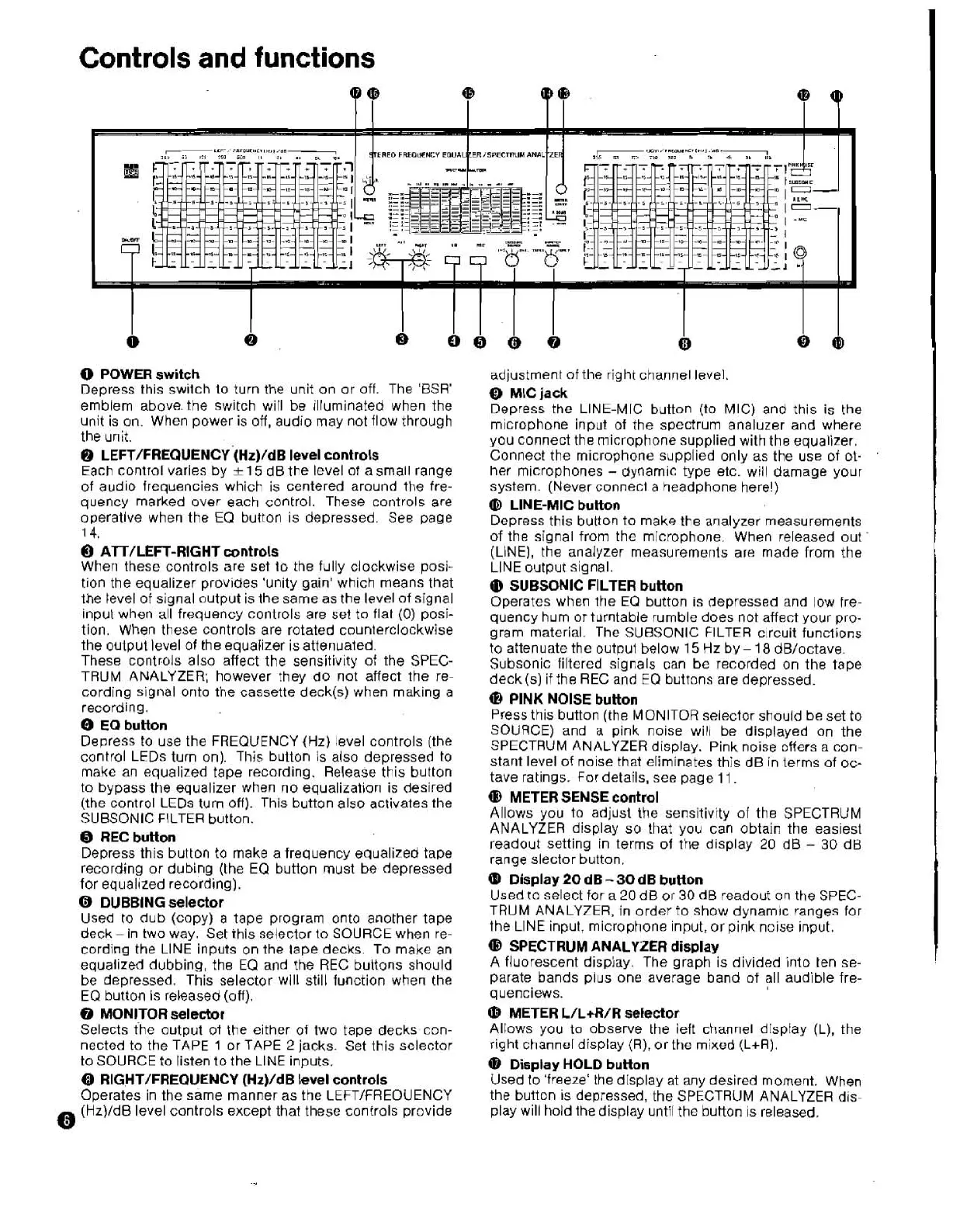
POWER switch
Depress this switch to turn the unit on or off. The 'BSR'
emblem above. the switch will be illuminated when the
unit is on. When power is off, audio may not flow through
the unit.
@
LEFT/FREQUENCY-(~z)/dB
level
controls
Each control varies by
k
15
dB the level of a small range
of audio frequencies which is centered around the fre-
quency marked over each control. These controls are
operative when the
EQ button is depressed. See page
1
4.
O
AlT/LEFT-RIGHT controls
When these controls are set to the fully clockwise posi-
tion the equalizer provides 'unity gain' which means that
the level of signal output is the same as the level of signal
input when all frequency controls are set
to
flat
(0)
posi-
tion. When these controls are rotated counterclockwise
the output level of the equalizer is attenuated.
These controls also affect the sensitivity of the SPEC-
TRUM ANALYZER; however they do not affect the re-
cording signal onto
the
cassette deck(s) when making a
recording.
O
EQ button
Depress to use the FREQUENCY
(Hz)
level controls (the
control LEDs turn on). This button is also depressed to
make an equalized tape recording. Release this button
to bypass the equalizer when no equalization is desired
(the control LEDs turn off). This button also activates the
SUBSONIC FILTER button.
0
REC button
Depress this button to make a frequency equalized tape
recording or dubing (the EQ button must be depressed
for equalized recording).
6
DUBBING selector
Used to dub (copy) a tape program onto another tape
deck -in two way. Set this selector
to
SOURCE when re-
cording the LlNE inputs on the
tape decks. To make an
equalized dubbing, the
EQ and the REG buttons should
be depressed. This selector will still function when the
EQ button is released (off).
O
MONITOR selector
Selects the output of the either of two tape decks con-
nected to the TAPE
1
or TAPE 2 jacks. Set this selector
to SOURCE to listen
to
the LlNE inputs.
0
RIGHT/FREQUENCY (Hz)/dB level controls
Operates in the same manner as the LEFT/FREOUENCY
0
(Hz)/dB
level controls except that these controls provide
adjustment of the right channel level.
@
MIC
jack
Depress the LINE-MIC button (to MIC) and this is the
microphone input of the spectrum analuzer and where
you connect the microphone supplied with the equalizer.
Connect the microphone supplied only as the use of ot-
.
her microphones
-
dynamic type etc. will damage your
system. (Never connect
a
headphone here!)
([I)
LINE-MIC button
Depress this button to make the analyzer measurements
of the signal from the microphone. When released out
(LINE), the analyzer measurements are made from the
LlNE output signal.
Q)
SUBSONIC FILTER button
Operates when the EQ button is depressed and low fre-
quency hum
or
turntable rumble does not affect your pro-
gram material. The SUBSONIC FILTER circuit functions
to attenuate the output below
15
Hz
by
-
18
dB/octave.
Subsonic filtered signals can be recorded on the tape
deck
(s) if the REC and
EQ
buttons are depressed.
@
PINK NOISE button
Press this button (the MONITOR selector should be set to
SOURCE) and a pink noise will be displayed on the
SPECTRUM ANALYZER display. Pink noise offers
a
con-
stant level
of
noise that eliminates this dB in terms of oc-
tave ratings.
For
details, see page
11.
(D
METER
SENSE
control
Allows you
to
adjust the sensitivity of the SPECTRUM
ANALYZER display so
that
you can obtain the easiest
readout setting in terms
of
the display 20 dB
-
30
dE3
range slector button.
@
Display
20
dB
-
30
dB button
Used
to
select for a 20 dB or
30
dB readout on the
SPEC-
TRUM ANALYZER, in order to show dynam~c ranges for
the LlNE input, microphone input, or pink noise input.
@
SPECTRUM
ANALYZER
display
A
fluorescent dispiay. The graph is divided into ten se-
parate bands plus one average band of all audible
fre-
quenciews.
@
METER L/L+R/R selector
Allows you to observe the left channel display (L), the
right channel display
(R), or the mixed (L+R).
@
Display HOLD button
Used to 'freeze' the display at any desired moment. When
the button is depressed, the SPECTRUM ANALYZER dis-
play will hold
the
display until
the
button is released.


 To Next Page
 Loading...