Connecting the associated equipment
1
Amplifier/receiver
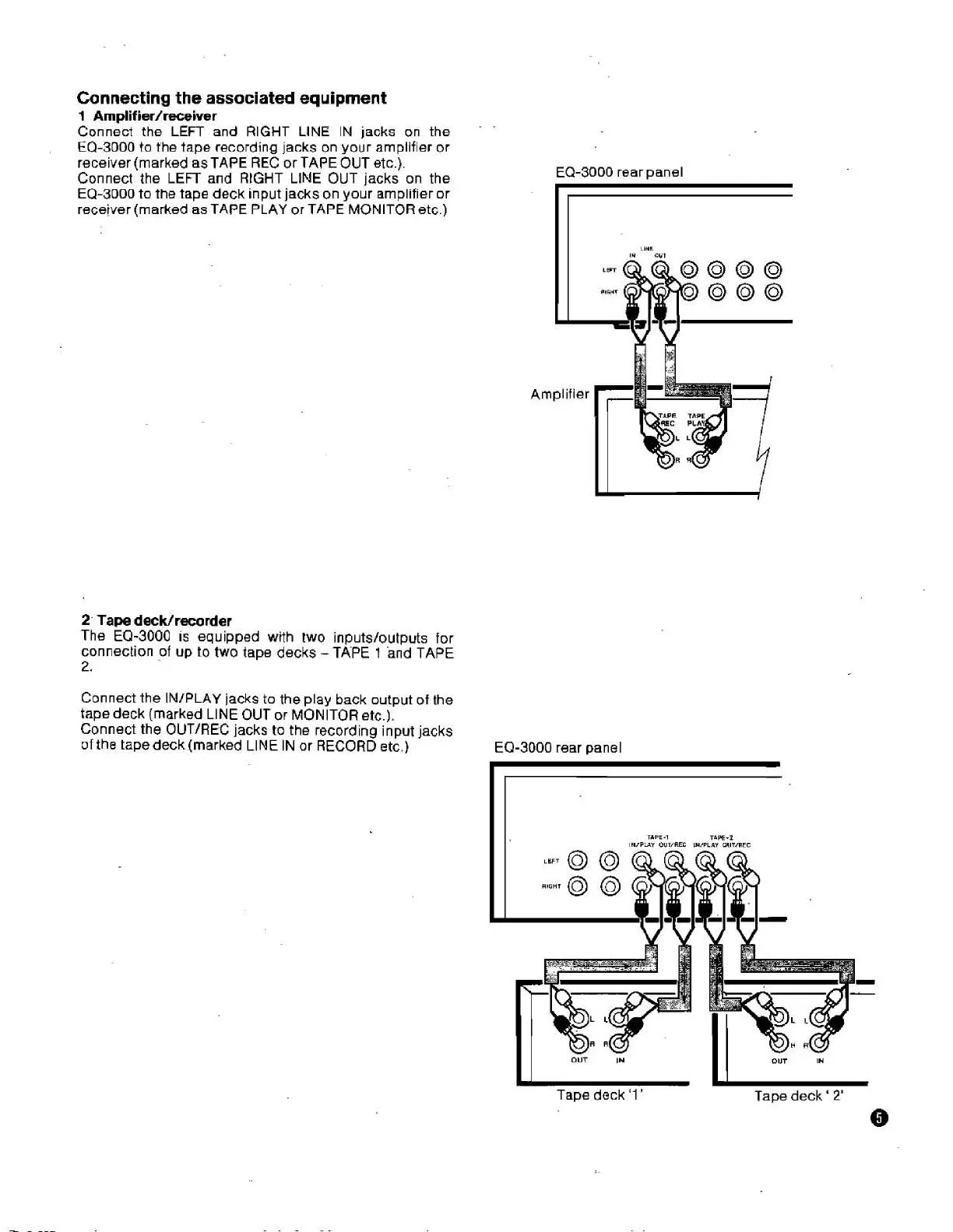
Connect the LEFT and RIGHT LlNE IN jacks on the
EQ-3000 to the tape recording jacks on your amplifier or
receiver (marked as TAPE REC or TAPE OUT etc.).
Connect the LEFT and
RIGHT LlNE OUT jacks on the
EQ-3000 to the tape deck input jacks on your amplifier or
receiver (marked as TAPE PLAY or TAPE MONITOR etc.)
2-
Tape
decWrecorder
The EQ-3000
IS
equipped with two inputs/outputs for
connection
of
up to two tape decks
-
TkPE
1
and TAPE
2.
Connect the IN/PLAY jacks to the play back output of the
tape deck (marked LlNE OUT or MONITOR etc.).
Connect the
OUT/REC jacks to the recording input jacks
of
the tape deck (marked LlNE IN or RECORD etc.)
EQ-3000 rear panel
EQ-3000 rear panel
I I
Tape deck '1
'
Tape
deck
'
2'
0


 To Next Page