VISIT BAOFENGTECH.COM AND MIKLOR.COM FOR DOWNLOADS AND HELP
Adding a NOAA Channel
1. Press the [MENU] key to enter the menu.
2. Enter 63 on the numerical keypad to get to NCH-AD.
3. Press [MENU] to select.
4. Use the and keys to select an empty memory channel or enter it directly on the
numerical keypad.
5. Press the [MENU] key to confirm.
6. The menu will display “NOAA__”, you need to enter the 2-digit NOAA channel number from
the list above.
7. Press the [MENU] key to confirm.
8. Press the [EXIT] key to exit the menu.
Switch your radio to Memory (MR) (press V/M or long press MENU on mic) to test your newly added
NOAA channel.
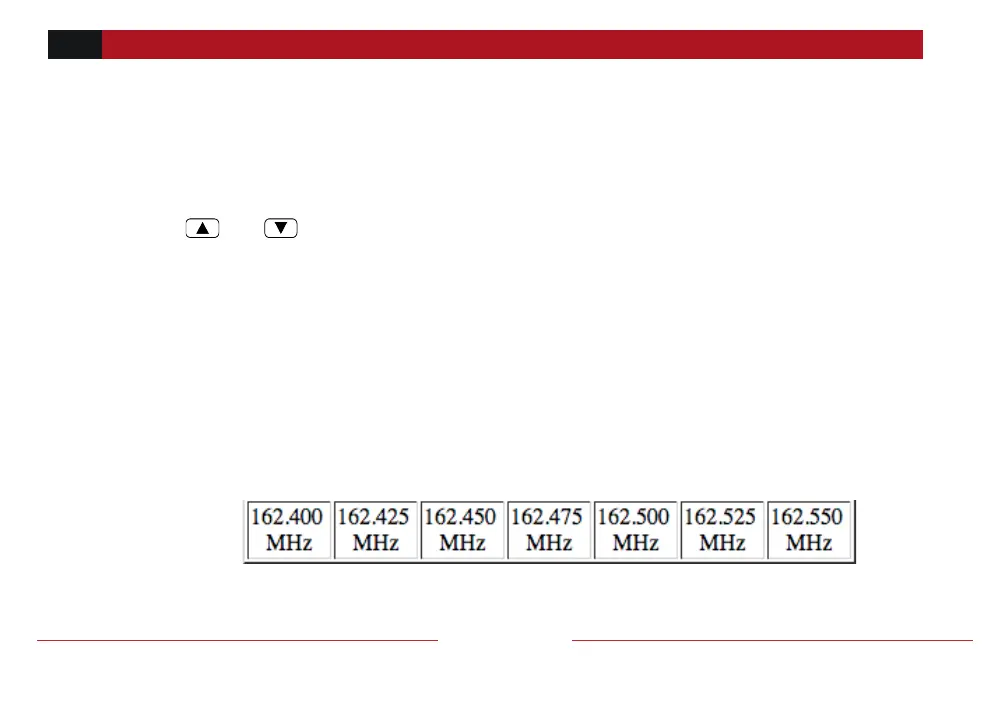
NOAA Weather Channels
NOAA Channel No. 01 02 03 04 05 06 07



 To Next Page