25
BÜCHI Vacuum Controller V-800/V-805
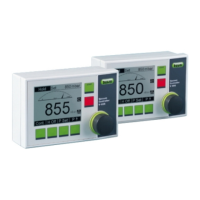
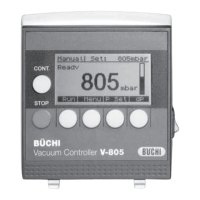
8.3 Fundamental arrangement of the display
Information on active mode
Set point
Operating state
Actual pressure
Selected unit
Graphical pressure display
Illustration of control keys
8.4 General information on the control keys
The key [OK] closes an input and puts the new value into
the working memory.
The key [ESC] (Escape) always take you one step
backward. Inputs that have already been changed, but
not yet confirmed with [OK] are ignored.
8.5 Manual distillation
8.5.1 Setting set values and start
Choose manual mode (if it is not already active)
[MENU] ð [MODE] ð [MANUAL]
Define set point ð [P Set]. You can always use the key
[é] to increase the actual value and [ê] to decrease the
value. Confirm the desired value with OK.
Define hysteresis ð [dP]. You can always use the key
[é] to increase the actual value and [ê] to decrease the
value. A = Automatic hysteresis. Confirm the desired value
with OK.
Now, the controller is ready. Press RUN to start the controller.
STOP ends the distillation and ventilates the apparatus (if it
has not already been configured).
8 Operation V-805


 To Next Page