EasyManua.ls Logo

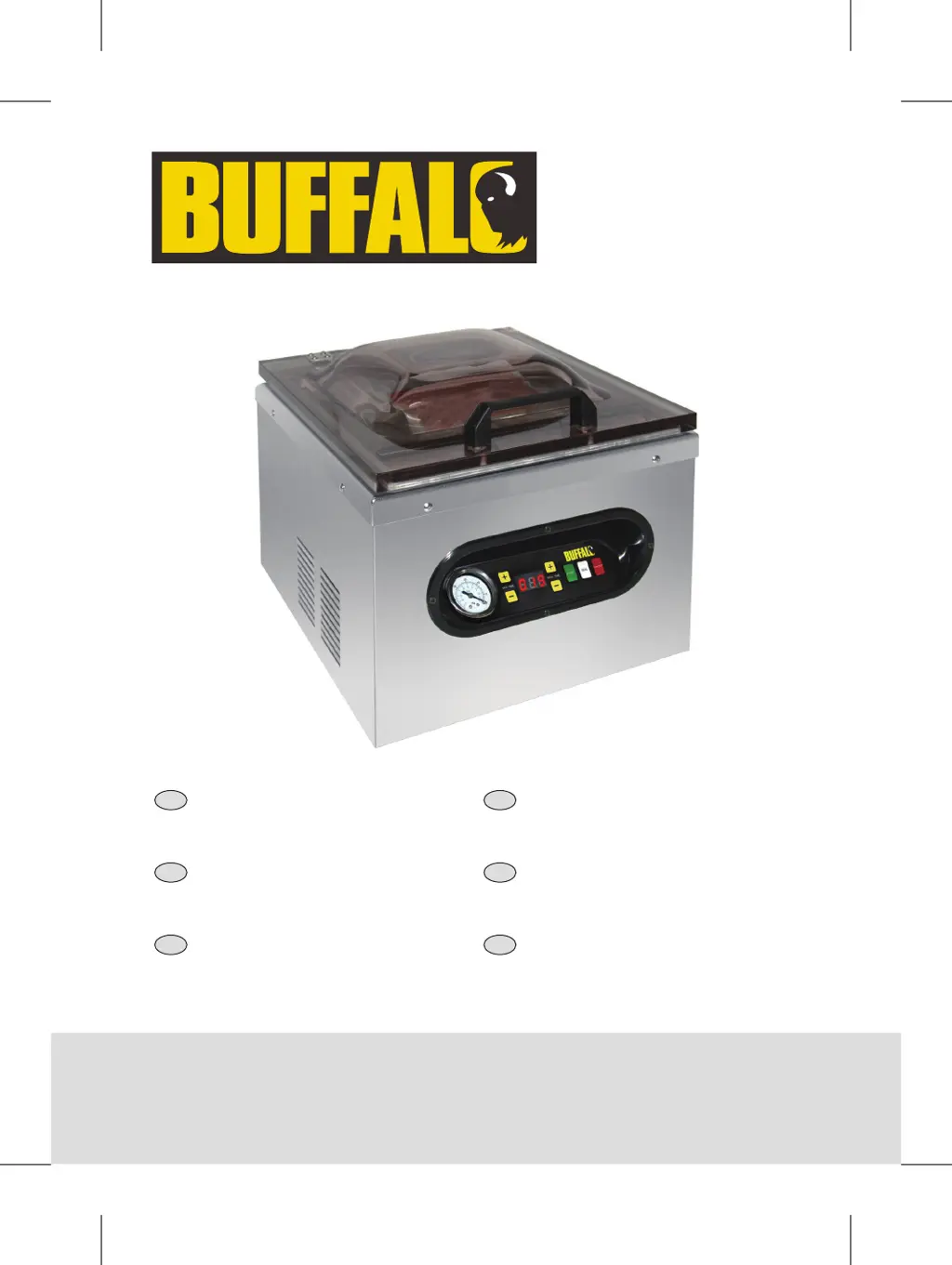
Buffalo GF439 - User Manual

Buffalo GF439
40 pages
Print Icon
To Next Page IconTo Next Page
Loading...
NL
Vacuümverpakkings-
machine
Handleiding
7
IT
Confezionatrice
sottovuoto
Manuale di istruzioni
22
FR
Machine d’emballage
sous vide
Mode d'emploi
12
ES
Máquina de envasado al
vacío
Manual de instrucciones
27
DE
Vakuumiergerät
Bedienungsanleitung
17
PT
Máquina de embalar a
vácuo
Manual de instruções
32
Model • Modèle • Modell • Modello • Modelo • Malli:
GF439
Vacuum Pack
Machine
Instruction manual
GF439_ML_A5_v6_20190829.indb 1 2019/8/29 14:22

Questions and Answers

  • C
    Catherine WeaverAug 13, 2025
    How to troubleshoot a Buffalo Kitchen Appliance that is not working?
    • M
      Michelle HernandezAug 13, 2025
      If your Buffalo Kitchen Appliance isn't working, first ensure it's properly plugged in and switched on. Check the power supply. Replace the plug fuse if it has blown. If the plug, lead, or internal wiring is damaged, call a BUFFALO agent or qualified technician.
  • M
    Megan PittmanAug 16, 2025
    Why are bags not sealing correctly in my Buffalo GF439 Kitchen Appliances?
    • J
      Joshua ReynoldsAug 16, 2025
      If the bags are not sealing correctly in your Buffalo Kitchen Appliance, make sure the inside of the bag is dry and free from moisture where it is to be sealed. Reposition the end of bag over the sealing bar. If the heat sealing foam bar is missing or incorrectly aligned, replace or re-position it (Spare part code:AE931). If the sealing bar requires replacement, call a BUFFALO agent or qualified technician. If you are using incorrect bags, call the Vacuum Pack machine supplier.
  • A
    Antonio DominguezAug 20, 2025
    What to do if my Buffalo GF439 Kitchen Appliances show error message E in Digital Display?
    • M
      Monica McfarlandAug 20, 2025
      If your Buffalo Kitchen Appliance displays an error message E, it means the machine has overheated. Switch off the power and leave it for 20 minutes.
  • M
    mcdonaldannaAug 25, 2025
    What to do if my Buffalo GF439 does not remove all the air from the bag?
    • R
      Ronnie PriceAug 25, 2025
      If your Buffalo Kitchen Appliance does not remove all the air from the bag, open the lid and reposition the bag. Ensure the open end of the bag is clean. Replace the bag if it may be punctured. If you are using incorrect bags, call the Vacuum Pack machine supplier.
  • K
    Kathleen BennettAug 28, 2025
    What to do if my Buffalo Kitchen Appliance is not working?
    • C
      Claudia GonzalezAug 28, 2025
      If your Buffalo Kitchen Appliance is not working, first ensure it is correctly plugged in and switched on. Then, check the fuse in the plug and replace it if necessary. Also, verify the power supply. If the plug and lead are damaged or there's an internal wiring fault, contact a Buffalo agent or qualified technician.
  • J
    james87Aug 31, 2025
    Why does my Buffalo Kitchen Appliance show error message E?
    • C
      Christine KochAug 31, 2025
      If the digital display of your Buffalo Kitchen Appliance shows error message E, it indicates that the machine has overheated. To resolve this, switch off the power and leave the appliance for 20 minutes to cool down.
  • R
    Rebecca DoyleSep 4, 2025
    What to do if my Buffalo Kitchen Appliances shows error message E01?
    • M
      mleeSep 4, 2025
      If your Buffalo Kitchen Appliance displays error message E01, it means the lid is open while the machine is in heating mode. Close the lid. If the error code persists, contact a Buffalo agent or qualified technician, as there may be an issue with the micro switch.
  • P
    pamelapriceSep 8, 2025
    How to fix bags that are not sealing correctly in Buffalo Kitchen Appliances?
    • M
      mbaileySep 8, 2025
      If bags are not sealing correctly with your Buffalo Kitchen Appliance, ensure the inside of the bag is dry and free from moisture where it is to be sealed. Also, make sure the end of the bag is placed above the sealing bar. If the heat sealing foam bar is missing or incorrectly aligned, replace or re-position it (Spare part code:AE931). If the issue persists, you may be using incorrect bags, so contact your Vacuum Pack machine supplier.

Summary

Safety Tips

Introduction

Pack Contents

Location of Controls

Controls

Control Panel Overview

Details on the On/Off button, Seal button, Start button, time adjustment buttons, vacuum gauge, and LED display.

Operation: Vacuum Packing Food

Cleaning, Care & Maintenance

Troubleshooting Guide

Technical Specifications

Electrical Wiring

Compliance

Buffalo GF439 Specifications

General IconGeneral
BrandBuffalo
ModelGF439
CategoryKitchen Appliances
LanguageEnglish

Related product manuals