EasyManua.ls Logo

Bulldog Security RS102 - User Manual

Bulldog Security RS102
11 pages
Print Icon
To Next Page IconTo Next Page
Loading...
CONTENTS
REMOTE STARTER
MODELS RS102/RS102E, RS112/RS112E, RS122/RS122E
INSTALLATION GUIDE
OWNER’S GUIDE
System Features ......................................1
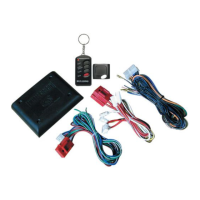
System Components ....................................1
Required Tools .......................................1
Technical Assistance .................................1
Before You Begin .....................................2
Precautions ..........................................2
Testing Your Wires ...................................2
Making Connections .................................2-4
Locating & Making Connections ......................4-5
Neutral Safety Switch................................5
Connecting 18-Pin Harness ............................6
Connecting 4-Relay Harness ...........................6
Antenna Placement ....................................6
Anti-Theft System ....................................7
Optional Connections ...............................7-9
Operating Instructions ...............................9
Programming Instructions ..........................9-10
Technical Assistance
All tech personnel are expertly qualified to answer any technical questions.
Technicians are available Monday through Friday from 9:00 a.m. until 8:00 p.m. and Saturday 10:00 a.m. until 4:00 p.m.
Address
288 Canton Avenue • Wintersville, Ohio 43953
Telephone
Phone: 740-264-4710 • 800-878-8007 • Fax: 740-264-7306

Other manuals for Bulldog Security RS102

Question and Answer IconNeed help?

Do you have a question about the Bulldog Security RS102 and is the answer not in the manual?

Summary

System Features

System Components

Required Tools

Technical Assistance

Before You Begin

Precautions

Testing Your Wires

Making Wiring Connections

Making End to End Connections

Provides step-by-step instructions for making secure end-to-end wire connections.

Locating & Making Connections

Key Vehicle Wire Connections

Guides on identifying and connecting essential vehicle wires like power, ignition, and starter.

Parking Lights & Brake Input

Connecting parking light activation and brake pedal switch wires.

Hood Pin & Tach Input

Installing the hood pin switch and connecting tachometer input.

Neutral Safety Switch

Wiring the neutral safety switch to prevent starting the vehicle in gear.

Connecting the 18-Pin Harness & 4-Relay Harness

Antenna Placement

Instructions for optimal placement of the remote starter antenna for maximum range.

Factory Anti-Theft Systems

Optional Connections

Testing Door Locks

Procedures for testing vehicle door lock wiring types (A, B, C).

Connecting Door Locks

Wiring guide for connecting the system to vehicle door locks.

Dome Light Supervision

Wiring the dome light supervision feature for convenience.

Trunk Release Output

Connecting the trunk release output for remote trunk access.

Operating Instructions

Programming Instructions

Bulldog Security RS102 Specifications

General IconGeneral
TypeRemote Starter
Number of Buttons on Remote4
Remote StartYes
Keyless EntryYes
AlarmNo
Trunk ReleaseYes
CompatibilityMost vehicles with automatic transmissions

Related product manuals