EasyManua.ls Logo

Bulldog Security RS112 - User Manual

Default Icon
11 pages
Print Icon
To Next Page IconTo Next Page
Loading...
CONTENTS
REMOTE STARTER
MODELS RS102/RS102E, RS112/RS112E, RS122/RS122E
INSTALLATION GUIDE
OWNER’S GUIDE
System Features ......................................1
System Components ....................................1
Required Tools .......................................1
Technical Assistance .................................1
Before You Begin .....................................2
Precautions ..........................................2
Testing Your Wires ...................................2
Making Connections .................................2-4
Locating & Making Connections ......................4-5
Neutral Safety Switch................................5
Connecting 18-Pin Harness ............................6
Connecting 4-Relay Harness ...........................6
Antenna Placement ....................................6
Anti-Theft System ....................................7
Optional Connections ...............................7-9
Operating Instructions ...............................9
Programming Instructions ..........................9-10
Technical Assistance
All tech personnel are expertly qualified to answer any technical questions.
Technicians are available Monday through Friday from 9:00 a.m. until 8:00 p.m. and Saturday 10:00 a.m. until 4:00 p.m.
Address
288 Canton Avenue • Wintersville, Ohio 43953
Telephone
Phone: 740-264-4710 • 800-878-8007 • Fax: 740-264-7306
Question and Answer IconNeed help?

Do you have a question about the Bulldog Security RS112 and is the answer not in the manual?

Summary

System Features

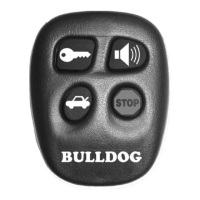
Four-Button Extended Range Remote Control

Remotely start car for heater or AC from distance.

Keyless Entry

Remotely locks and unlocks power door locks.

Cold Start

Remotely programs car to start at preset temperature.

Technical Assistance

Technical Assistance Contact

Provides website and hotline for technical support.

Precautions

Safety First Precautions

Advises system is for fuel-injected, automatic transmission vehicles only.

General Safety Warnings

Warns against starting indoors, using improper connections, or disconnecting battery.

General Motors;Dodge Dakota Neutral Safety Warning

Warns about mechanical neutral safety switch in older GM/Dakota vehicles.

Making Wiring Connections

Locating & Making Connections

Constant Power Connection

How to locate and connect to the vehicle's constant power wire.

Ignition Wire Connection

How to locate and connect to the vehicle's ignition wire(s).

Accessory Wire Connection

How to locate and connect to accessory wires for heater/blower.

Starter;Crank Wire Connection

How to locate and connect to the starter/crank wire.

Chassis Ground Connection

How to properly connect the chassis ground wire.

Brake Input Connection

How to locate and connect to the vehicle's brake switch wire.

Hood Pin Switch Installation

Instructions for installing and connecting the hood pin switch.

Neutral Safety Switch

Pre-1996 GM;Dodge Dakota Neutral Safety

Details the mechanical neutral safety switch for older GM/Dakota vehicles.

Connecting the 18-Pin Harness & 4-Relay Harness

18-Pin Harness Wire Functions

Lists the functions of each wire in the 18-pin harness.

4-Relay Harness Wire Functions

Lists the functions of wires in the 4-relay harness.

Optional Connections

Testing Switch Wire and Motor Wires

Connecting Door Locks (Optional)

Operator Programming Instructions

Entering Programming Mode

Steps to enter programming mode by pressing the brake.

Adding Additional Remotes

Procedure to program new remotes to the system.

Cold Start On and Off (Degree Select)

How to enable/disable cold start and select temperature.

Programming Runtime with Brake not Pressed

Clearing the E-Prom

Clearing E-Prom Procedure

Steps to clear the E-Prom and reset the unit to factory defaults.

How to Use Your Remote Transmitter

Starting the Vehicle

How to start the vehicle using the remote transmitter.

Pit Stop: Exiting the Car with the Engine Running

How to exit the car with the engine running.

Keyless Entry Operation

How to use the remote for locking and unlocking doors.

Bulldog Security RS112 Specifications

General IconGeneral
BrandBulldog Security
ModelRS112
CategoryRemote Starter
LanguageEnglish

Related product manuals