EasyManua.ls Logo

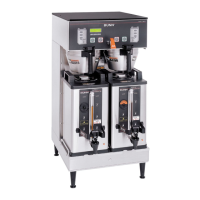
Bunn Titan Dual - User Manual

Bunn Titan Dual
57 pages
Print Icon
To Next Page IconTo Next Page
Loading...
TITAN DUAL™
INSTALLATION & OPERATING MANUAL
BUNN-O-MATIC CORPORATION
POST OFFICE BOX 3227
SPRINGFIELD, ILLINOIS 62708-3227
PHONE: (217) 529-6601 FAX: (217) 529-6644
To ensure you have the latest revision of the manual or to obtain the illustrated parts catalog, please visit the Bunn-O-Matic website, at
www.bunn.com. This is absolutely FREE, and the quickest way to obtain the latest catalog and manual updates. Contact Bunn-O-Matic
Corporation at 1-800-286-6070 to obtain a paper copy of the required Illustrated Parts Catalog mailed via U.S. Postal Service.
40119.0000B 10/07 ©2007 Bunn-O-Matic Corporation www.bunn.com

Other manuals for Bunn Titan Dual

Questions and Answers

  • J
    James BrownJul 29, 2025
    Why is my Bunn Titan Dual's temperature too low?
    • C
      Christy SilvaJul 29, 2025
      If your Bunn Coffee Maker's temperature is too low, it could be due to several reasons. The water temperature in the tank might not be reaching the ready temperature, so wait for the brewer to heat up properly. Other potential causes include a tank heater failure, a control board/thermistor failure, or issues with the temperature sensor probe wires (broken, disconnected, shorted, or pinched). Also, check that the voltage at the terminal block matches the voltage specified on the brewer data plate within +/- 10%.
  • K
    Karen LawsonAug 2, 2025
    What to do if my Bunn Titan Dual will not operate?
    • J
      John MillerAug 2, 2025
      If your Bunn Coffee Maker isn't operating, start by checking if the water supply is shut off. Also, ensure the ON/OFF switch is turned ON. Other potential issues could be an inlet solenoid failure or a control board failure.
  • J
    Jennifer FisherAug 6, 2025
    Why is the beverage from my Bunn Titan Dual weak?
    • B
      Brian Long MDAug 6, 2025
      If you're getting a weak beverage from your Bunn Coffee Maker, several factors could be at play. Ensure you're using BUNN paper filters for proper extraction. Use a sufficient quantity of fresh drip or regular grind coffee. The Bunn-O-Matic sprayhead should be used to properly wet the bed of ground coffee in the funnel. Make sure the BUNN paper filter is centered in the funnel and the bed of grounds is leveled by gently shaking. Finally, check the water temperature immediately below the sprayhead with a thermometer; it should not be less than 195°F (90°C).
  • M
    Michelle BlackAug 11, 2025
    Why won't the brew cycle start on my Bunn Coffee Maker?
    • A
      andrewfriedmanAug 11, 2025
      If the brew cycle isn't starting on your Bunn Coffee Maker, first ensure that there is a water supply and check the plumbing and shut-off valves. Then, verify that the brewer is receiving power and the correct voltage across the terminals at the terminal block. If water and power are present, the ON/OFF and BREW switches should be tested. Issues may also stem from the brew valve or control board.
  • M
    Michael Armstrong DVMAug 15, 2025
    What to do if my Bunn Coffee Maker water will not heat or display shows HEATING TIME TOO LONG?
    • J
      jamesrogersAug 15, 2025
      If your Bunn Coffee Maker is displaying 'HEATING TIME TOO LONG' or the water isn't heating, remove power from the brewer and check for continuity through the limit thermostat and tank heaters. Also, test the temperature probe by submerging it in a water bath and connecting an ohmmeter to the pins in the connector. The control board may also be a source of the issue.
  • S
    Sheila EscobarAug 19, 2025
    How to fix automatic refill if it will not operate or display shows FILL TIME TOO LONG on Bunn Coffee Maker?
    • M
      maria65Aug 19, 2025
      If the automatic refill on your Bunn Coffee Maker isn't working, and the display shows 'FILL TIME TOO LONG', first check the plumbing and shut-off valves to ensure there is a water supply. Then, check the sensitivity setting. Also, remove the strainer from the refill valve and check for obstructions. Ensure the ON/OFF switch is ON. If problems persist, the control board may need to be substituted with one known to be in good working order.
  • S
    Steven BerryAug 25, 2025
    What to do if water flows into tank continuously with power removed from Bunn Coffee Maker?
    • T
      Troy HortonAug 25, 2025
      If water continuously flows into the tank of your Bunn Coffee Maker even when the power is removed, check the sensitivity setting. Also, ensure that the refill probe is free of scale buildup and the connection to it is secure. If the problem persists, try substituting the control board with one known to be in good working order.

Summary

COMMERCIAL PRODUCT WARRANTY

INTRODUCTION

USER NOTICES AND SAFETY

ELECTRICAL REQUIREMENTS AND HOOK-UP

PLUMBING REQUIREMENTS

TANK DRAIN PROCEDURE

Instructions for draining the brewer's water tank, including panel removal and plug replacement.

OPERATING CONTROLS OVERVIEW

MAIN ON;OFF SWITCH

Locates and describes the main power switch for the entire brewer unit.

BREW ENABLE SWITCH

Details the function of the brew enable/disable switch and its use during brewing or programming.

BREW BUTTON

Explains how to initiate a brew cycle by pressing the BREW button.

BATCH SELECTOR SWITCHES

Describes how to select batch sizes (Half or Full) for brewing and programming.

FUNCTION SCREEN DISPLAY

Identifies the display screen that shows brewer functions and aids in programming.

INITIAL SET-UP PROCEDURE

VIEWING ASSET & SERIAL NUMBER

Instructions on how to access and view the machine's asset and serial numbers through the display.

COFFEE BREWING PROCEDURE

CLEANING AND MAINTENANCE

GLOSSARY OF TERMS

PROGRAMMING OVERVIEW

PROGRAMMING SWITCHES

Identifies the five hidden buttons used to navigate and control the brewer's programming mode.

PROGRAMMING THE BREWER - LEVELS AND NOTES

PROGRAMMING LOCKOUT SWITCH

Explains the function and location of the switch that prevents unauthorized changes to programming settings.

PROGRAMMING FUNCTIONS FLOW CHART

SETTING BREW LOCKOUT

SETTING DISPLAY LANGUAGE

SETTING DISPLAY UNITS

SETTING BREW TEMPERATURE

SETTING READY TEMPERATURE

SETTING BREW VOLUMES

SETTING BYPASS PERCENTAGE

SETTING BREW METER

SETTING PULSE BREW;PREINFUSION

BREW SETTINGS FLOW CHART

SETTING DRIP TIME

COPYING BREW SETTINGS

SETTING REFILL SENSITIVITY

SETTING SPRAYHEAD FLOW RATE

SETTING BYPASS FLOW RATE

CALIBRATING SPRAYHEAD FLOW

CALIBRATING BYPASS FLOW

BREW COUNTERS AND TRACKING

ENABLE OR DISABLE ADVERTISING MESSAGES

ENABLE ADS FLOW CHART

SETTING CLEAN ALERT

SETTING ENERGY SAVINGS MODE

SETTING FRESHNESS TIMER ALERT

ENTERING MACHINE ASSET NUMBER

ENTERING SERVICE NUMBER

SERVICE TOOLS FOR DIAGNOSTICS

SERVICE TOOLS FLOW CHART

TESTING SWITCHES

TESTING COIL FREQUENCY

RESETTING TO FACTORY DEFAULTS

FACTORY DEFAULT VALUES SUMMARY

TROUBLESHOOTING GUIDE

TROUBLESHOOTING COMMON ISSUES

Temperature Too Low

Discusses low temperature issues, probable causes, and remedies including brew lockout.

Heating Time Too Long

Covers extended heating times, identifying causes like heater failure or control board issues.

Fill Time Too Long

Addresses issues with fill time, listing causes like water shut-off, solenoid, or control board problems.

Temperature Sensor Issues

Troubleshoots temperature sensor range errors related to connection issues or wire shorts.

Equipment Not Operating

Investigates equipment non-operation due to power issues or incorrect voltage.

TROUBLESHOOTING BREW CYCLE START

TROUBLESHOOTING AUTOMATIC REFILL

TROUBLESHOOTING REFILL CIRCUIT

TROUBLESHOOTING CONTINUOUS WATER FLOW

TROUBLESHOOTING HEATING ISSUES

TROUBLESHOOTING BYPASS AND STEAMING

TROUBLESHOOTING INCONSISTENT BEVERAGE

TROUBLESHOOTING OPERATIONAL PROBLEMS

Dripping from Sprayhead

Troubleshoots dripping from the sprayhead, identifying potential causes like a leaky brew valve.

Filter Overflow

Addresses filter overflow issues, suggesting correct filter types and sprayhead checks.

Server Overflow

Diagnoses beverage overflow into the server, relating it to previous brew residue or volume adjustments.

Unusual Brewer Noises

Identifies causes for unusual brewer noises, such as loose solenoids or plumbing line contact.

TROUBLESHOOTING WEAK BEVERAGE

SCHEMATIC WIRING DIAGRAM

Bunn Titan Dual Specifications

General IconGeneral
ModelTitan Dual
MaterialStainless Steel
Weight68 lbs
Featuresstainless steel construction
Electrical120V AC
WarmersTwo
Product TypeAutomatic Coffee Brewer
Voltage120V

Related product manuals