2
Replacement instructions
Instructions de remplacement
1307/1_EU-ML_00253577
→ Wire the device according to the notes you made of the wire/terminal correspondence and the instructions in
the user manual.
2. REPLACING THE 115/230 V AC POWER
SUPPLY BOARD ON A WALL-MOUNTED
VERSION
→ Remove the strips covering the screws.
→ Unscrew the 4 screws in the cover.
→ Unscrew all the terminals in the electronic board housed in the cover.
→ Make a note of the correspondence between the wires and the terminals and then disconnect all electrical
wires from their terminal.
→ Remove the 2 terminal strips inserted in the 115/230 V AC power supply board.
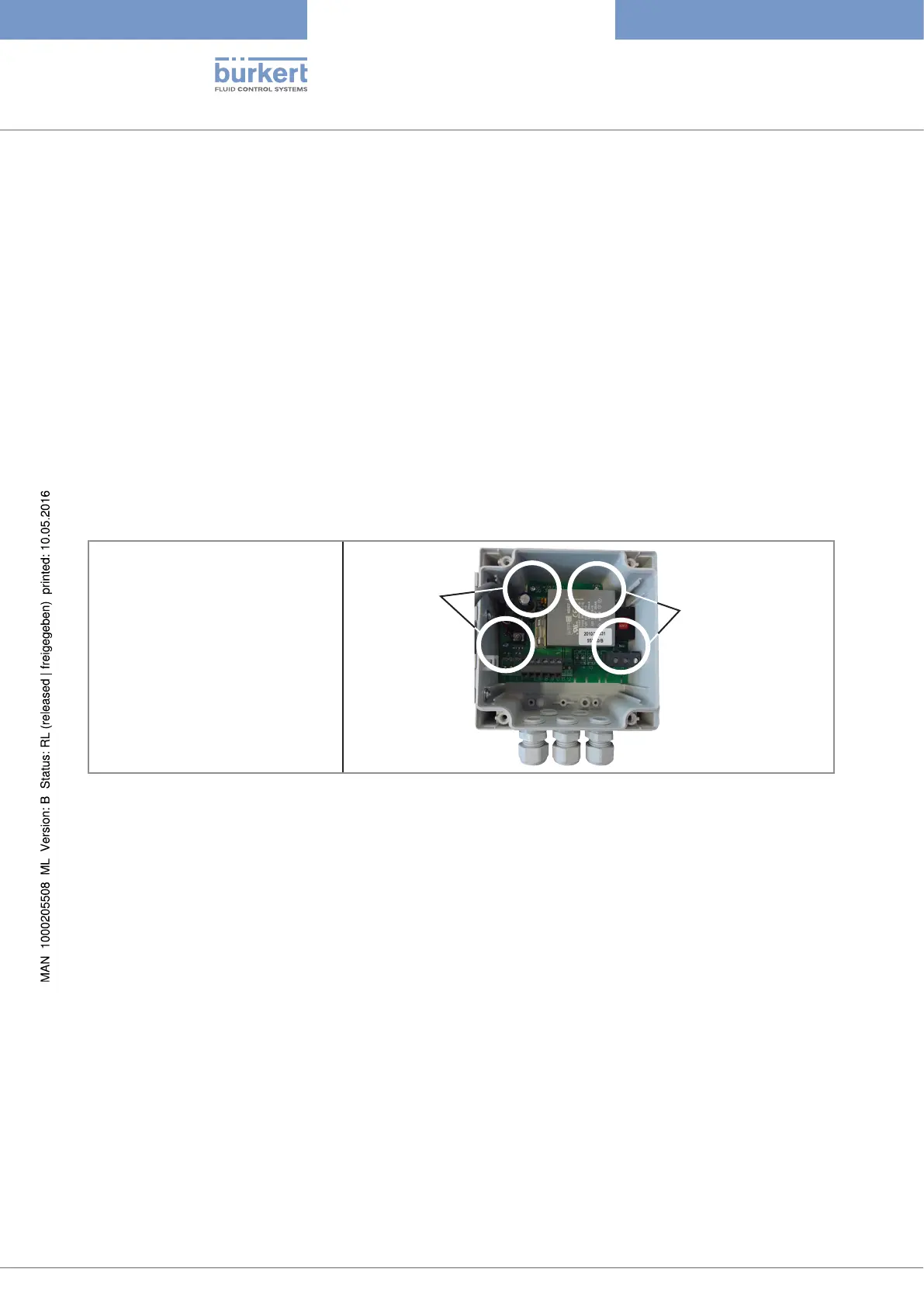
→ Unscrew the 4 screws in the
power supply board. See
opposite.
Screws
Screws
→ Carefully remove the power supply board.
→ Insert the new power supply board into the bottom of the box, paying careful attention to the position of the
holes for the locating screws of the board. See figure above.
→ Tighten the 4 screws in the power supply board to secure the power supply board to the box.
→ Wire the device according to the notes you made of the wire/terminal correspondence and the instructions in
the user manual.
→ Plug in the 2 terminal strips previously removed and already wired to the power supply board.
Type 8025/8035



 To Next Page