Operation
Instruction Manual VACTEST PPP 700 D_EN_en 9 | 44
4.2 Handling
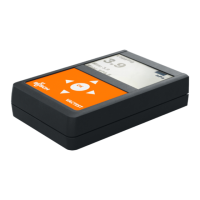
Press the OK-Key to switch on the device. After approx. 2 seconds the display will show the measure-
ment menu with the actual pressure. To switch off the device press and hold the OK-Key for 3 seconds.
Measurement: Change operation mode / Keylock
Menu: Move upwards / Increment input value
Measurement: Change additional info / Reset Min/Max
Menu: Move downwards / Decrement input value
Measurement: Select main menu / Switch on/off
Menu: Confirm
Measurement: Switch between absolute and relative pressure
Menu: Move left / Skip into previous menu
Measurement: Switch between absolute and relative pressure
Menu: Move right / Skip into next submenu
1
2
3
4
5
6
Description
1 Operating Mode 2 Pressure Reading
3 Additional Info 4 Keypad
5 Charge of Battery 6 Pressure Unit


 To Next Page