14
For any help concerning set up and use of your TV please call the Customer Helpline: 0871 2000 463
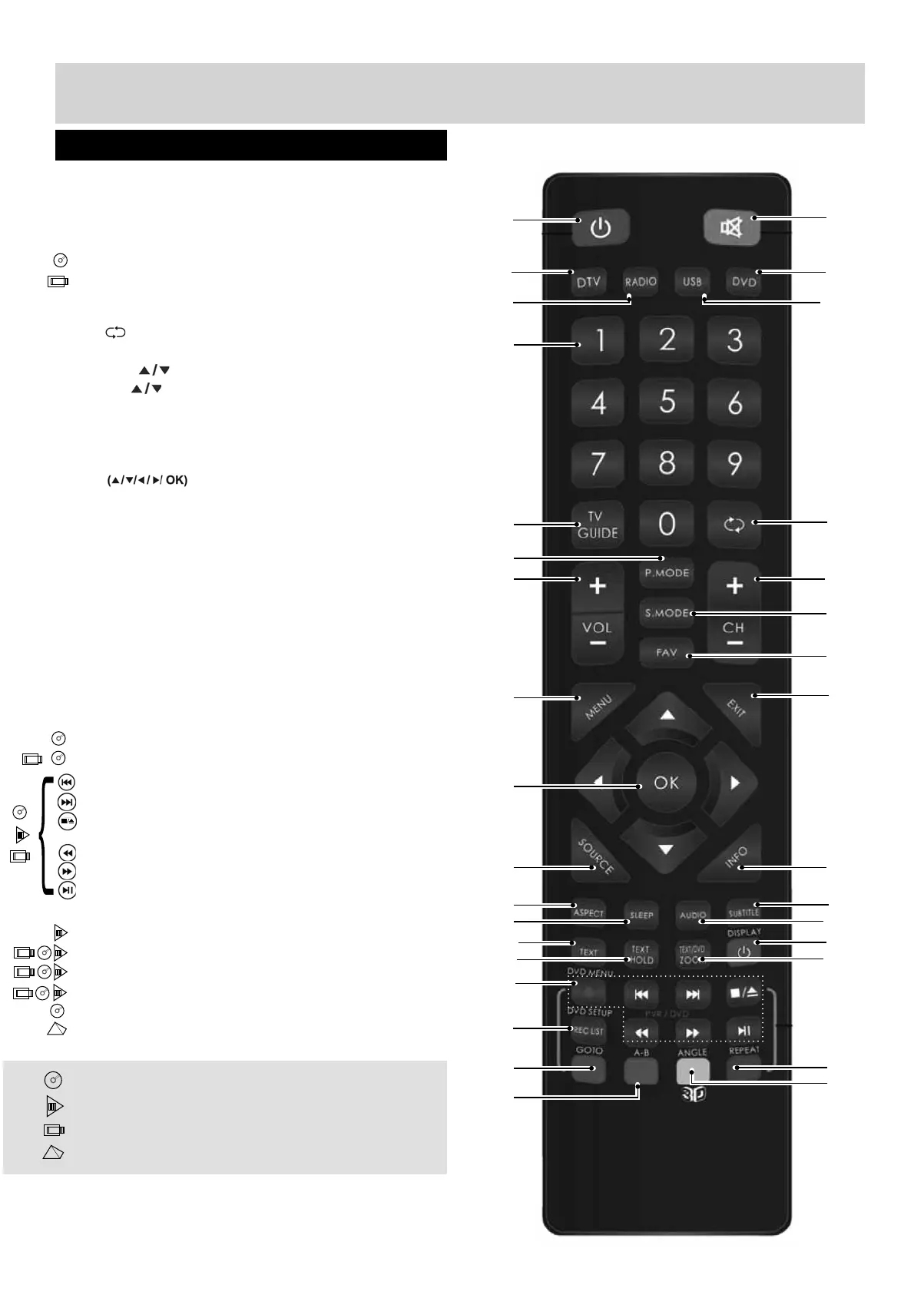
1. STANDBY
2. MUTE
3. DTV
4. RADIO
5. DVD
6. USB
7. NUMBER BUTTONS
8. TV GUIDE
9. - To return to the previous channel viewed
10. P.MODE - Scrolls through picture mode options
11. VOL
12. CH
13. S.MODE - Scrolls through sound mode options
14. FAV - To display favourites menu
15. MENU
16. EXIT
17. - Allows you to navigate the
on-screen menus and adjust the system settings
to your preference
18. SOURCE/AV
19. INFO - Press once for now/next channel
information. Press twice for programme
information about current programme
20. ASPECT
21. SLEEP
22. SUBTITLE
23. AUDIO
24. TEXT
25. TEXT HOLD
26. DISPLAY
27. TEXTZOOM/DVD ZOOM
28. DVD Menu/Record
- To restart the current chapter
- To advance forward to the next chapter
- To stop/eject Disc
(hold for 4 seconds to eject disc)
- To play in fast rewind mode
- To play in fast forward mode
- To play/pause
29. REC LIST
30. GOTO
31. A-B
32. REPEAT
33. ANGLE/
3D - Change to 3D mode
For Models with Integrated DVD players
For Models with PVR Function
For Models with USB Playback
For Models with 3D Feature
Remote Control
Viewing remote control - TV
1
35
4
7
8
10
11
12
13
15
17
18
20
22
24
26
28
29
21
23
25
27
30
31
32
33
19
16
14
9
6
2
UserGuide - Bush -50-211F Home Mode.indd Sec1:14UserGuide - Bush -50-211F Home Mode.indd Sec1:14 11/8/2013 3:54:48 PM11/8/2013 3:54:48 PM



 To Next Page