9
For any help concerning set up and use of your TV please call the Customer Helpline: 0871 2000 463
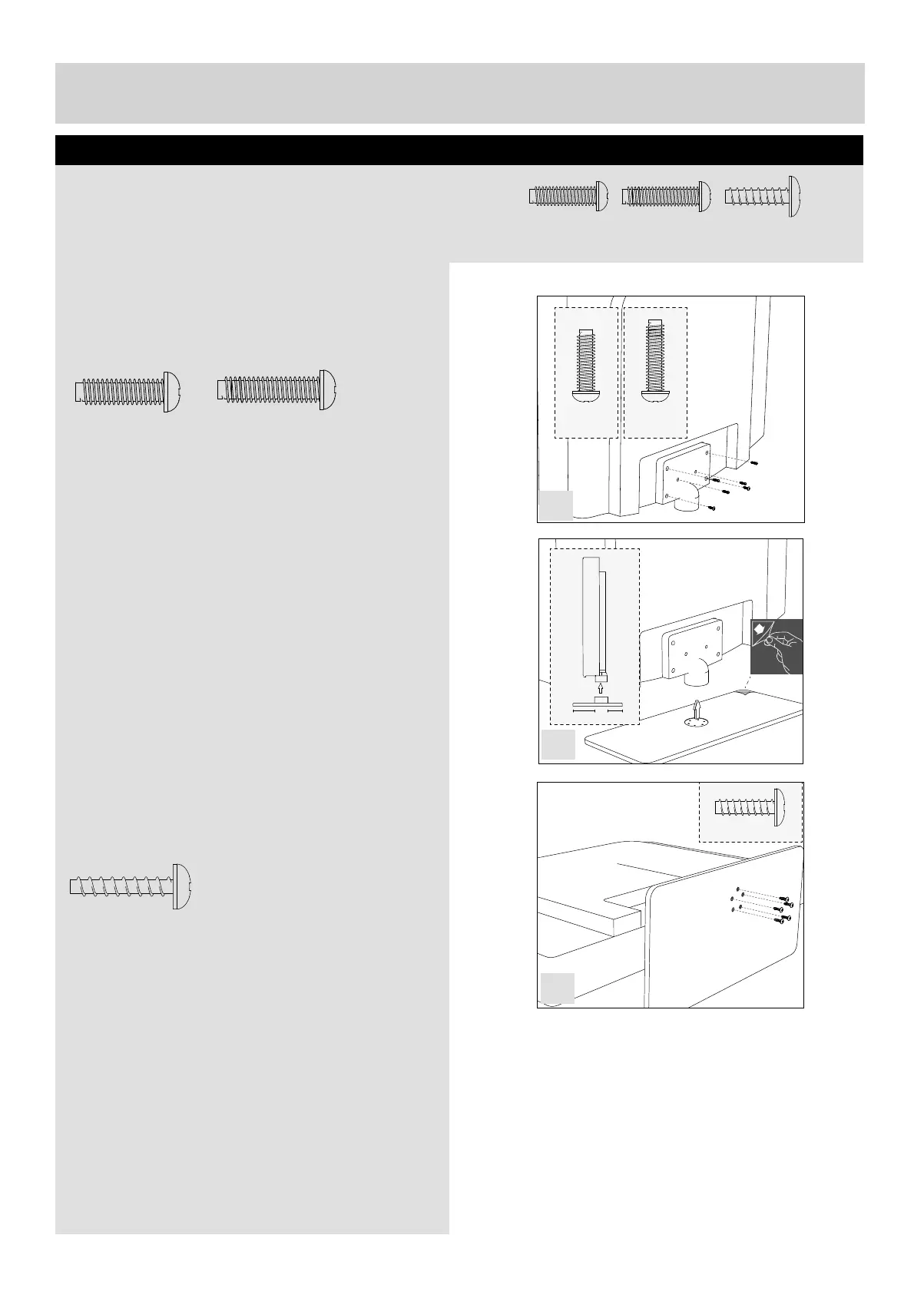
To complete the stand installation you will require a Phillips screw driver.
The Stand Installation pack comes with three sets
of screws.
fi g 1) Secure the stand neck to the TV using the
4 x B M (4x14) and 2 x A M (4x16) screws provided.
fi g 2) Peel off the protective plastic cover then attach
the stand base to the stand neck
fi g 3) Secure the base to the neck using the
5 x ST (4x25) screws provided.
Attaching The Stand
5 x ST (4x25)
2 x A M (4x16)
4 x B M (4x14)
4 x B
M (4x14)
2 x A
M (4x16)
5 x ST(4x25)
4 x B
M (4x14)
2 x A
M (4x16)
A
A
B
B
B
B
1 1/2
5 x ST(4x25)
4
1
2
3
UserGuide - Bush -50-211F Home Mode.indd Sec1:9UserGuide - Bush -50-211F Home Mode.indd Sec1:9 11/8/2013 3:54:41 PM11/8/2013 3:54:41 PM


 To Next Page