Connections
Bringing it all together
Connections22
If you require any technical guidance or find that your TV is not operating as intended, a simple solution can often be found in the Troubleshooting section of these instructions,
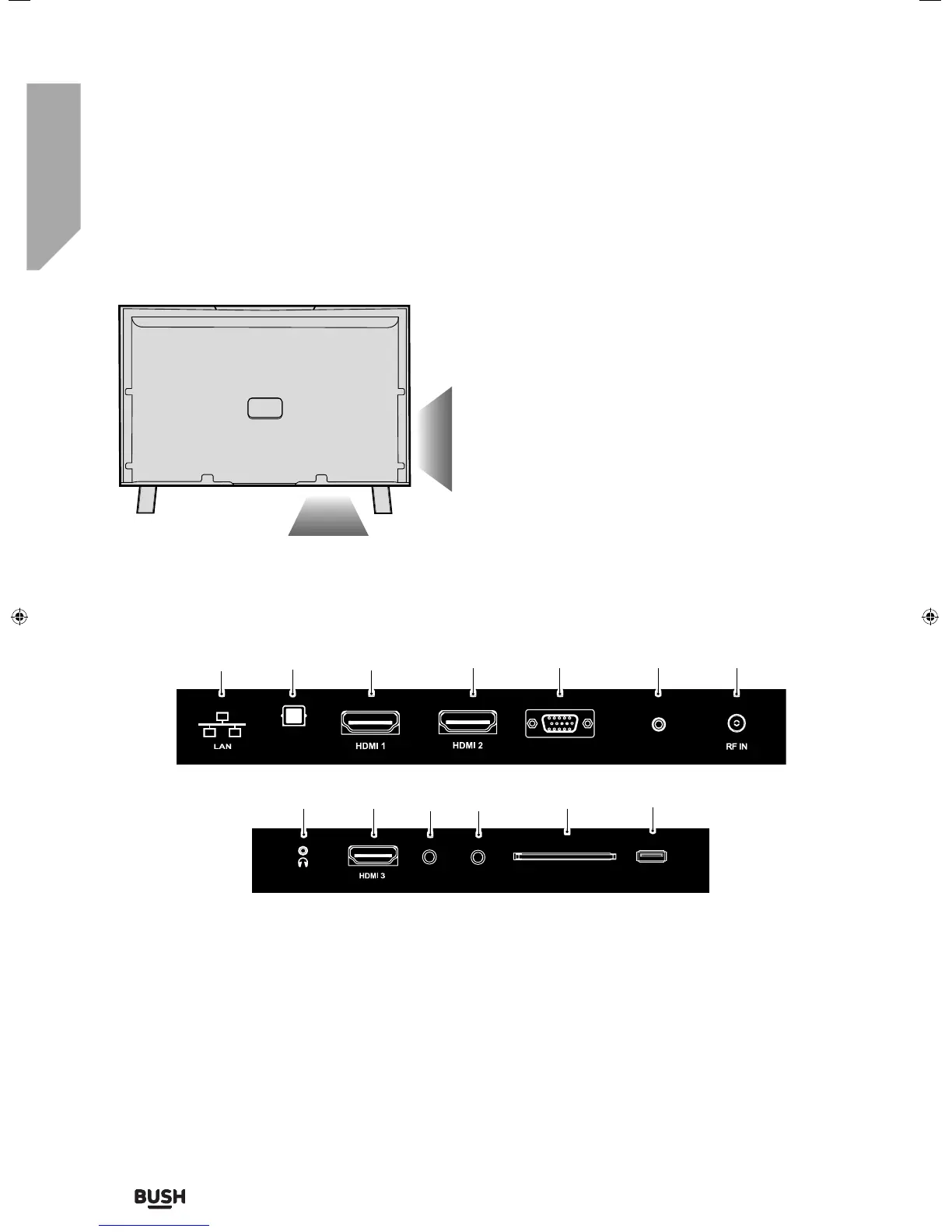
LAN* Network connection
DIGITAL AUDIO Digital optical audio output
HDMI 1 HDMI input
HDMI 2 (ARC) HDMI input
VGA/PC VGA/PC input
VGA/PC AUDIO IN 3.5mm PC audio input
RF IN RF / TV aerial input
EARPHONE Earphone socket
HDMI 3 HDMI input
COMPONENT (HD) Component input (YPbPr)
AV IN Audio/Video input
CI CARD IN Common Interface module
USB USB input
1
2
3
4
5
6
7
8
9
10
11
12
13
VGA/PC (Audio in)
VGA/PC IN
Digital Audio
Output
*The Ethernet port is used only for Freeview HD services only.
1
2
3
45 67
Connections
Y Pb Pr
AV IN
USB
CI CARD IN
EARPHONE
8
91011 12 13
User Guide - BUS-MAN-0027 BUSH 55-148F.indd 22User Guide - BUS-MAN-0027 BUSH 55-148F.indd 22 04/12/2015 15:16:4204/12/2015 15:16:42



 To Next Page