Connections
Bringing it all together
Connections 23
or online at www.argos-support.co.uk If you still require further assistance, call one of our experts on 0330 024 0805. (Calls are charged at the standard rate of your network provider).
Connections
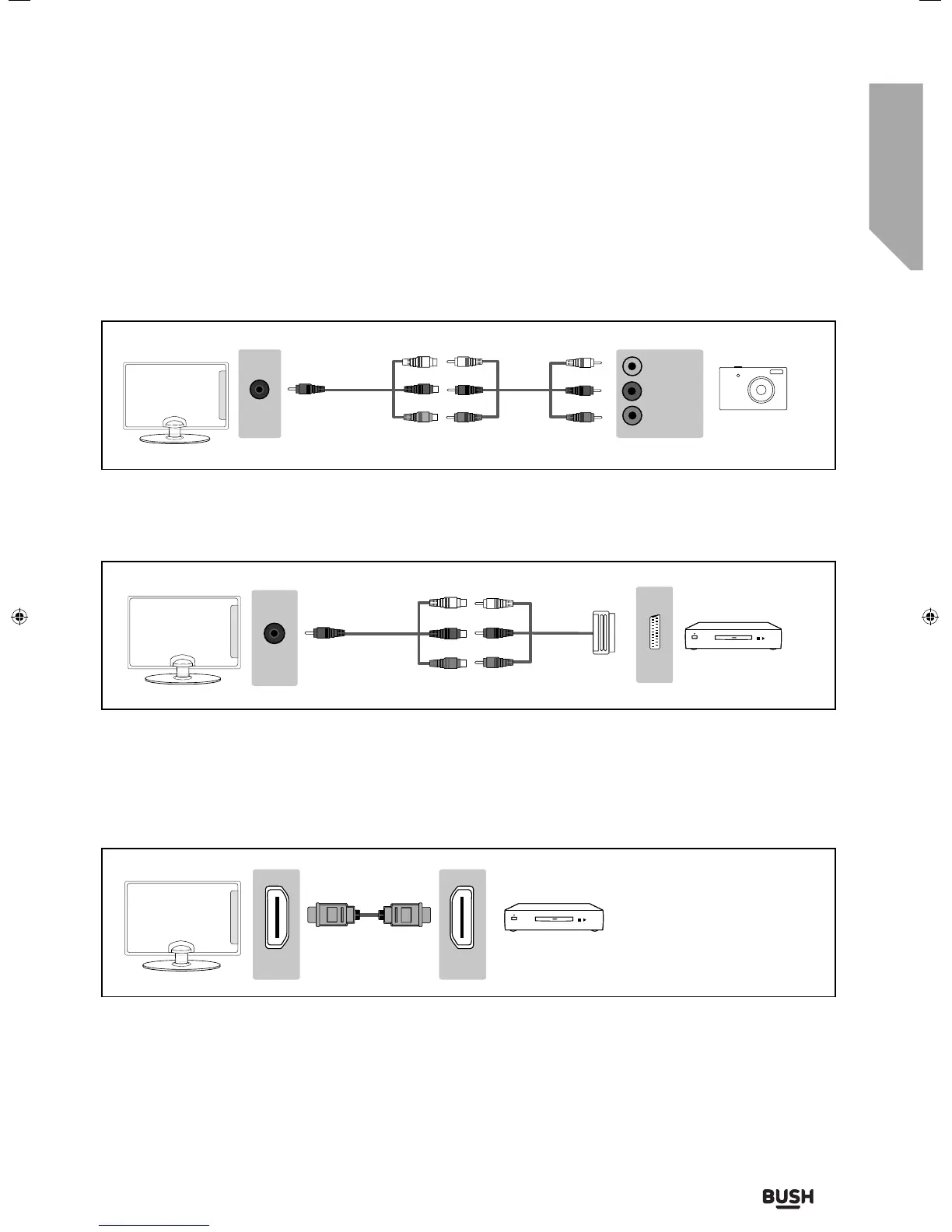
Connecting a camcorder, camera or games console.
The TV source should be set to composite/AV.
Connecting a DVD player/recorder, video recorder or cable/satellite box.
Source should be set to composite/video.
Mini
AV in
L (white)
R (red)
Video
(yellow)
Scart
Mini
AV in
Connecting a High Definition (HD) Device Option 1 - via HDMI to HDMI cable
A HDMI cable can output both video and audio and enables you to enjoy digital-quality video and audio with
minimal loss of quality.
TVs Source should be set to the corresponding HDMI Port (HDMI 1, HDMI 2, etc).
HDMI HDMI
User Guide - BUS-MAN-0027 BUSH 55-148F.indd 23User Guide - BUS-MAN-0027 BUSH 55-148F.indd 23 04/12/2015 15:16:4204/12/2015 15:16:42



 To Next Page