BCR30DAB
5
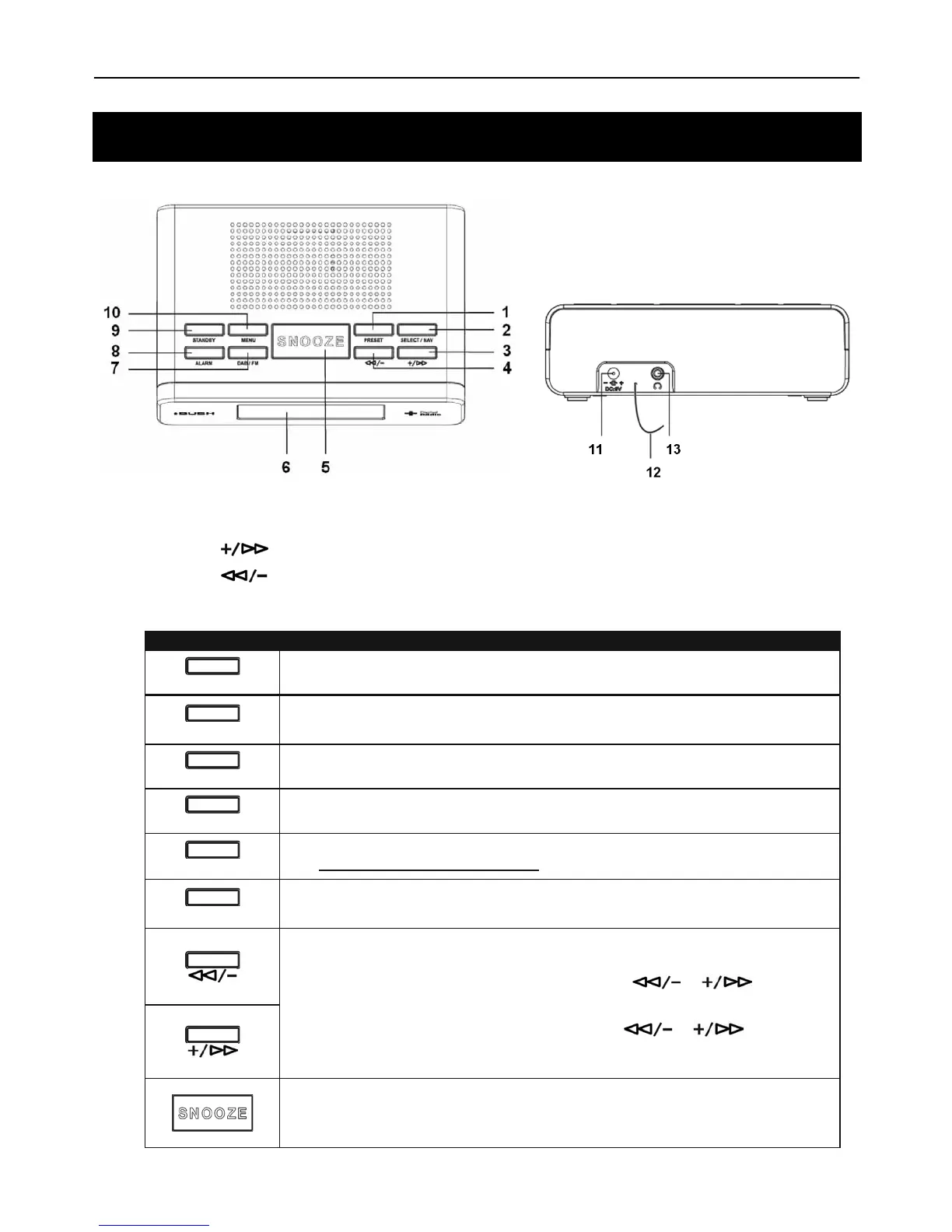
1. PRESET Button 6. LCD Display 11. DC Jack
2. SELECT/NAV Button 7. DAB/FM Button 12. ANTENNA
3.
Button
8. ALARM Button 13. Headphone Jack
4.
Button
9. STANDBY Button
5. SNOOZE Button 10. MENU Button
Control DAB + and FM
STANDBY
Press to turn on/off Radio
MENU
Press to go to Main Menu or select other menus
DAB/FM
Press to convert between DAB+ and FM mode
ALARM
Press to set alarm1, press again to set alarm2
PRESET
Press to enter presets options
(Note: for detail please refer page 14)
SELECT/NAV
Press to select an option or confirm
a. Press to decrease or increase volume level
b. In DAB+ mode, press SELECT/NAV button then press or button to
select different DAB+ stations or options.
c. In FM mode, press SELECT/NAV button, then press or button to
adjust FM frequency.
a. When alarm is sounding, press Snooze to postpone the alarm for a period of 5-30
minutes.
b. Press to set sleep time.
Your DAB+ Radio



 To Next Page