BCR35DAB
- 1 -
System Setting
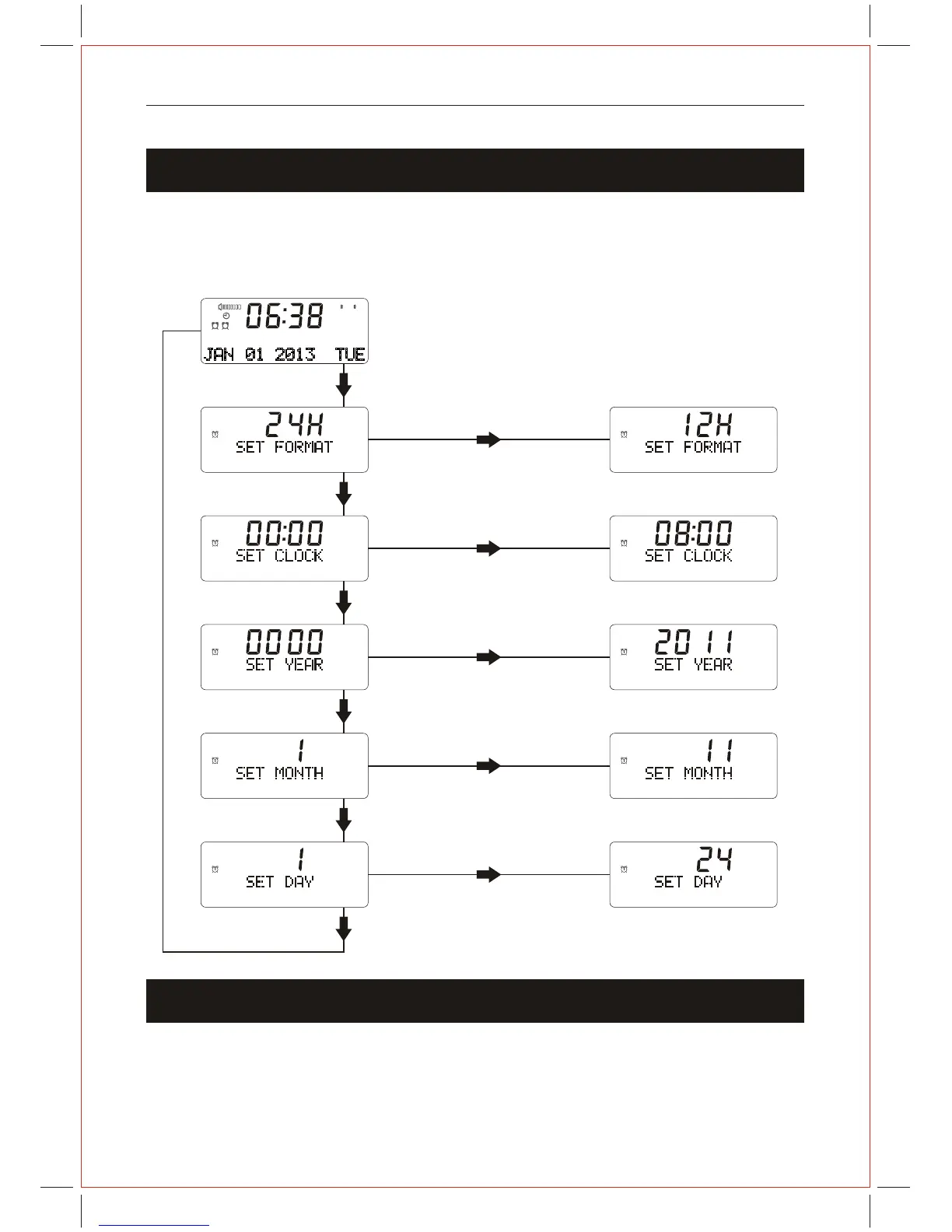
Using the MENU Control (STANDBY mode)
The MENU control allows you to change some of the system options on your unit.
These options are arranged in a menu structure as shown below.
In DAB+ mode, the time and date is set automatically
and is always accurate.
If you wish to manually set the time and date, follow the
sequence shown below.
1 1
Press the " < " & " > " Button
to choose 12/24 hour format.
Press SELECT button
Press SELECT button
Press SELECT button
Press SELECT button
Press MENU button
Press SELECT button
Press the Button
to set hour / minute time.
" < " & " > "
1 1
1
1
1
Press the Button
to set correct
Year.
" < " & " > "
Press the Button
to set correct
Month.
" < " & " > "
Press the Button
to set correct Day.
" < " & " > "
1
1
1
Factory Reset
This setting will restore the factory default settings of the unit.
1. Press and hold the MENU button,"Press SELECT key to Reset" will show in the display.
2. Press the SELECT button to select Reset.
JAN 01 2013 TUE



 To Next Page