Page 4
User instructions
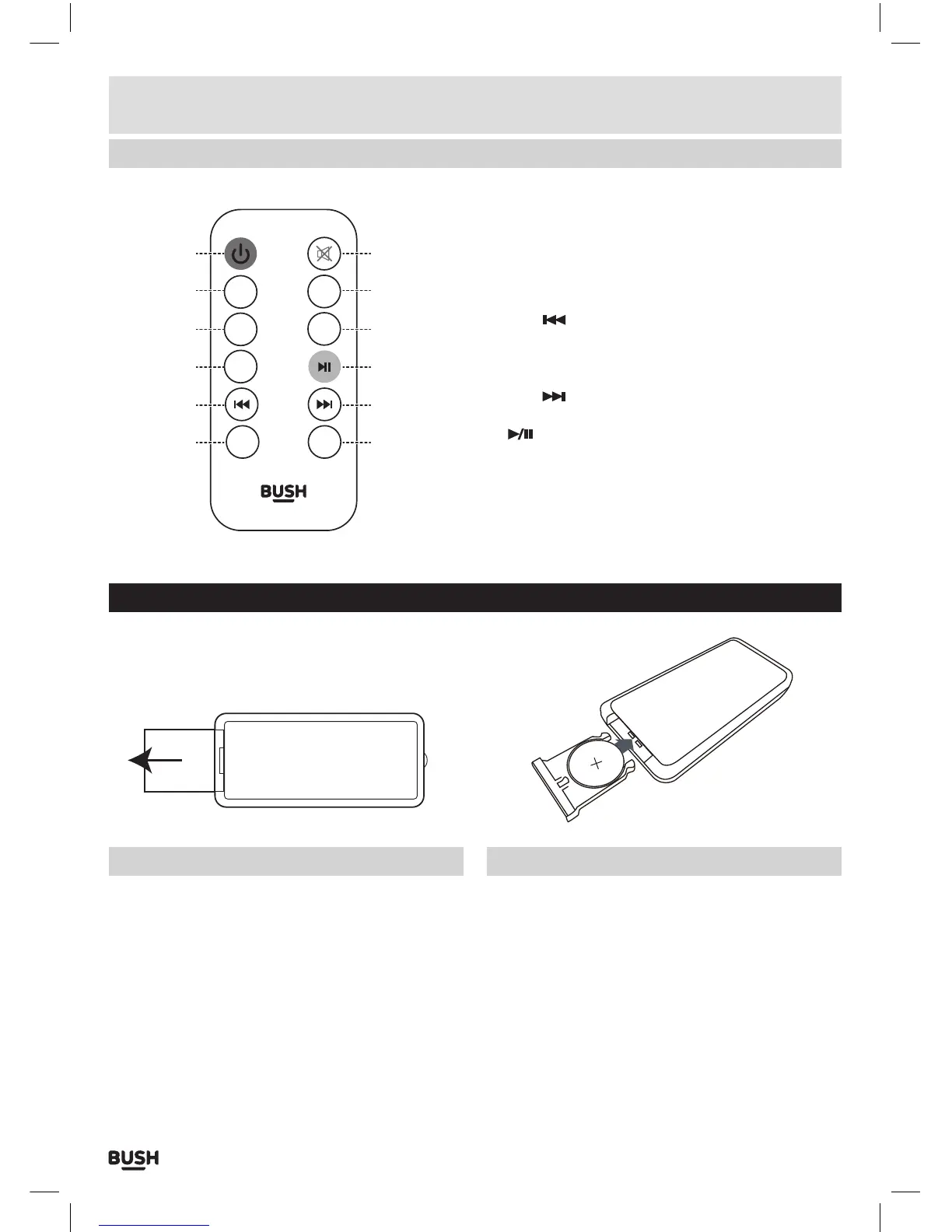
Overview of remote control
If you have damaged or missing parts,
call the Customer Helpline: 0870 600 3030
12
13
14
15
16
17
22
21
20
19
18
17
SOURCE
PAIR
FLAT/TV
MOVIE
VOL - VOL +
MUSIC
12: STANDBY: Switch on the Sound bar or switch to
STANDBY mode.
13: PAIR: Press and hold for 3 seconds to ‘Unpair’ a
connected Bluetooth device.
14: FLAT/TV: Press to enable the FLAT/TV sound EQ.
15: MOVIE: Press to enable the MOVIE sound EQ.
16: SKIP
: Skip to previous track for Bluetooth audio
playback.
17: VOLUME - / +: Increase or decrease the volume
output.
18: SKIP
: Skip to next track for Bluetooth audio
playback.
19:
PLAY/PAUSE: START or PAUSE Bluetooth audio
playback.
20: MUSIC: Press to enable the MUSIC sound EQ.
21: SOURCE: Select an audio source from TV, AUX,
COAX or BT inputs.
22: MUTE: Press to mute the sound output.
Preparing the remote control
Before use, pull the tab out from the bottom of the
remote control. This allows the terminals contact with
the pre-installed battery.
Installing batteries in the remote
1: Push open the battery compartment on the bottom of
the remote control using a fingernail.
2: Insert a CR2025 battery into the space taking care to
match the + & - polarity symbols correctly.
3: Replace the battery compartment.
Disposal of batteries
Dispose of used batteries with regard to the recycling
regulations in your area.
Do NOT short circuit batteries or throw them into water,
the general rubbish or in a fire. Weak batteries can leak
and damage the remote control. Replace them in good
time!



 To Next Page