User instructions
Listening
to the storcd
DAB stations
To
listen the DAB stations that have been
stored
press
either UP/DOWN
buttons
(8,11)to
cycle through
the list. Press
the SNOOZE/SELECT
button
(9)
to tune
to the selected
station.
Storing
preset
stations
It is
possible
to store up
to 10 of
your
favorite
stations
to the
preset
keys.
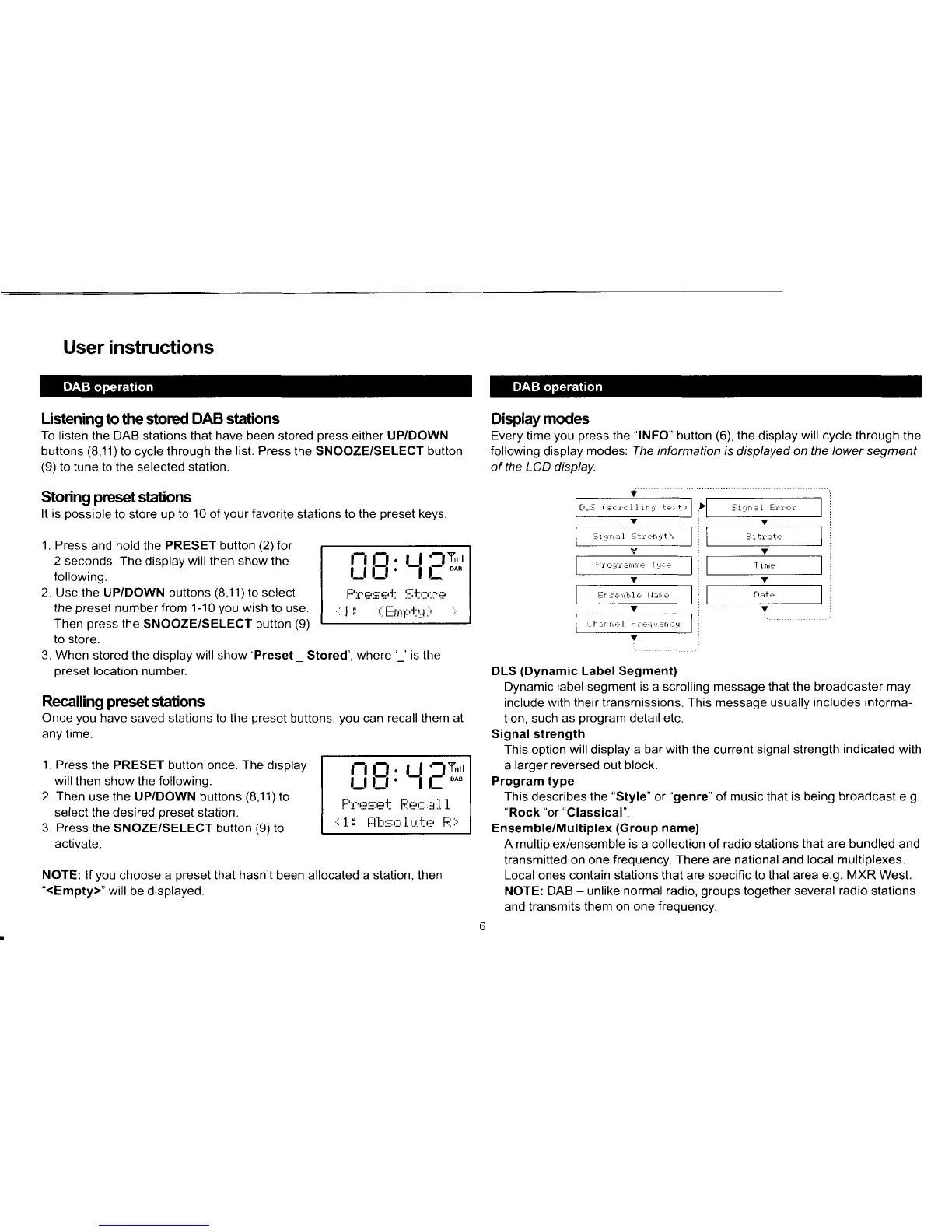
"lNFO"
button
(6),
the display
will cycle through
the
The information is
displayed
on the lower segment
v:
l*.-,. ,,@
VIV
r,:
|
-'
' '' '-"""
I
i | "''"'"
I
Y;V
'-",-t
l
"'
,,"','-
-,,"
1
1
t"'=
l
f
,*"""' ..".,"
f
DLS
(Dynamic
Label Segment)
Dynamic
label
segment
is a scrolling
message
that the broadcaster may
include
with their transmissions.
This
message usually includes
informa-
tion, such as
program
detail etc.
Signal
strength
This option
will
display
a bar with
the current
signal strength indicated with
a
larger reversed out block.
Program type
This
describes
the
"Style"
or
"genre"
of music that is being
broadcast
e.g.
"Rock "or "Classical".
Ensemble/Multiplex
(Group name)
A multiolex/ensemble
is
a collection of radio stations
that are bundled
and
transmitted on one
frequency.
There are
national and local multiplexes.
Local ones contain stations that
are
specific to that area e.g.
MXR
West.
NOTE: DAB
-
unlike
normal radio,
groups
together
several radio
stations
and transmits them on
one freouencv.
Displaymodes
Every time
you press
the
following
display
modes.
of the LCD display.
1. Press
and hold the
PRESET button
(2)
for
2 seconds. The display will then show the
following.
2. Use
the UP/DOWN buttons
(8,11)
to select
the
preset
number from 1-10
you
wish
to use.
Then
press
the SNOOZE/SELECT button
(9)
to store.
3. When
stored the display
will
show'Preset
_
Stored', where
'_'
is the
oreset location number.
Recalling
preset
stations
Once
you
have
saved
stations to the
preset
buttons,
you
can
recall them at
any time.
'1.
Press
the PRESET button once. The display
will
then show the following.
2. Then
use
the UP/DOWN buttons
(8,11)to
select the desired
preset
station.
3. Press
the SNOZE/SELECT button
(9)
to
activate.
i_iB,
Ll
llr
r- 1 Ht-.rj
r-
.-,
r_r_rl.
li
:..t.; '
t[ilFr-,-l.1
i_iE,
Ll
FTrl
I l. H:.lj
r-
ri.Hr_..1.t. I
,..1.
r
[jh:-;,::,.1.r..r.t{- Fl:,
NOTE:
lf
you
choose a
preset
that
hasn't
been
allocated a station, then
"<Empty>"
will be displayed.



 To Next Page