Page 4
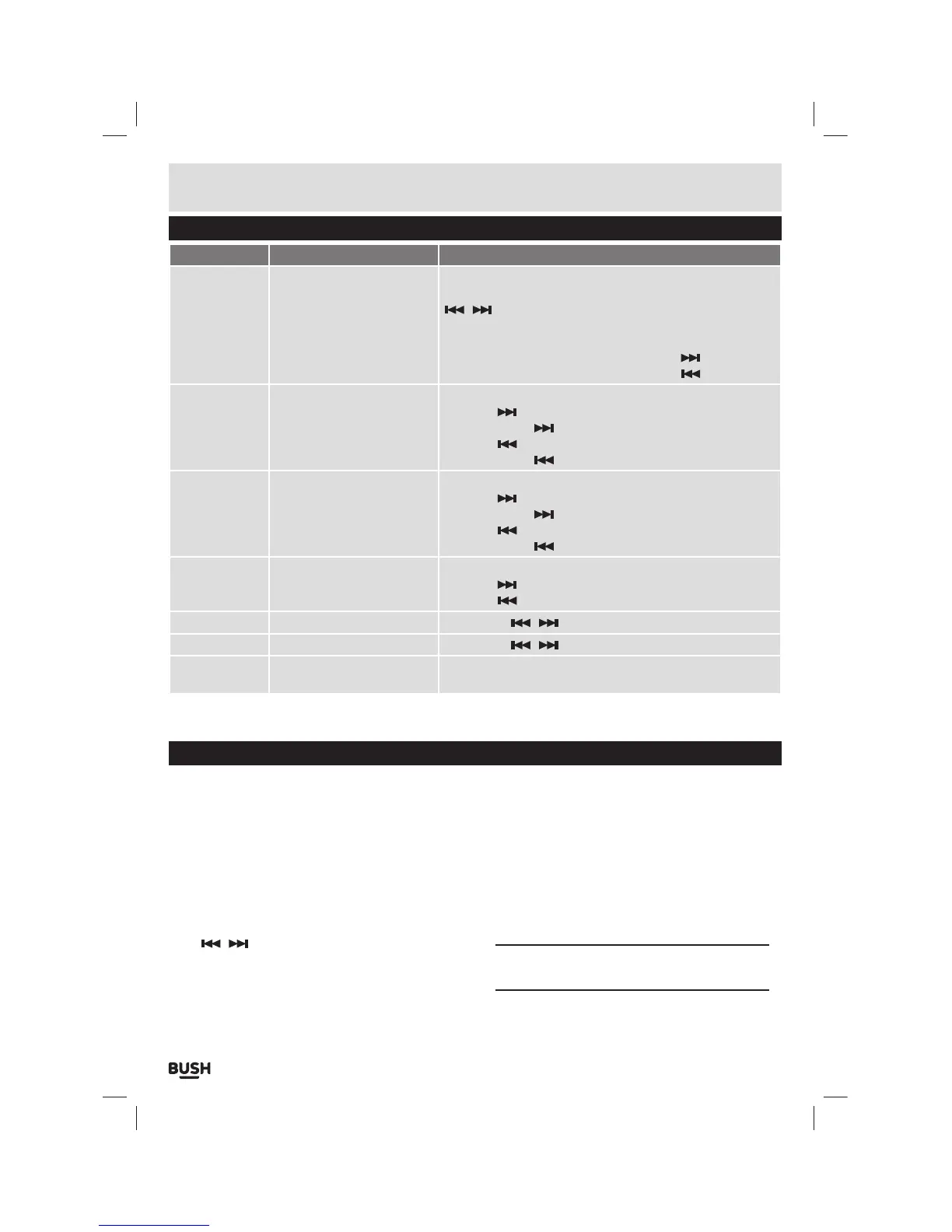
Button functions
To Press
General
Power On/ Off
Turn On/ Off
Scroll through lists
Select option
Return to previous menu
Volume up
Volume down
Switch the On/ Off switch
Hold the Play/Pause button for 3 second
/ buttons
Select button
M button
During playback press Select then press the
button
During playback press Select then press the
button
Music
Play/ Pause tracks
Skip to the next track
Fast forward
Skip back to previous track
Fast rewind
Press the Play / Pause button
Press the
button
Press & hold the
button
Press the
button
Press & hold the
button
Movie
Play/ Pause a movie
Skip to next movie
Fast forward
Skip back to previous movie
Fast rewind
Press the Play / Pause button
Press the
button
Press & hold the
button
Press the
button
Press & hold the
button
Images
Select image
Skip to next image
Skip to previous image
Select button
Press the
button
Press the
button
FM Radio
Skip 0.05MHz Press either
/ button
Camera
Zoom Press either
/ button to increase/ decrease zoom
Video Camera
Record/ Pause
Save recording
Select button
Press the ‘M’ button
Connecting to a PC
Once the unit is charged or during charging you can
copy files to the player.
1: Follow steps 1-2 of ‘Getting started’ to connect the
player to a pc/ laptop.
2: Once connected the player will power up and present
you with three options:- Power & Data (Charge
the device & connect to a pc/ laptop) , Charge
(Charge only) & Charge & Play (Use the device while
charging). Select the ‘Power & Data’ option using
the
/ buttons and select by pressing the ‘M’
button.
3: When the unit is connected a hardware driver
is automatically installed and the device is then
available in the list of devices (Named CMP41_8G).
On some operating systems an auto play window will
appear. Choose to take no action and click OK to close
the window.
4: Double click ‘My Computer’ Or ‘Computer’ on some
operating systems. Look for ‘Removable disks
or storage’ option and locate the device named
‘CMP41_8G’ and double click.
NOTE: Do not disconnect the USB cable at any
time when copying data to or from the device.
User instructions



 To Next Page