Getting to know your Stereo DAB/FM Radio
You’ll be up and running in no time
Getting to know your Stereo DAB/FM Radio
You’ll be up and running in no time
Ready? Let’s begin...
Please read these instructions carefully. They contain important information which will
help you get the best from your product and ensure safe and correct installation and
operation.
If you require any further assistance, our technical experts are happy to help. For full
details, refer to the product support section at the end of these instructions.
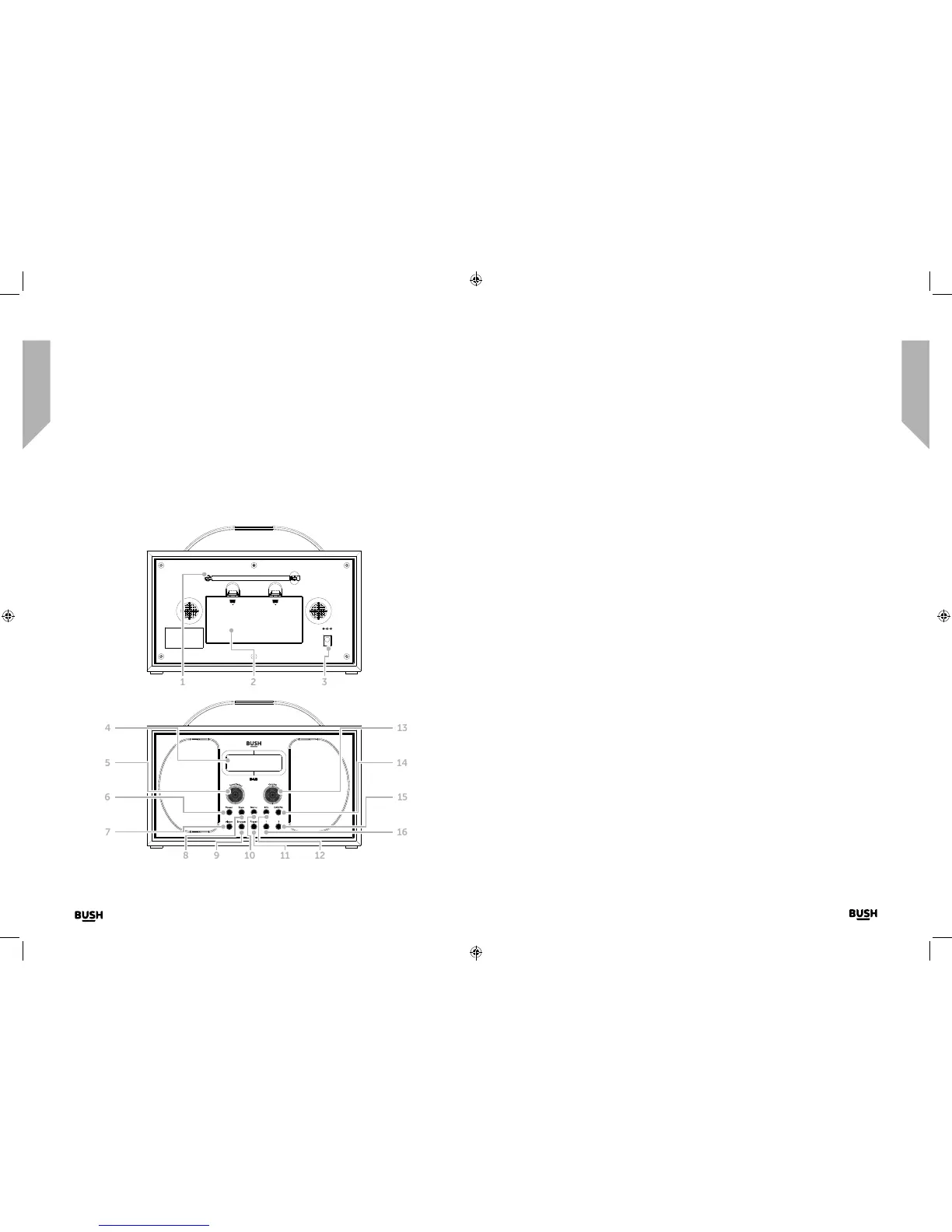
Fig 1.
9. Snooze
• Press to Snooze when the alarm
sounds
10. Menu
• Short press: Enter/Exit the Menu
11. Preset
• Short press: Preset recall
• Long press: Preset store
12. Info
• Short press: Station information
13. Rotary Volume control
14. DAB/FM
• Short press: changes the mode
15. Memory preset 2
• Short press: Preset memory
location 2 recall
• Long press: Preset memory
location 2 store
16. Memory preset 1
• Short press: Preset memory
location 1 recall
• Long press: Preset memory
location 1 store
1. Telescopic aerial
2. Battery compartment
3. Power socket
4. Backlit display
5. Rotary Tune/Select control:
• Rotate: Scroll through the available
stations/frequencies or menu
options
• Short press: Select a displayed radio
station/frequencyor menu option
6. Power
• Short press: Power on
• Short press: Standby (Mains power)
• Short press: Power off (Battery)
7. Alarm
• Short press:
• Alarm settings
8. Scan
• In DAB mode:
• Short press: Scans for radio
stations
• In FM mode:
• Short press: Scans up the
frequency band
• Long press: Scans down the
frequency band
DC 6 V 1 A
Fig 2.
1 2 3
11 12
13
109
6
7
8
5
4
16
15
14



 To Next Page