COAXIAL
OPTICAL
AUX
DC IN
SUB
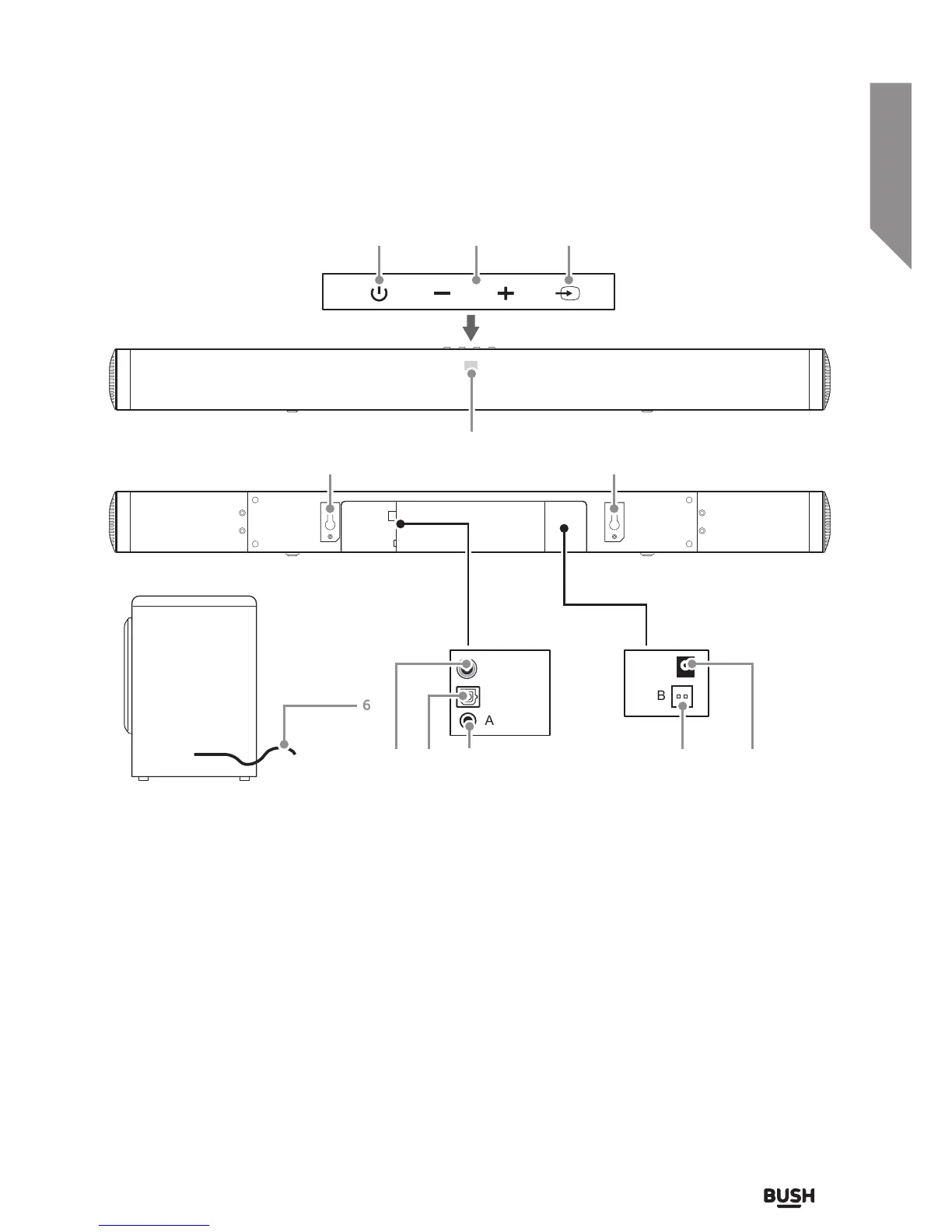
Getting to know your Soundbar
You’ll be up and running in no time
1. STANDBY button: Switch on the Sound bar or
switch to STANDBY mode.
2. VOLUME + / - buttons: Increase or decrease the
output volume.
3. SOURCE touch button: Select an audio source
from AUX, OPTICAL, COAX or BT inputs.
4. STATUS LED: Input mode and standby status.
5. WALL-MOUNT BRACKETS: Use these brackets to
fix the Sound bar to a wall.
6. SUB WOOFER CONNECTION CABLE: Connect to
the soundbar.
7. COAXIAL DIGITAL AUDIO INPUT (RCA): Connect
the digital audio output from a TV, DVD or Blu-ray
player.
8. OPTICAL DIGITAL AUDIO INPUT: Connect the
digital audio output from a TV, DVD/ Blu-ray player
or games console.
9. AUX AUDIO INPUT (3.5mm): Connect the
analogue audio output from an MP3 player or
similar using a 3.5mm audio cable.
10. SUB WOOFER CONNECTION SOCKET: Connect
the sub woofer cable from No 6.
11. MAINS POWER DC INPUT: Connect the supplied
power adapter.
7 118
9
4
10
6
1
5 5
2 3



 To Next Page