8
Shenzhen C-Data Technology Co., Ltd.
Marketing@cdatatec.com +86-755-26014509
Console access is really only required when initially configuring a device, or if remote
access fails.
Console access requires:
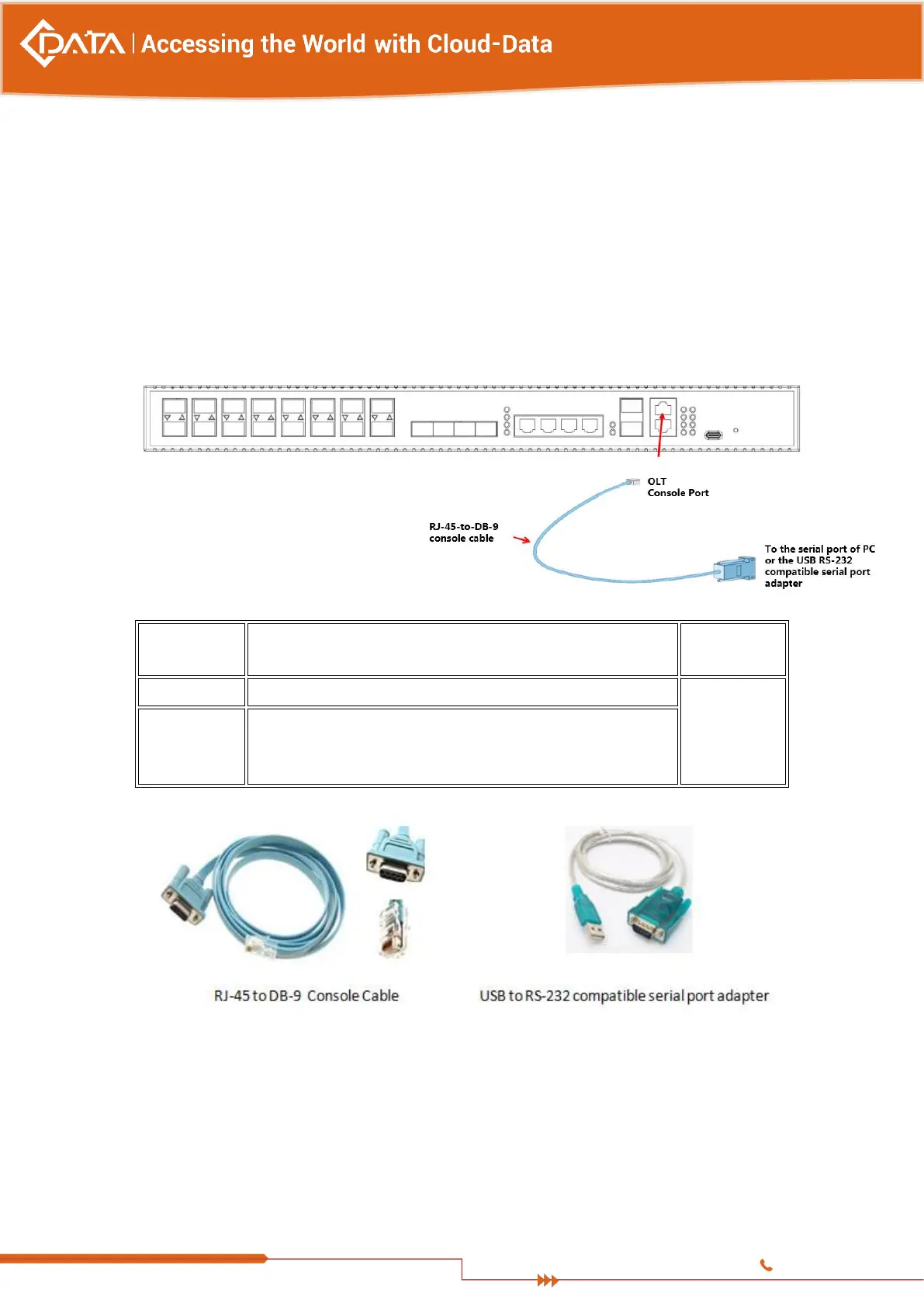
Console cable: RJ-45-to-DB-9 console cable
Terminal emulation software: HyperTerminal
The cable is connected between the serial port of the host and the console port on the
device. Most computers and notebooks no longer include built-in serial ports. If the host
does not have a serial port, the USB port can be used to establish a console connection. A
special USB-to-RS-232 compatible serial port adapter is required when using the USB
port.
RJ-45 to DB-9 Console Cable
USB to RS-232 compatible serial port adapter ( Adapter may
require a software driver )
RJ-45 to DB-9 Console Cable
When starting the management, please use straight and cross Ethernet cable, connecting
“Console” management interface to network or managed PC.
MGMT access requires:
RJ45 cable
Terminal emulation software: HyperTerminal


 To Next Page