10
Shenzhen C-Data Technology Co., Ltd.
Marketing@cdatatec.com +86-755-26014509
power souce.
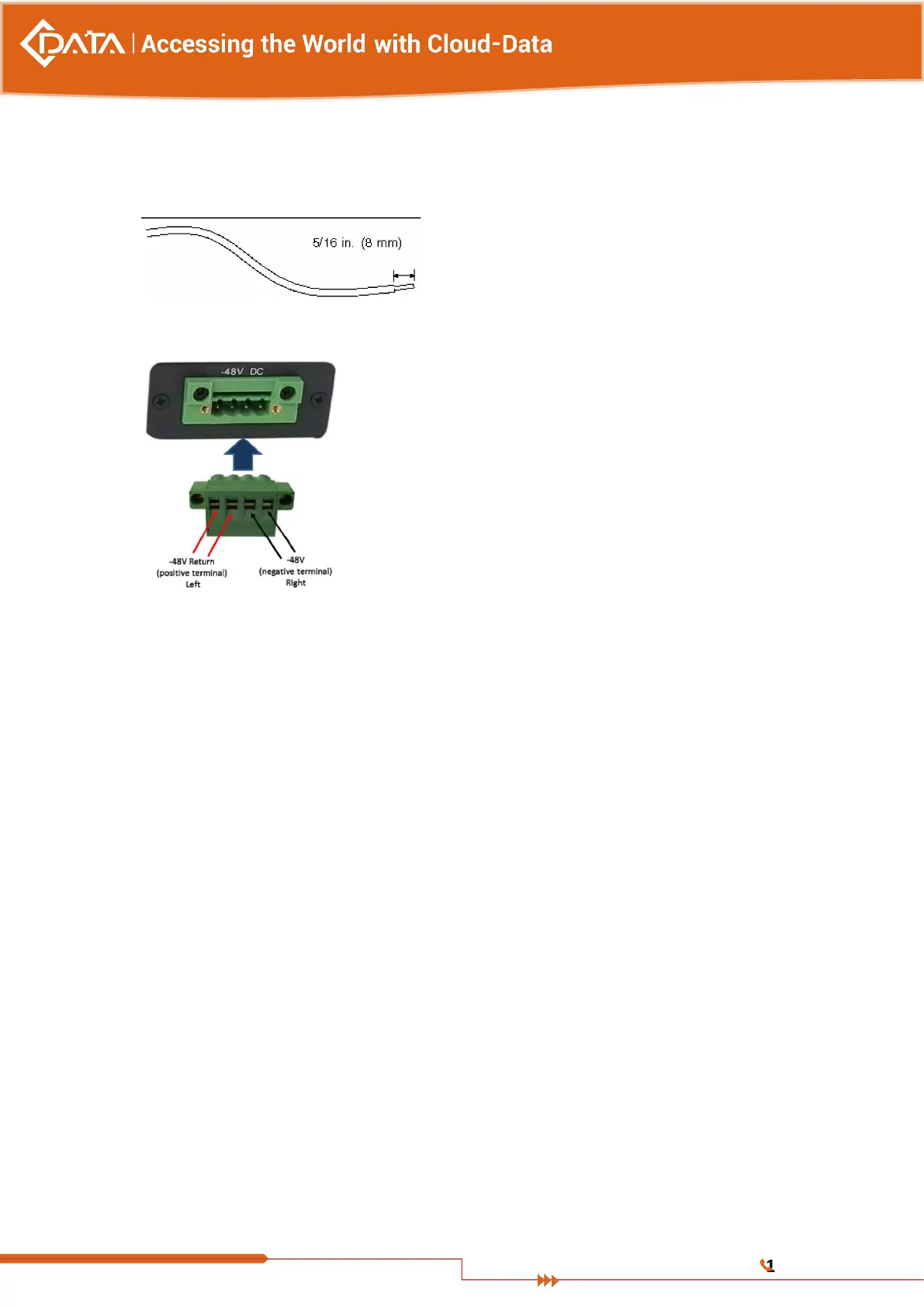
Do not strip more than 5/16 inches(8mm) from each wire. Doing so leaves uninsulated
wire exposed from the DC connector after the assembly is complete.
6. Feed the exposed section of the appropriate wire into the rectangular plug hole in the
DC input plug. Shows which wires should be inserted into each hole in the DC input plug.
7. Repeat Step 5 and Step 7 for the other two wires to complete the assembly of the DC
input power cable.
6. Connect the DC input power cables to the DC connectors.
3.5 OLT Working Status Checkout
3.5.1 Check Out Power Supply
Before you connect the power supply, double check the power supply if it is accord with
the power supply requirements, If each module and card are installed correctly , If the
equipment is in reliable grounding or not. After checking everything is OK, you can turn on
the power supply sources.
3.5.2 Check Out OLT Working Status
Please check if the OLT’s working status from following aspects:
Check the power LED. The power LED will be on.
The SYS LED will flash per second
If the uplink equipment is connected to the uplink port, the relevant connection LED is
on.
3.5.3 Network Management Checkout


 To Next Page