EasyManua.ls Logo

cabur PLUS EV - Operations; Operating Elements; Display Areas

cabur PLUS EV
49 pages
Print Icon
To Next Page IconTo Next Page
To Previous Page IconTo Previous Page
Loading...
19
7 Operations
After the charger is installed, it is ready for charging the EVs. The following describes the
operating elements and the display/indicators elements of the charger.
7.1 Operating elements
7.1.1 Display Areas
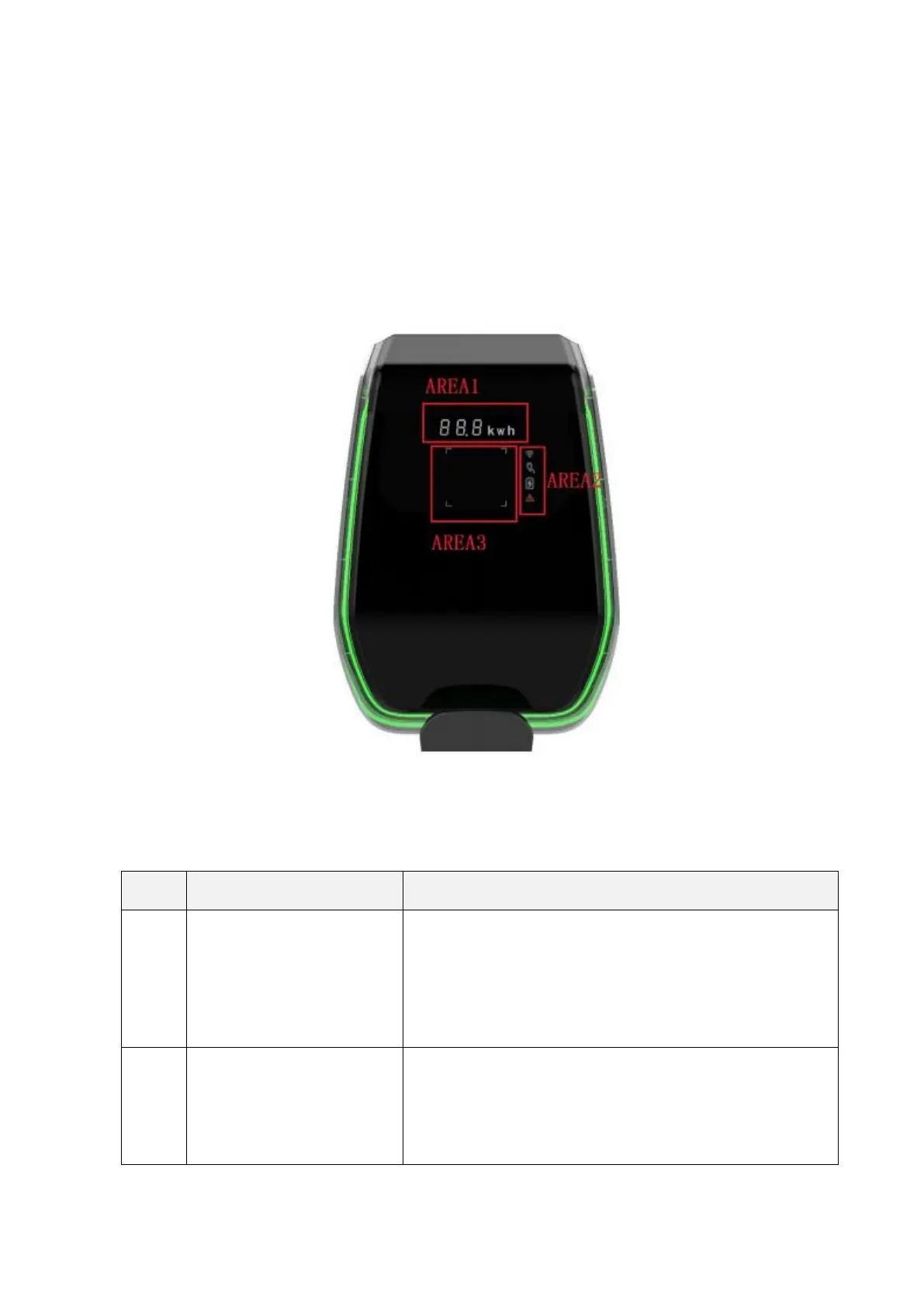
The charger has three display areas AREA1, AREA2, AREA3 on its front side
Each AREA has its own function as in the following table:

Display
Area
Type
Function description
AREA1
Digital character display
It displays the following information:
Main network voltage
Main network frequency
Station number
Output current (only during the charging process)
Error code
AREA2
LED indicators
They give real time information about:
WiFi mode and status
Charger connection to the EV
Charging process
Errors