5
Anti−Cold Air Function (F3)
A) Intelligent Anti−Cold Air Function
NOTE: The intelligent anti−cold air parameter changes with the
room temperature. Once the room temperature rises, the anti−cold
air temperature rises as well, which is designed to provide the user
with increased comfort. After the room temperature decreases, the
anti−cold temperature decreases as well, which is designed to
improve fan speed and result in a faster heating operation.
NOTE: No setting adjustment recommended.
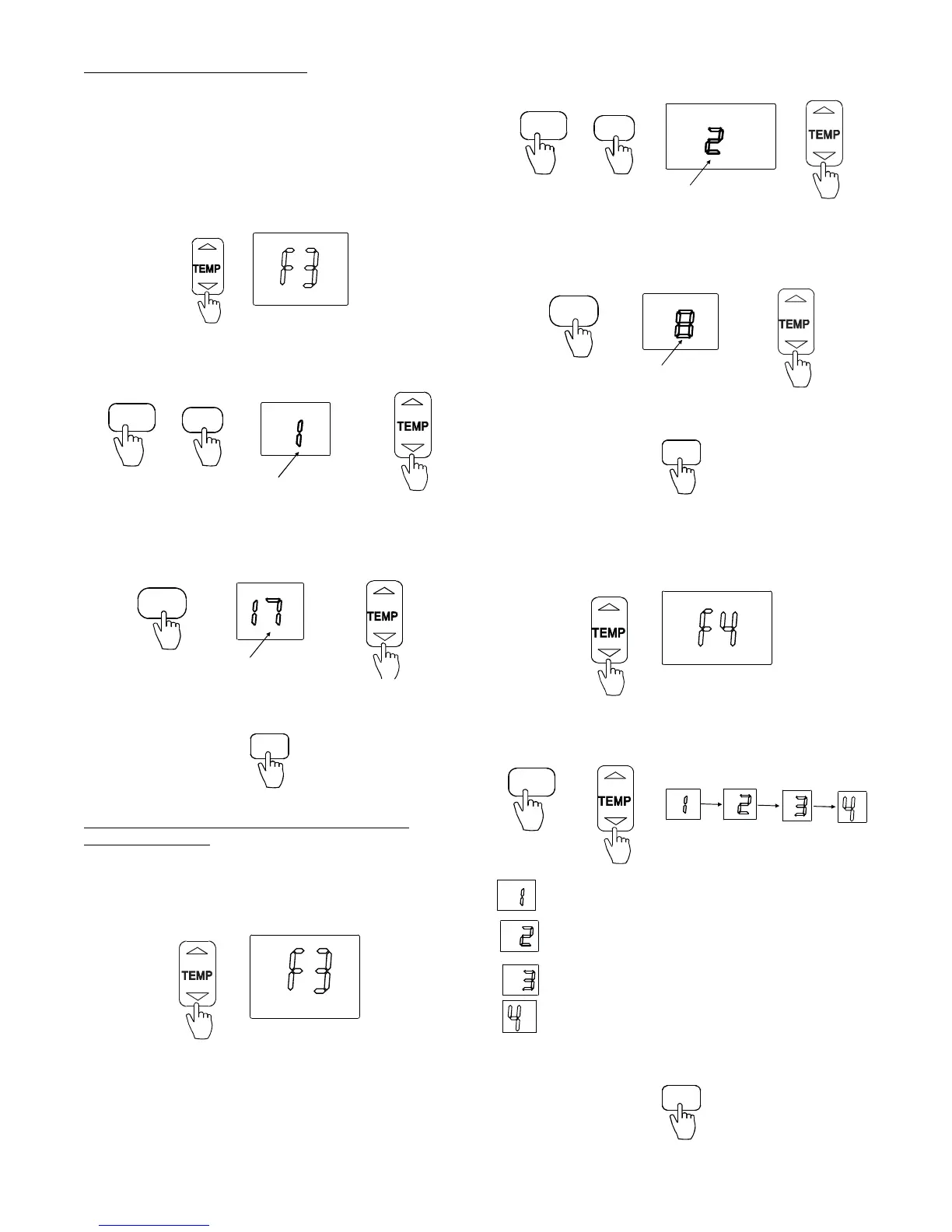
1. Press
▲ and ▼ to select “F3”.
Fig. 18 – Select F3
2. Press MODE. Press FAN to select the parameter. Next,
press
▲ and ▼ to select 1.
Flashing
MODE
FAN/SLC
Fig. 19 – Select 1
3. Press TIMER OFF to adjust the parameter. The parameter
continues to flash. Next, press ▲ and ▼ to adjust the
parameter (range: 63
_F (17_C) ~ 70_F(21_C)).
Flashing
TIMER OFF
Fig. 20 – TIMER OFF
4. Press TIMER ON to confirm.
TIMER ON
Fig. 21 – TIMER ON
B) General Anti−Cold Air Function Setting (Cold Blow
Prevention Function)
The general anti−cold air parameter is set regardless of the room
temperature.
NOTE: No setting adjustment recommended.
1. Press
▲ and ▼ to select “F3”.
Fig. 22 – Select F3
2. Press MODE. Press FAN to select the parameter. Next,
press
▲ and ▼ to select “2”.
Flashing
MODE
FAN/SLC
Fig. 23 – Select 2
3. Press TIMER OFF to adjust the parameter, which
continues to flash. Next, press ▲ and ▼ to adjust the
parameter (range: 46
_F(8_C) ~ 82_F(28_C)).
Flashing
TIMER OFF
Fig. 24 – Adjust the parameter
4. Press TIMER ON to confirm.
TIMER ON
Fig. 25 – TIMER ON
Indoor Fan Motor Speed Control after Set
Temperature is Reached (F4)
1. Press ▲ and ▼to select “F4”.
Fig. 26 – Select F4
2. Press MODE. Next, press
▲ and ▼ to select “1”, “2”,
“3”, or “4”.
MODE
Indicates fan motor stopping
Indicates unit operating at lowest fan speed
Indicates unit operating at setting fan speed
Indicates terminal function
Fig. 27 – Select a number
3. Press TIMER ON to confirm.
TIMER ON
Fig. 28 – TIMER ON


 To Next Page