6
Louver Angle Memory Function (F5)
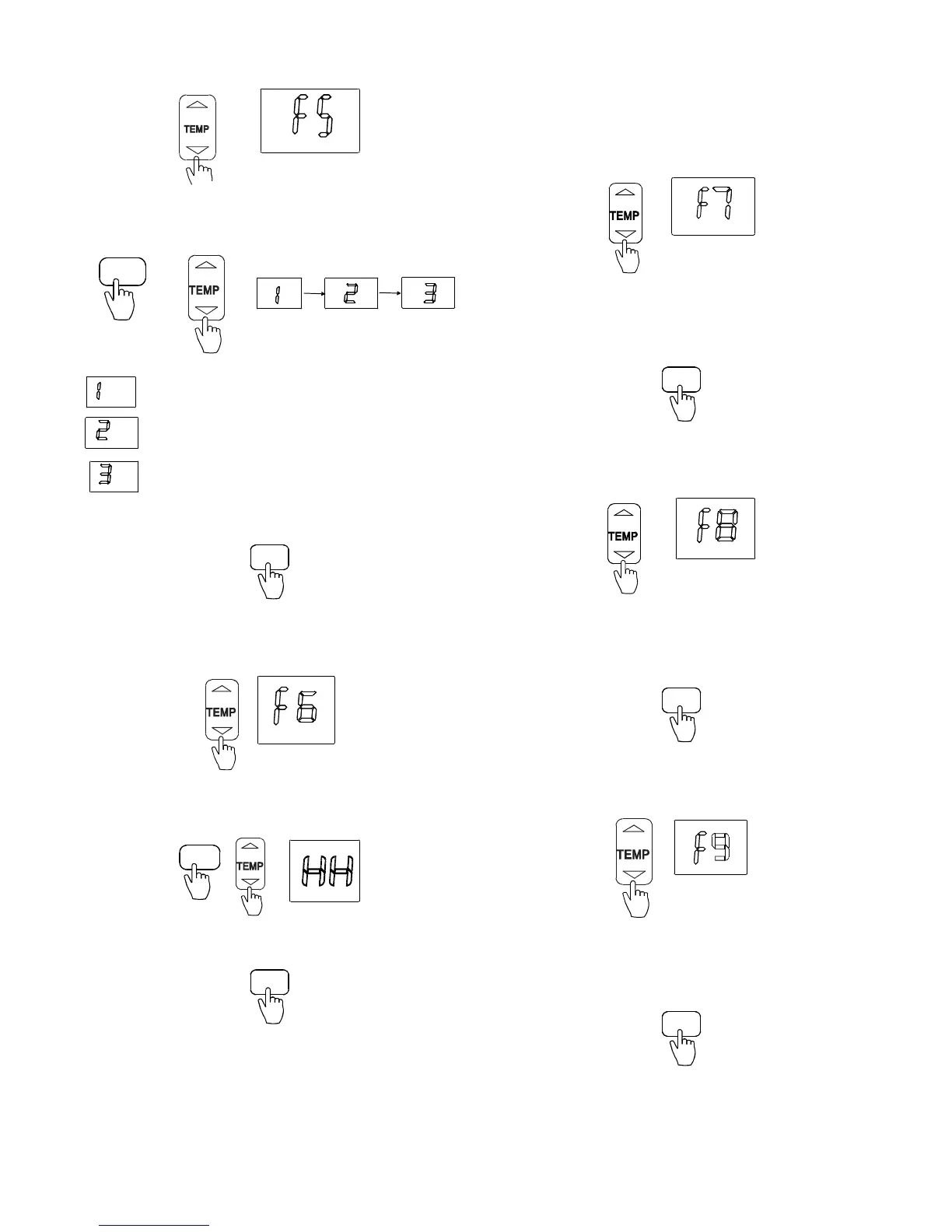
1. Press ▲ and ▼to select “F5”.
Fig. 29 – Select F5
2. Press MODE. Next, press
▲ and ▼ to select “1”, “2”, or
“3”.
MODE
Indicates memory function cancellation
Indicates the louver angle memory function is enabled
either by turning off or a power failure
Indicates the louver angle memory function is enabled
by turning off and disabled due to a power failure
Fig. 30 – Select a number
3. Press TIMER ON to confirm.
TIMER ON
Fig. 31 – TIMER ON
Heating Only or Cooling and Heating Setting (F6)
1. Press ▲ and ▼ to select “F6”.
Fig. 32 – Select F6
2. Press MODE. Next, press
▲ and ▼ to select “HH” or
“CH” (HH: Heating only − CH: Cooling and Heating).
MODE
Fig. 33 – Select HH or CH
3. Press TIMER ON to confirm.
TIMER ON
Fig. 34 – TIMER ON
Cooling Temperature Compensation (F7)
Defines the adjustment for the thermal stratification in the room
and how the indoor unit is sensing the space. To adjust the
temperature compensation, in Celsius only:
NOTE: Temperature compensation in Celsius regardless of the
units used.
1. Press
▲ and ▼to select “F7”.
Fig. 35 – Select F7
2. Press MODE. Next, press
▲ and ▼ to select the
parameter (range: −2
_C ~ +2_C).
3. Press TIMER ON to confirm.
TIMER ON
Fig. 36 – TIMER ON
Refrigerant Leakage Detection (F8)
1. Press ▲ and ▼to select “F8”.
Fig. 37 – Select F8
2. Press MODE. Next, press
▲ and ▼ to select “ON” or
“OFF”.
3. Press TIMER ON to confirm.
TIMER ON
Fig. 38 – TIMER ON
Cleaning Filter Reminder (F9)
1. Press ▲ and ▼ to select “F9”.
Fig. 39 – Select F9
2. Press MODE. Next, press
▲ and ▼to select “ON” or
“OFF”.
3. Press TIMER ON to confirm.
TIMER ON
Fig. 40 – TIMER ON


 To Next Page