5
Installation Preparation
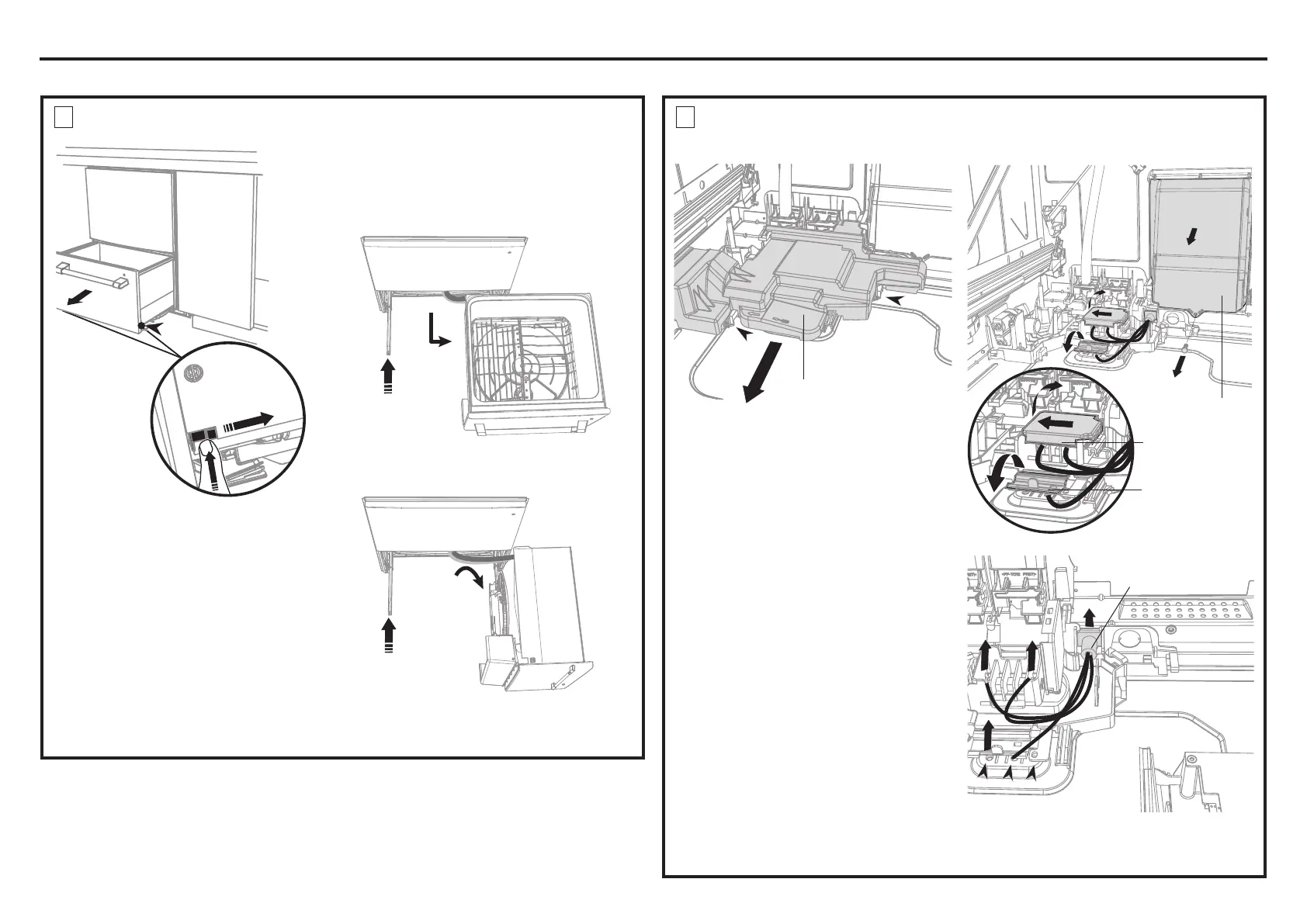
OPTIONAL - HARD WIRING PRIOR TO INSTALLATION
Access cover
Clip
Clip
1 With a flat-bladed screwdriver, push
in the clips and slide out the access
cover.
2 Unscrew the electronics module
cover.
3 Carefully pull out the electronics
module and rest on the chassis base
out of the way.
4 With a screwdriver, unclip the plastic
harness cover and hinge open.
5 Slide the terminal block cover
sideways to unlock and hinge open
to access the terminal block.
6 Unscrew the Live, Neutral and
Ground wires as shown.
NOTE: Only unscrew the live and
neutral terminals 2 turns. They are
fork terminals and do not require the
screws to be removed. The ground
requires the screw be removed. It is
a ring terminal. Remove the center
ground screw.
7 Unscrew the three screws on the
base as shown and remove the cord
from the product.
1
1
Remove existing
power cord
6
7
7
To prevent kinked hoses
Either sit the drawer down on the left
hand side (recommended) or rotate the
drawer clockwise, resting it on its side after
removal.
2
REMOVE THE ACCESS COVER AND REMOVE THE
POWER CORD
1
REMOVE THE LOWER DRAWER
4” (100 mm)
Electronics
module
Terminal
block cover
2
3
4
5
Harness cover
4
4
3
3
Push drawer
runners back
in on either
side.
Push drawer
runners back
in on either
side.
Sit the drawer down
Rotate the drawer
clockwise (max. 90
o
)
and rest on side.
OR
Press the release tabs
in on either side and
push back to release
drawer from runners.
Lift drawer off runners.
1
2


 To Next Page