Cafi na ALPHA – 04/2006
13
8 Obtaining a beverage
Specially prepared instructions for frequent
and quick use on obtaining a beverage can
be found in the Cafi na Quick Manual.
8.1
Coffee and milk drinks
8.1.1 Scrolling through list of bever-
ages and obtaining a beverage
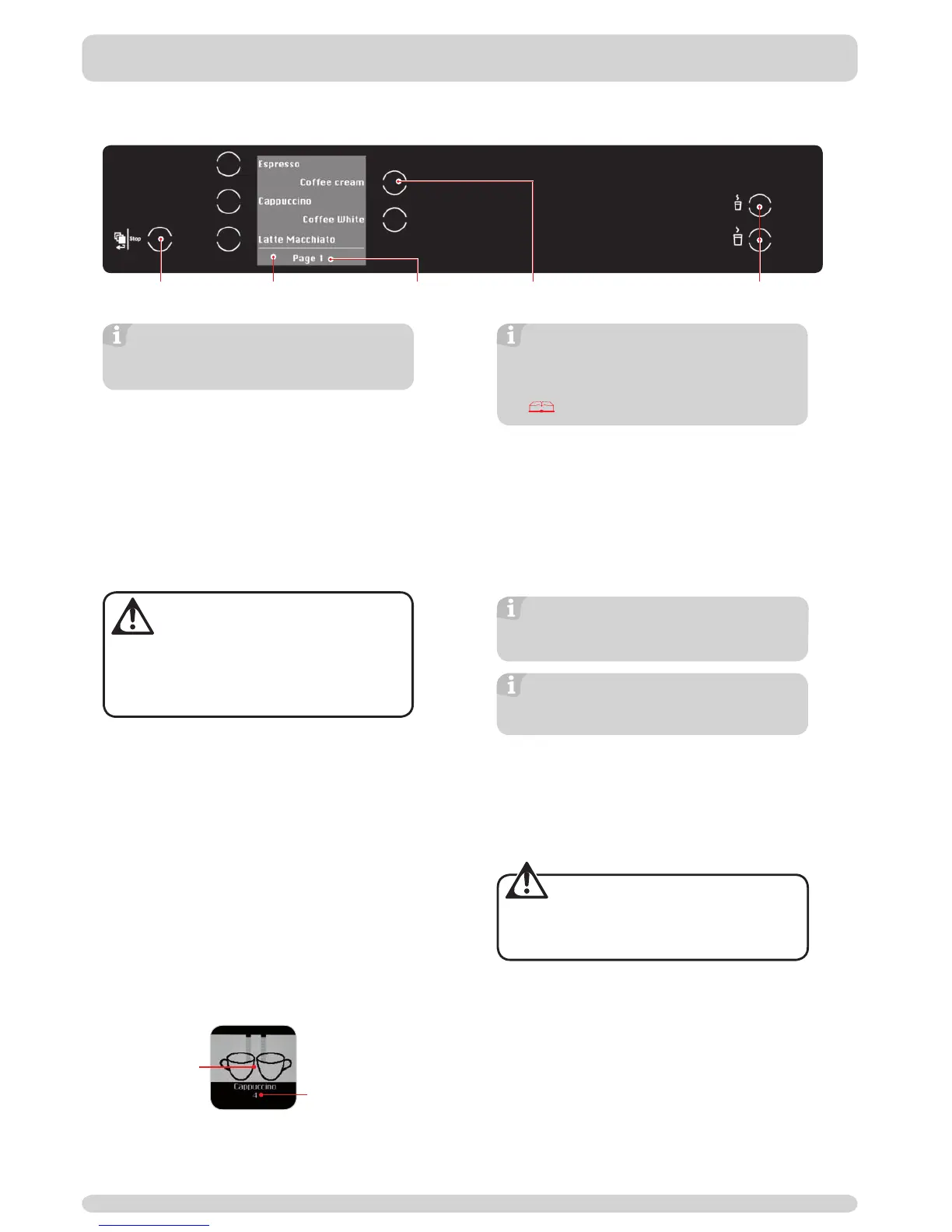
1| The fi rst page of the list of beverages is
displayed in the standard image on the display.
2| Pressing Shift/Stop will display subsequent
pages of the product list.
3| Place a cup to fi t underneath spout.
WARNING:
Risk of scalding!
There is a risk of scalding whilst the beve-
rage itself is served.
➤ Avoid direct contact with the coffee spout
and also with the beverages.
4| Serve beverage desir
ed by pressing the
particular key.
8.1.2 Selecting number of cups
The quantity served is determined by how often
a beverage key is pressed. During serving, the
number of cups required, though not yet served, is
displayed.
Serving mode 1: One cup served.
Serving mode 2: Two cups served at
the same time.
Beverages are programmed in upon initial
operation by authorized experts. Using the
« MANAGER» Key Card enables already saved
types of beverages to be changed. See:
Chapter 9 «Key Cards».
8.1.3
Stopping a serving
Stopping a beverage order and deleting
subsequent tasks:
Press the Shift/Stop key twice.
Deleting subsequent beverage tasks:
Press Shift/Stop once.
A single beverage order in serving
mode 1 or 2 can be deleted by
pressing Shift/Stop once.
To completely delete a number of beverage
orders in serving mode 1 or 2, press
Shift/Stop twice in succession.
8.2
Hot water
8.2.1 Obtaining a beverage
1| Place glass or cup under the hot water spout.
WARNING: Risk of burning!
The hot water spout becomes very hot!
➤ Proceed with care and avoid direct contact
with spout.
2| Select por
tion by portion or manually.
8.2.2


 To Next Page