2017 Portable Spa
LTR20171001, Rev. C
Operating Your Spa
www.calspas.com
23
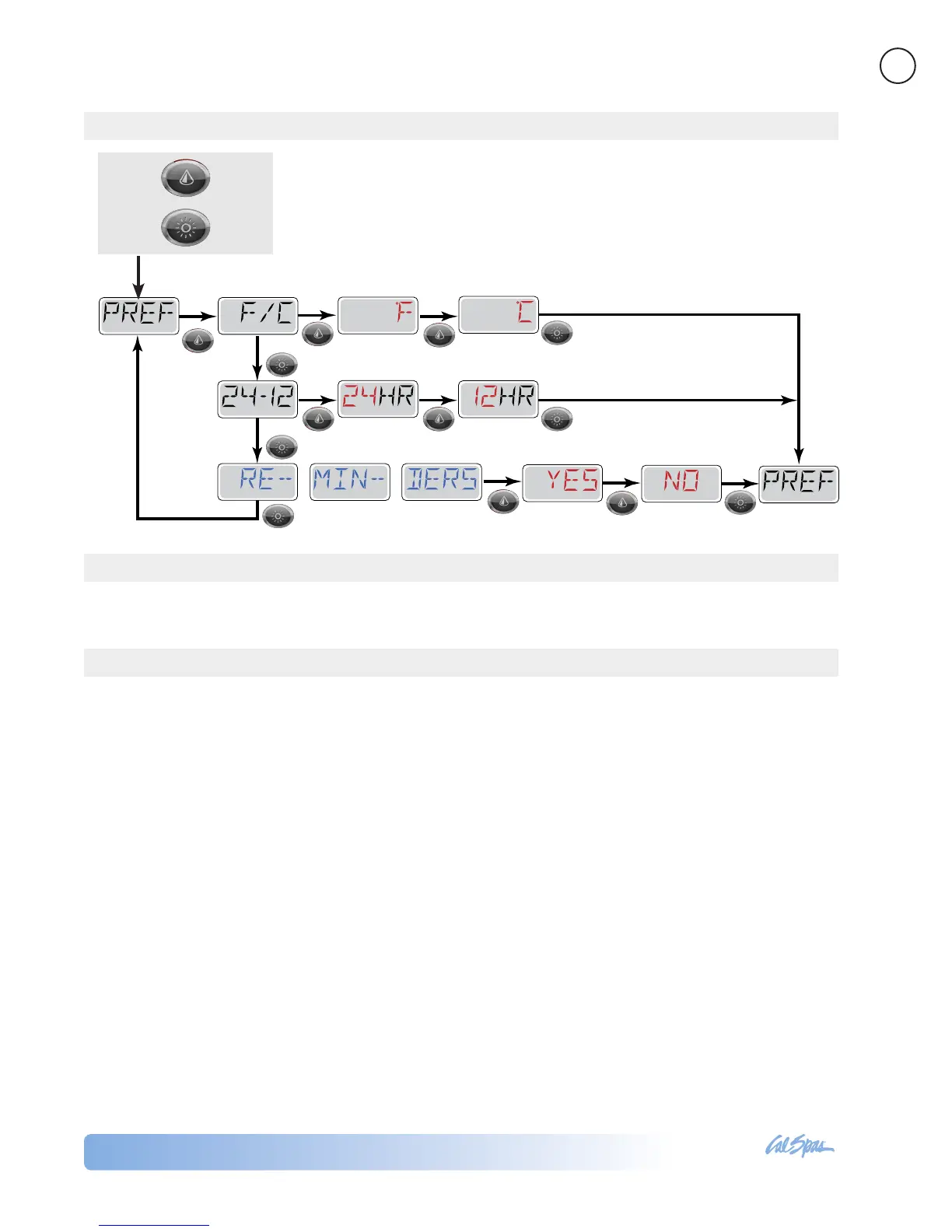
This allows you to set the following preferences for system operation:
• Change the temperature between Fahrenheit and Celsius
• Change the clock between 12-hour and 24-hour display
• Turn periodic reminders (like “CLEAN FILTER”) on or off
This menu feature is for system information only and is used mainly for repair and troubleshooting.
9x
Then
Press
Press Once
Pumps
Press the “Jets 1” button once to turn pump 1 on
or off, and to shift between low- and high-speeds if
equipped. If left running, the pump will turn off after
a time-out period. The pump 1 low-speed will time
out after 30 minutes. The high-speed will time out
after 15 minutes.
On non-circ systems, the low-speed of pump 1 runs
when the blower or any other pump is on. If the spa
is in Ready Mode, Pump 1 low may also activate for
at least 1 minute every 30 minutes to detect the spa
temperature (polling) and then to heat to the set
temperature if needed. When the low-speed turns
on automatically, it cannot be deactivated from the
panel, however the high speed may be started.
Circulation Pump
The circulation pump will come on when the system
is checking temperature (polling), during lter cycles,
during freeze conditions, or when another pump is
on.
The ozonator will run with the circulation pump
during ltration cycles.
Purge Cycles
In order to maintain sanitary conditions, secondary
Pumps and/or a Blower will purge water from
their respective plumbing by running briey at the
beginning of each lter cycle.
Setting Preferences
Utilities
Other Spa Systems
SET
SET
SET
SET
SET
SET
Toggle Yes and No
to set
to set
to set
Toggle Fº en Cº
Toggle 12-hour clock
and 24-hour clock
Several spa functions operate in the background and require no action or maintenance from you. This is for
your information only.



 To Next Page