2017 Portable Spa
LTR20171001, Rev. C
Operating Your Spa
www.calspas.com
22
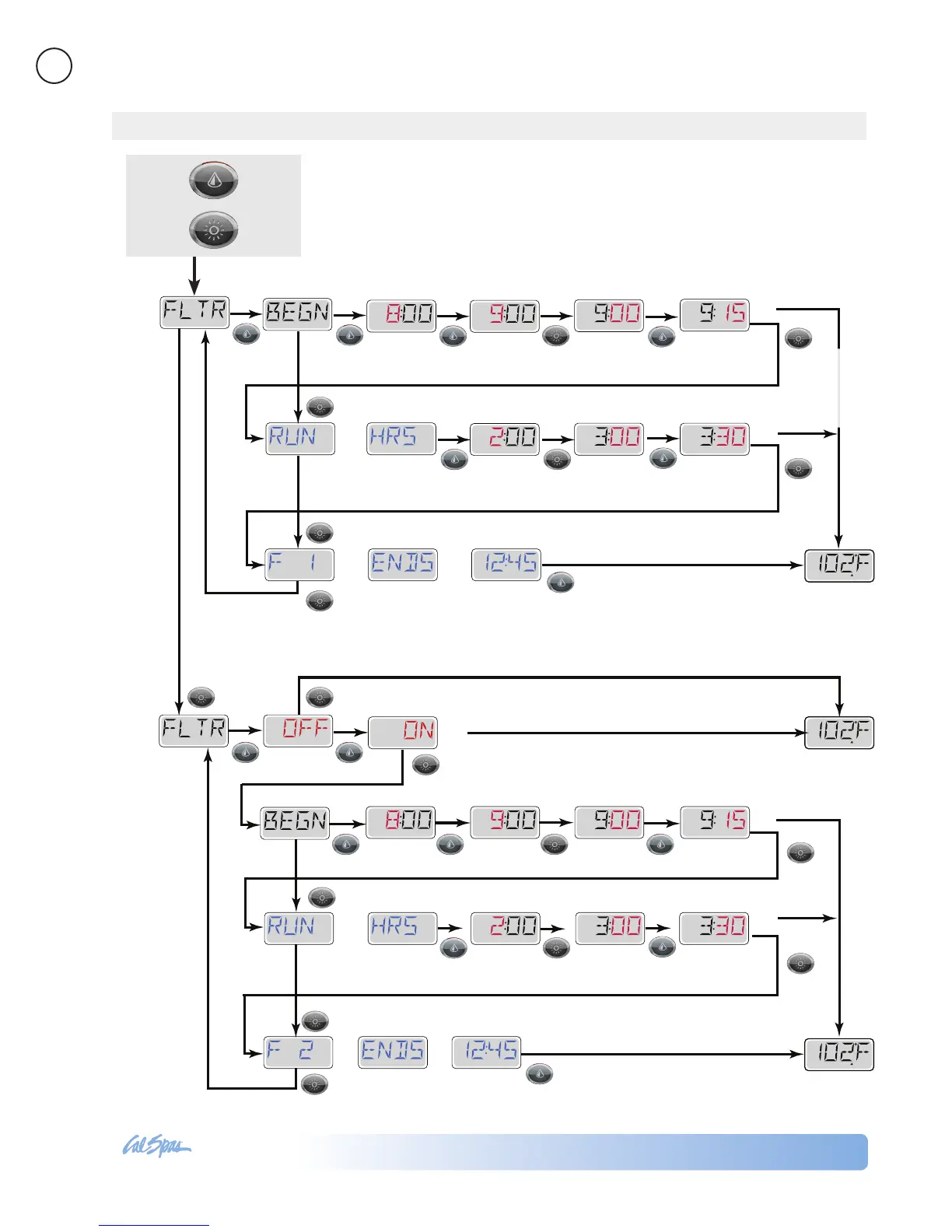
Main Filtration
Filter cycles are set using a duration. Each setting can be adjusted in 15-minute
increments. Filter Cycle 1 and Filter Cycle 2 (if enabled) are set to the same
duration.
If Filter Cycle 2 is enabled, Filter 2 will appear in the LCD. If Filter 2 is disabled,
Filter 1 will appear.
7x
Then
Press
Press Once
Adjusting Filtration
READY
RANGE
FLTR1
SET
FLTR
2 P
SET
FLTR
2 P
SET
FLTR
2 P
FLTR
2
FLTR
2
SET
FLTR
2
SET
FLTR
2
SET
FLTR
2
FLTR
2
A
SET
FLTR
2 P
2
SET
FLTR
2
SET
FLTR
2
*****
*****
*****
READY
RANGE
FLTR1
SET
FLTR1 P
FLTR1
FLTR1
SET
FLTR1
SET
FLTR1
FLTR1
A
1
READY
RANGE
FLTR1
SET
FLTR1 P
SET
FLTR1 P
SET
FLTR1 P
SET
FLTR1
*****
*****
Shows start
time
Sets start
hour
Sets
minutes
Sets 15- minute
increments
to show RUN HRS
Sets Filter 1
length in hours
Selects part
of an hour
to show F1 ENDS xx:xx
Sets 15-minute
increments
Note: Waiting several seconds will lose any
new Filter 1 Start Time and Run Hours and
revert to the previous Filter 1 settings.
to set
to set
Main Screen
Main Screen
If you wait
it will revert to
original setting.
If you wait several seconds, it
will revert to original setting.
Note: Waiting several seconds will lose any new
Filter 2 On/Off, Start Time and Run Hours and
revert to the previous Filter 2 settings.
Main Screen
to set
to set
to set
Press Light button
to select Filter 2
Shows start
time
Sets start
hour
Sets
minutes
Sets 15- minute
increments
to show RUN HRS
to show F2 ENDS xx:xx
to set
Sets Filter 2
length in hours
Selects part
of an hour
Sets 15-minute
increments



 To Next Page