2017 Portable Spa
LTR20171001, Rev. C
Cleaning and Maintenance
www.calspas.com
46
Changing the UV Lamp
CAUTION: Always turn off power to the spa at
the GFCI prior to any maintenance.
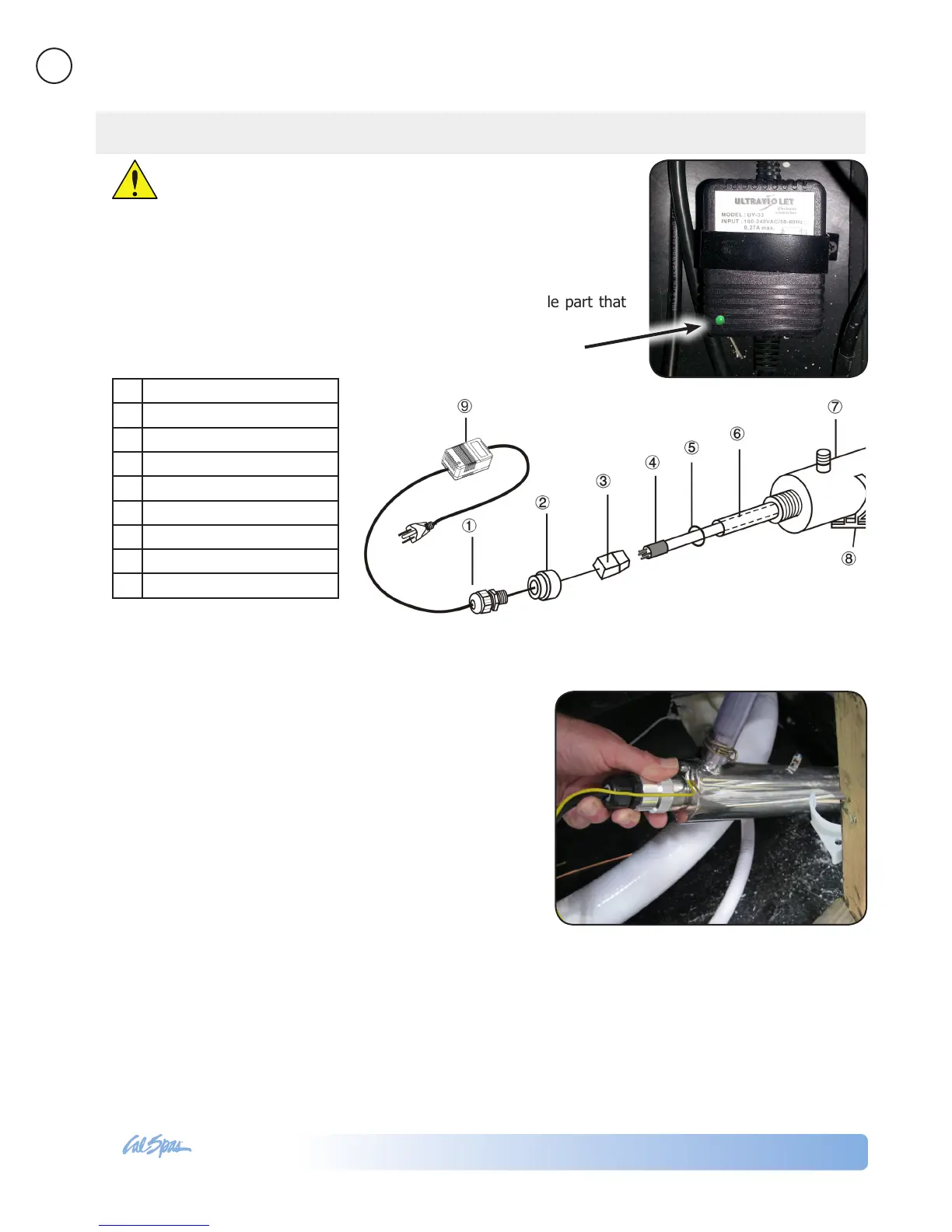
Note: Periodically you should the check the light on the transformer for the
UV light system. The transformer is mounted in the spa equipment area
close to the system control box. When it is operating normally, the light will
be green. When it requires maintenance, it will be red. This usually happens
when the UV lamp needs replacing. The UV lamp is a wearable part that
needs replacing about once a year.
To remove the UV lamp
1. Disconnect power.
2. Turn water off and open down stream of system
to relieve pressure.
3. Cut the tie wrap that attaches the UV lamp
chamber to the spa frame.
4. Remove the water-proof strainer (1) and unscrew
the aluminum nut (2).
5. Pull out the lamp (4) approximately 2” from the
chamber (7).
6. While holding the lamp end, remove the lamp
socket (3) from the end now exposed.
7. Remove the lamp from the chamber.
8. Remove the O-ring (5) from the end of the quartz
thimble (6).
9. Remove the quartz thimble.
To reinstall the replacement UV lamp, follow these
steps in reverse.
When replacement UV lamp has been installed,
conduct a nal leak check:
1. Restore power to the spa at the GFCI.
2. Turn on the pump and let water run for ve
minutes to check for leaks.
1 Water-proof strainer
2 Aluminum nut
3 Lamp socket and lead wire
4 Germicidal UV lamp
5 Rubber O-ring
6 Quartz thimble
7 Chamber
8 Clip
9 Ballast
See page 54 for part numbers for
replacement parts.



 To Next Page