2017 Portable Spa
LTR20171001, Rev. C
Operating Your Spa
www.calspas.com
21
6x
Then
Press
Press Once
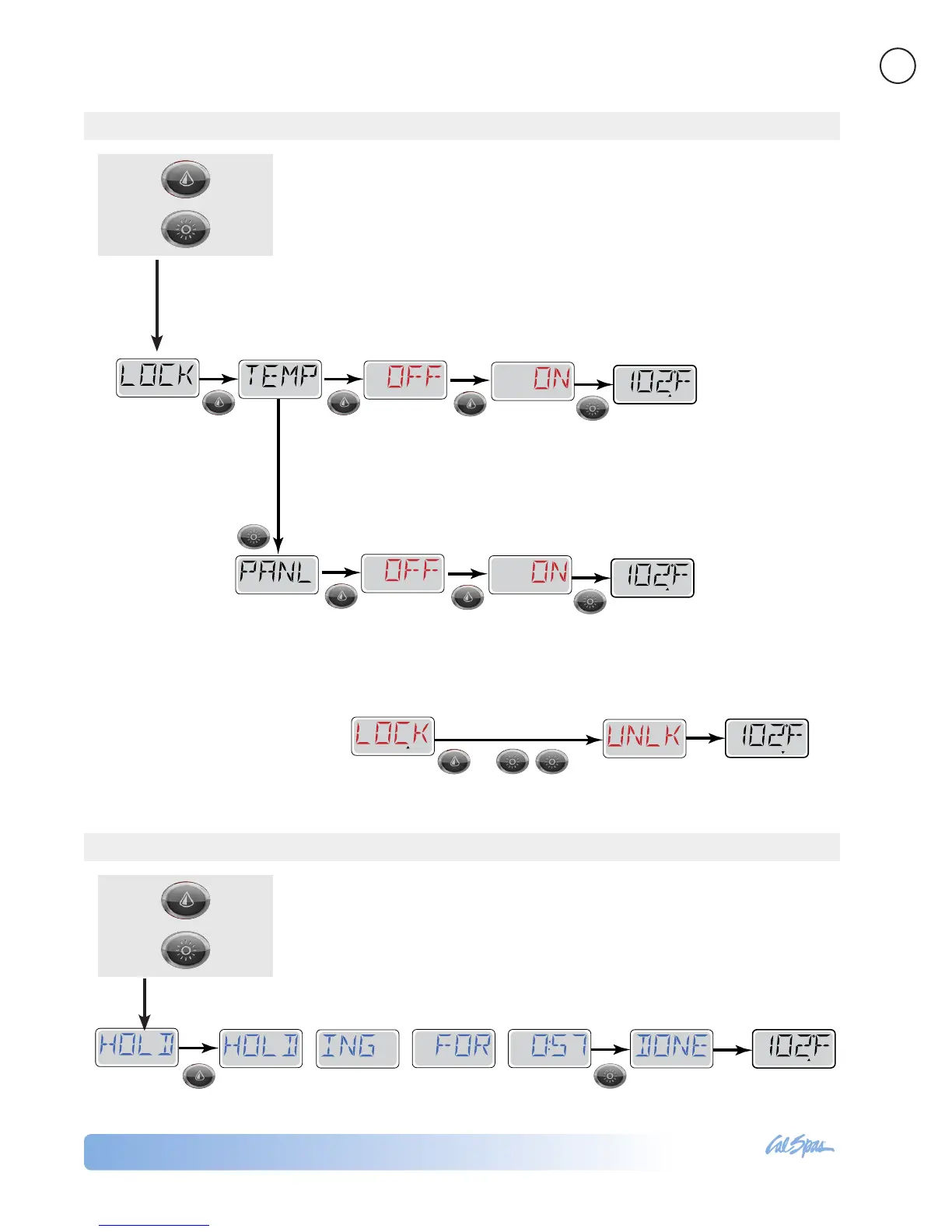
The control can be locked to prevent unwanted use or temperature adjustments.
You can lock the set temperature or the control panel.
Locking the temperature allows Jets and other features to be used, but the Set
Temperature and other programmed settings cannot be adjusted.
Locking the panel prevents the controller from being used, but all automatic
functions are still active.
Unlocking the control
While pressing and holding the
WARM Button, press the LIGHT
button twice.
5x
Then
Press
Press Once
Locking the Control
Hold Mode
Hold Mode is used to disable the pumps during service functions like cleaning or
replacing the lter. (See page 44 for instruction on cleaning the lter.)
Hold Mode will last for 1 hour unless the mode is exited manually.
READY
R
ANGE
FLTR1
READY
RANGE
FLTR1
Press and
Press
SET
SET
SET
SET
READY
RANGE
FLTR1
SET
SET
SET
READY
RANGE
FLTR1
Main screen
Press Light button to
lock control panel
The set temperature
has been locked
You can toggle between ON and OFF
using the Warm and Cool buttons
You can toggle between ON and OFF
using the Warm and Cool buttons
Main screen
The control panel
has been locked
TO LOCK SET TEMPERATURE
TO LOCK THE CONTROL PANEL
READY
RANGE
FLTR1
Timer will count down for 60 minutes Main Screen



 To Next Page