2017 Portable Spa
LTR20171001, Rev. C
Operating Your Spa
www.calspas.com
20
Ready-in-Rest Mode
READY/REST appears in the display if the spa is in Rest Mode and Jet 1
is pressed. When the spa is being used, it will heat to set temperature.
While Pump 1 High can be turned on and off, Pump 1 Low will run until
set temperature is reached, or 1 hour has passed. After 1 hour, the system
will revert to Rest Mode. This mode can also be reset by entering the Mode
Menu and changing the Mode.
REST
RANGE
READY
/ REST
RANGE
Twice
Then
Press
Press Once
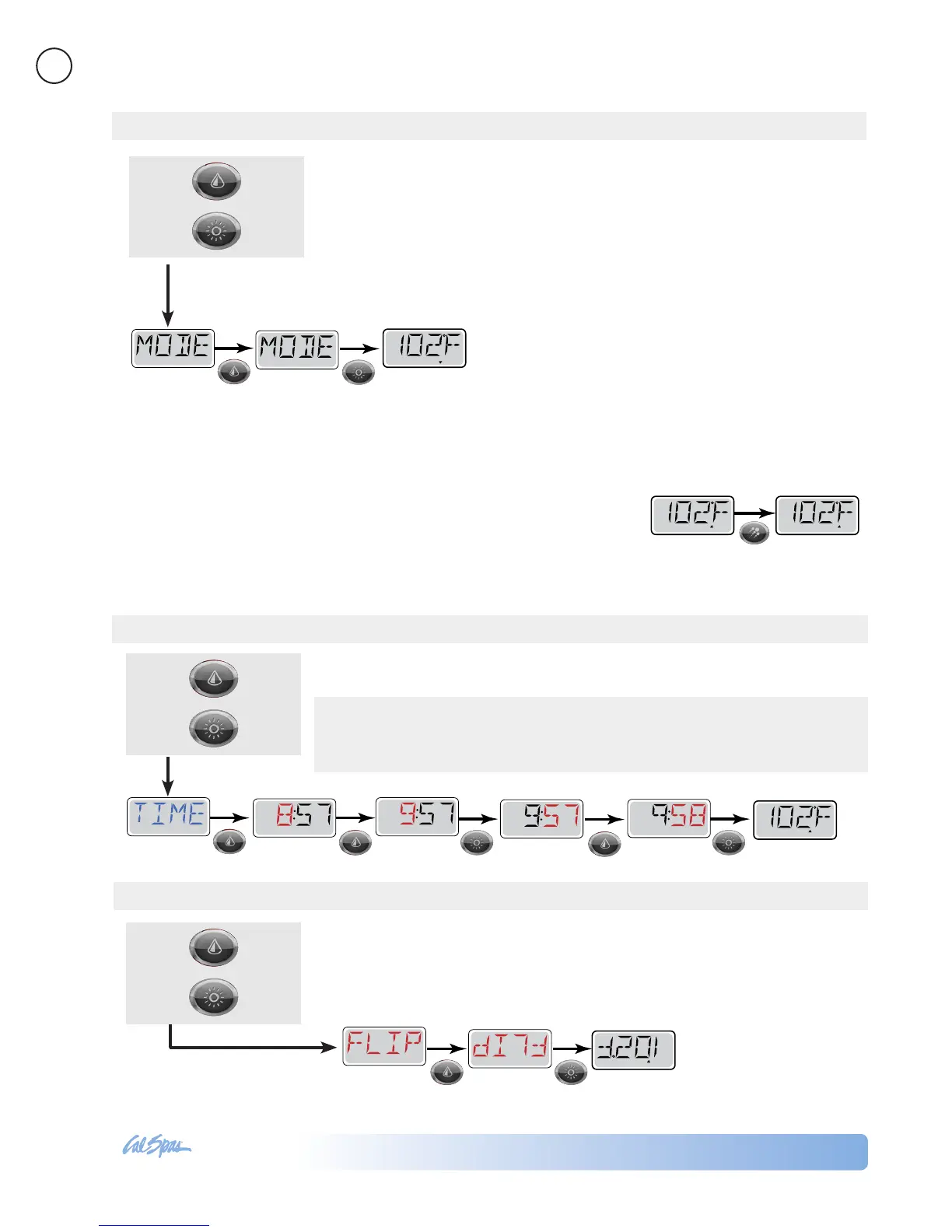
Setting the time of day is important for determining ltration times and other
background features. 24-hour time display can be set under the PREF menu.
3x
Then
Press
Press Once
Setting Time
Setting the Heat Mode
Note: This system does NOT display the time of day. The default
display on the Main Screen is the current water temperature.
Displaying time of day is not a selectable feature.
READY
RANGE
FLTR1
READYSET
SET
REST
Toggle between
There are two heat modes: READY Mode and REST Mode.
READY Mode: In order for the spa to heat, a pump needs to circulate water
through the heater. The pump that performs this function is known as the
“heater pump.”
The heater pump can be either a 2-Speed Pump 1 or a circulation pump. If the
heater pump is a 2-Speed Pump 1, READY Mode will circulate water every 1/2
hour, using Pump 1 Low, in order to maintain a constant water temperature,
heat as needed, and refresh the temperature display.
This is known as “polling.”
REST Mode: REST Mode will only allow heating
during programmed lter cycles. Since polling does not
occur, the temperature display may not show a current
temperature until the heater pump has been running
for a minute or two.
SET
P
SET
P
SET
P
SET
P
READY
RANGE
FLTR1
Set hour Set minutes Main Screen
SET
SET
READY R
ANGE
FLTR 1
Main Screen
Press Temp button to
flip the display
Inverting the display allows you to be able to read the control panel while you
are in the spa.
4x
Then
Press
Press Once
Flip (Invert Display)



 To Next Page