- - -
Page 20 - Manual FA01176-EN - 02/2019 - © CAME S.p.A. - The contents of this manual may be changed, at any time, and without notice. - Translation of the original instructions
Command and control devices
⚠
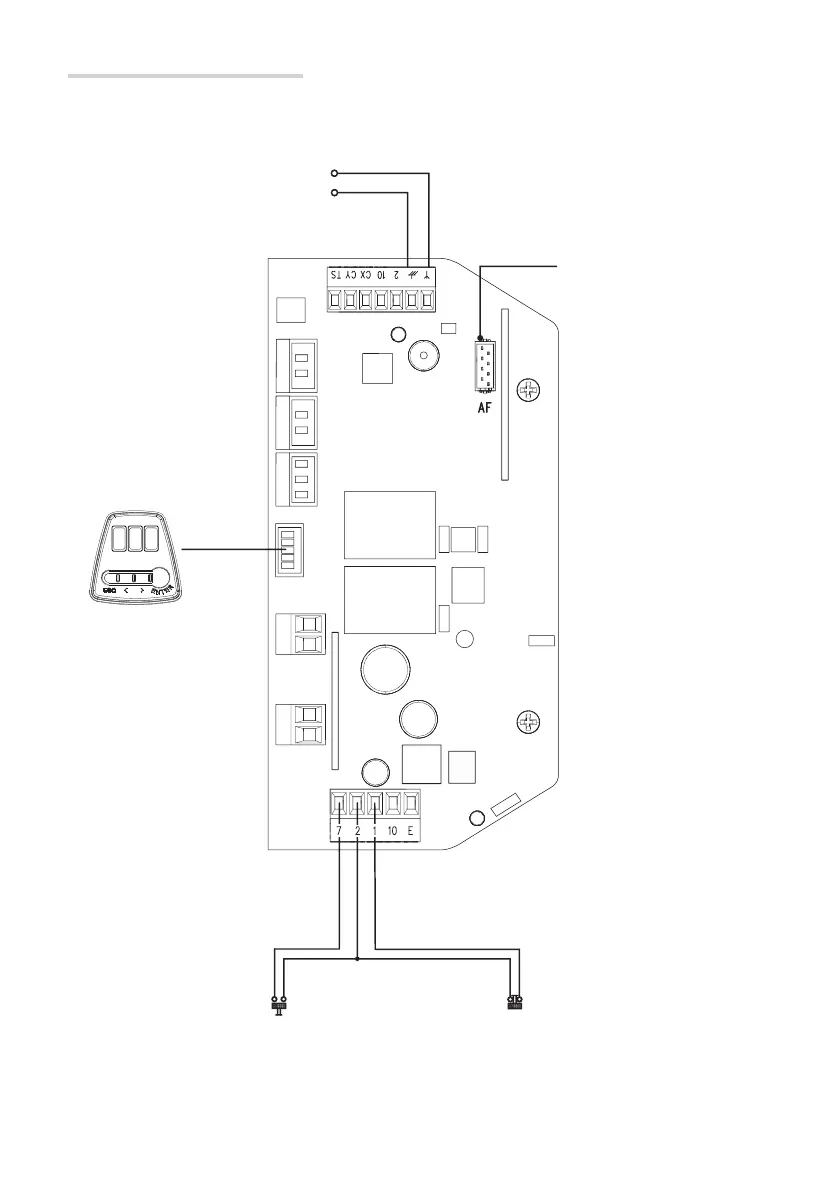
Before fi tting the AF card, you must cut o the mains power supply.
STOP button (NC contact). Enables the door to stop
and excludes the automatic closing. To resume
movement press the control button or use another
control device. See function F 1.
OPEN-CLOSE-INVERT (step-by-step) function
from control device (NO contact). Alternatively,
from function programming you can activate other
commands.
See function F 7.
Connector for AF card for
remote control.
Antenna with RG58 cable for
remote control.
p. 20 -
Manual
FA01176-EN - 02/2019 - © CAME S.p.A. -
The contents of this manual may be changed, at any time, and without notice. - Original instructions


 To Next Page
 Loading...