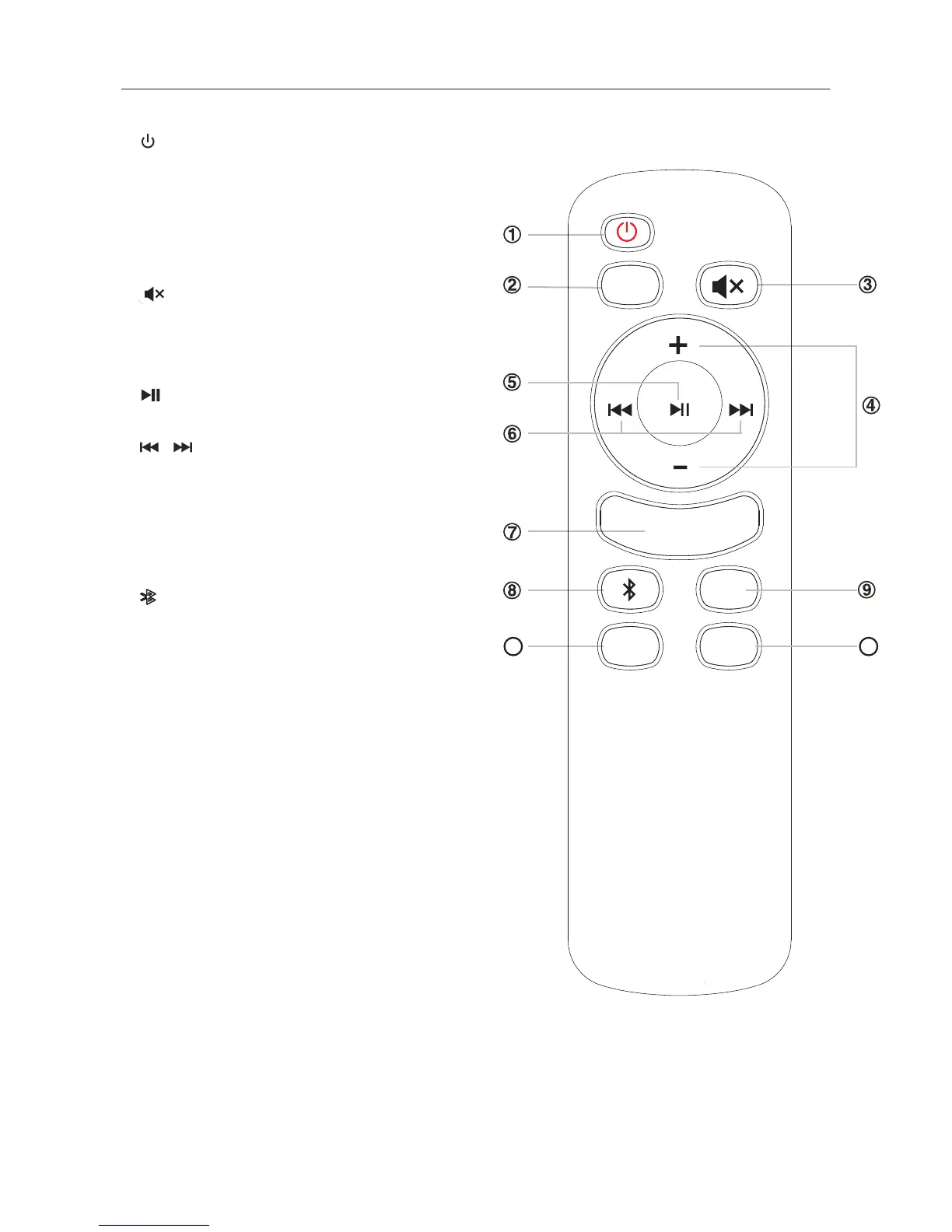
Remote Control
10
11
1.
• Switch the unit between ON and STANDBY modes.
2. PAIR
• Increase/decrease the volume level.
3.
• Mute or resume the sound.
4. VOL+/VOL-
5.
10. AUDIO/AUX
11. OPTI/COAX
• Press repeatedly to switch audio source
to AUDIO
• Press repeatedly to switch audio source
to OPTICAL
• Play/pause in Bluetooth and USB.
PAIR
AUX/
AUDIO
OPTI/
COAX
EQ
USB
• Press repeatedly to switch audio source
to Bluetooth.
• Press and hold the button to activate the pairing
function in Bluetooth and/or disconnect the
existing paired Bluetooth device.
6.
8.
• Press repeatedly to switch audio source
to USB.
9. USB
/
·Select a preset sound effect. Default EQ is MUSIC,
7. EQ
press to switch to NEWS, NORMAL and MUSIC as
recycle.
• To select previous/next track in Bluetooth and USB.
and AUX(L/R).
and COAXIAL.


 To Next Page