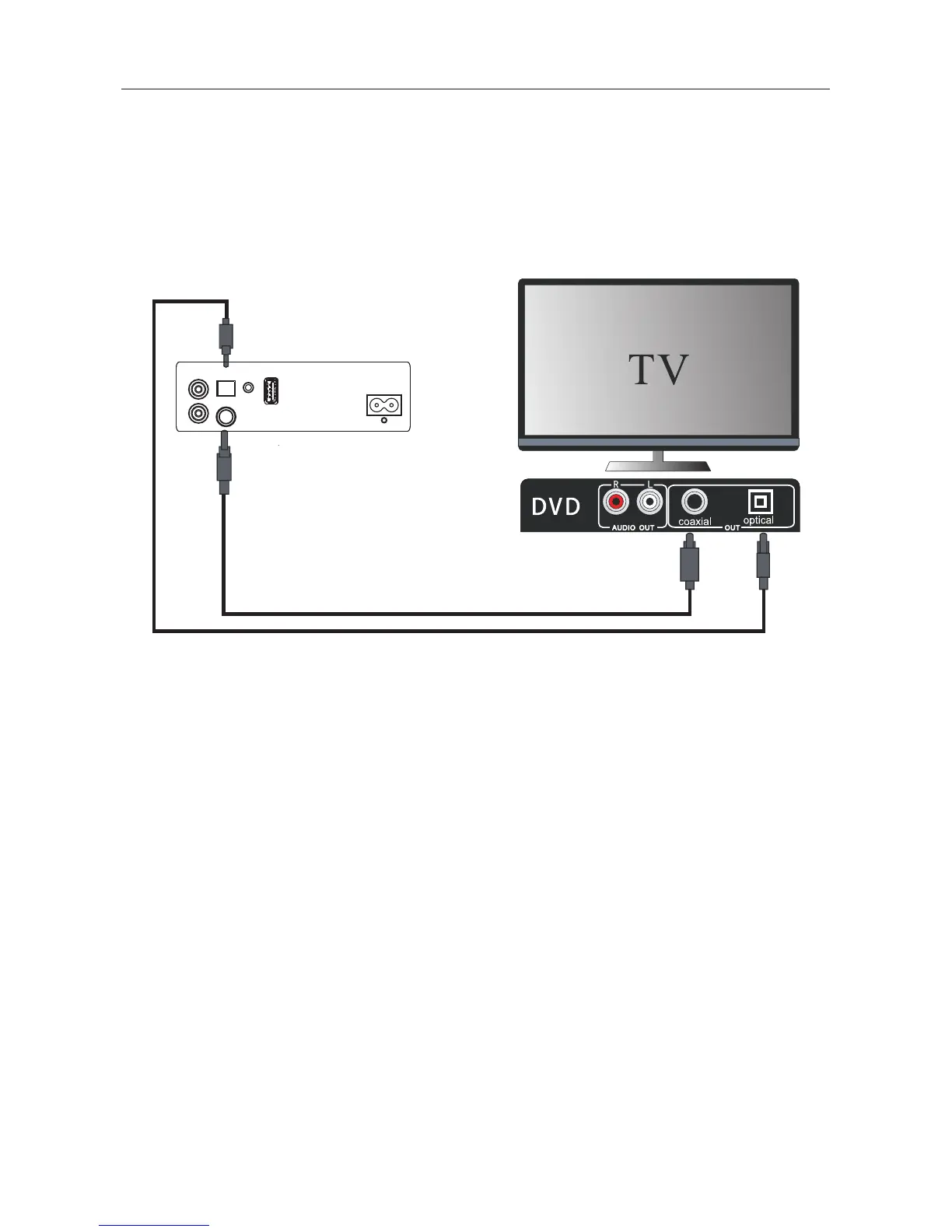
Digital inputs connection
Connecting DVD player/TV outputs to digital inputs from the sound board.
- Remove the protective cap of the OPTICAL socket. Use the optical cable (Not supplied) to connect
the OPTICAL output socket from the DVD player/TV with the input socket from the sound board.
- Use the COAXIAL cable (Not supplied) to connect the COAXIAL output socket from the DVD player/TV
with the input socket from the sound board.
sound board inputs
DVD player / TV outputs
11
If there is no sound coming out of the sound board and the indicator lights up make sure
Connections
that the audio setting of your source player(e.g.DVD player, game player, TV) is set to PCM
with COAXIAL input.
If there is no sound output and the OPTICAL indicator lights up, ensure that the audio setting
of the input source(e.g.TV,game console, DVD player, TV) is set to PCM with OPTICAL input.
Tip
AC~
AUX IN
OPTICAL
AUDIO IN
USB
R
L
COAXIAL


 To Next Page