11
STOPPING
Every propulsion engine is fitted with a stop solenoid. To stop engine simply turn the
key to the “0” position and the engine will stop.
When leaving the boat for an extended period, turn off battery isolator.
Canaline Engine Control Panels
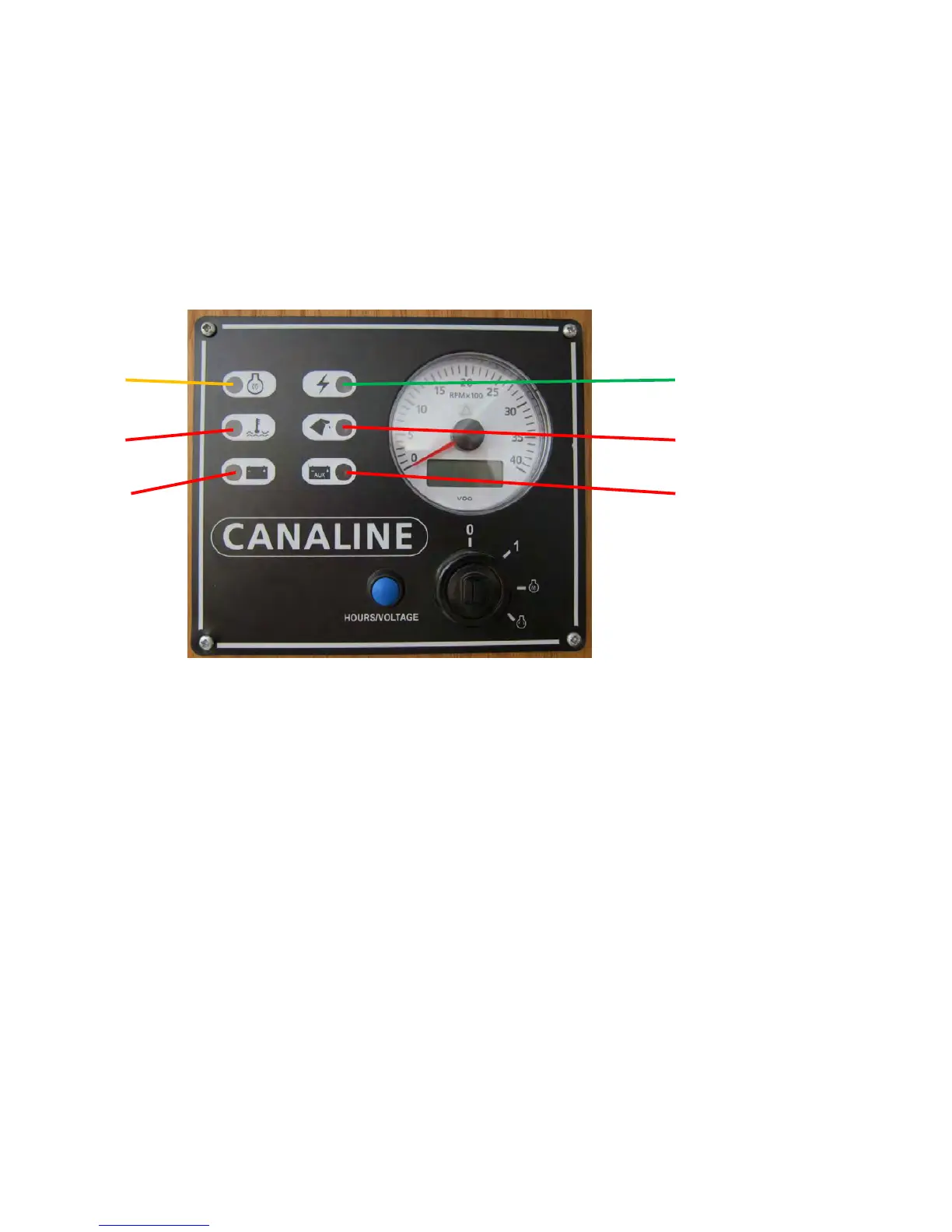
Canaline Engine control panels feature LED Module to indicate as listed below. An
Intermediate Panel is shown for illustration only.
1 4
2 5
3 6
1. Yellow ~ Timed Preheat LED
Illuminates when Key is switched to preheat position to indicate Preheat time.
2. Red & Buzzer ~ Engine Coolant Temperature
LED Illuminates and Buzzer sounds if Engine Temperature is too high.
3. Red & Buzzer ~ Starter Alternator
LED Illuminates and Buzzer sounds if no charge from Alternator or Belt breaks.
4. Green ~ Panel Power
LED illuminates when Key is switched on.
5. Red & Buzzer ~ Engine Oil Pressure
LED Illuminates and Buzzer sounds if Oil Pressure is too low.
6. Red & Buzzer ~ Auxiliary / Domestic Alternator
LED Illuminates and Buzzer sounds if there is no charge from Alternator or Belt breaks.


 To Next Page