Using the Keep warm
Keep warm function is suitable for keeping food warm.
Using the Keep warm to get stable temperature
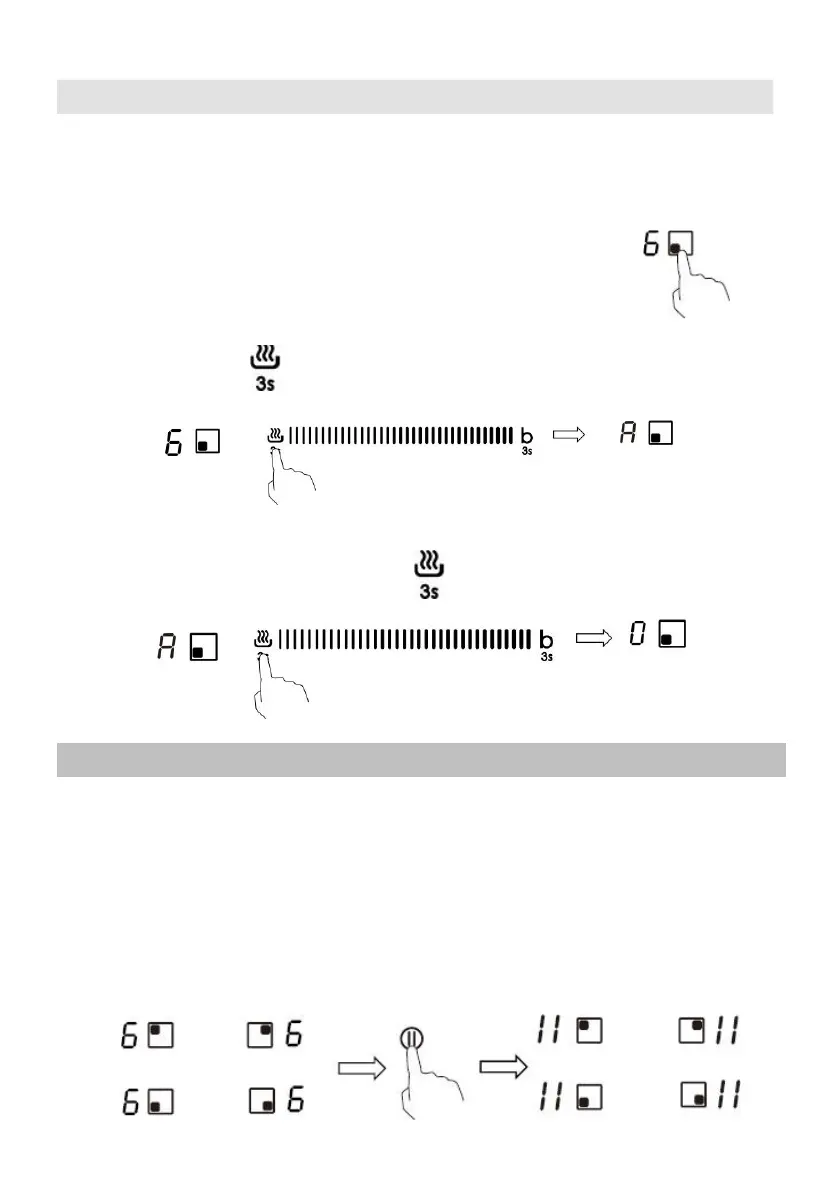
1. Touch the heating zone selection button that you wi
sh
to
use keep warm, an indicator next to the key will flash.
2. Touch the button , then hold 3 second,
t
he cooking zone indicator will
display “A”.
3. If you want to cancel the keep warm, touch the heating zone selection
button, and then touch the button for 3 second. The heating zone
will go back to “0” power stage.
Using the Pause function
Pause function can be used at any time during cooking. It allows to stop the
induction cooktop and come back to it.
1. Make sure the cook zone is working.
2. Touch the button pause function, the cooking zone indicator will show “ll”.
And then
the operation
of
the
induction cooktop will
be deactivate within the
scope
of all cooking zones, except the pause function, on/off and lock keys.


 To Next Page