dvanced Guide
>
How to Use This Manual
> Registering Topics to My Manual
Registering Topics to My Manual
Register frequently read pages as My Manual topics so that you can refer to those pages easily at any
time.
1.
Display the topic
Display the topic to be added to My Manual.
2.
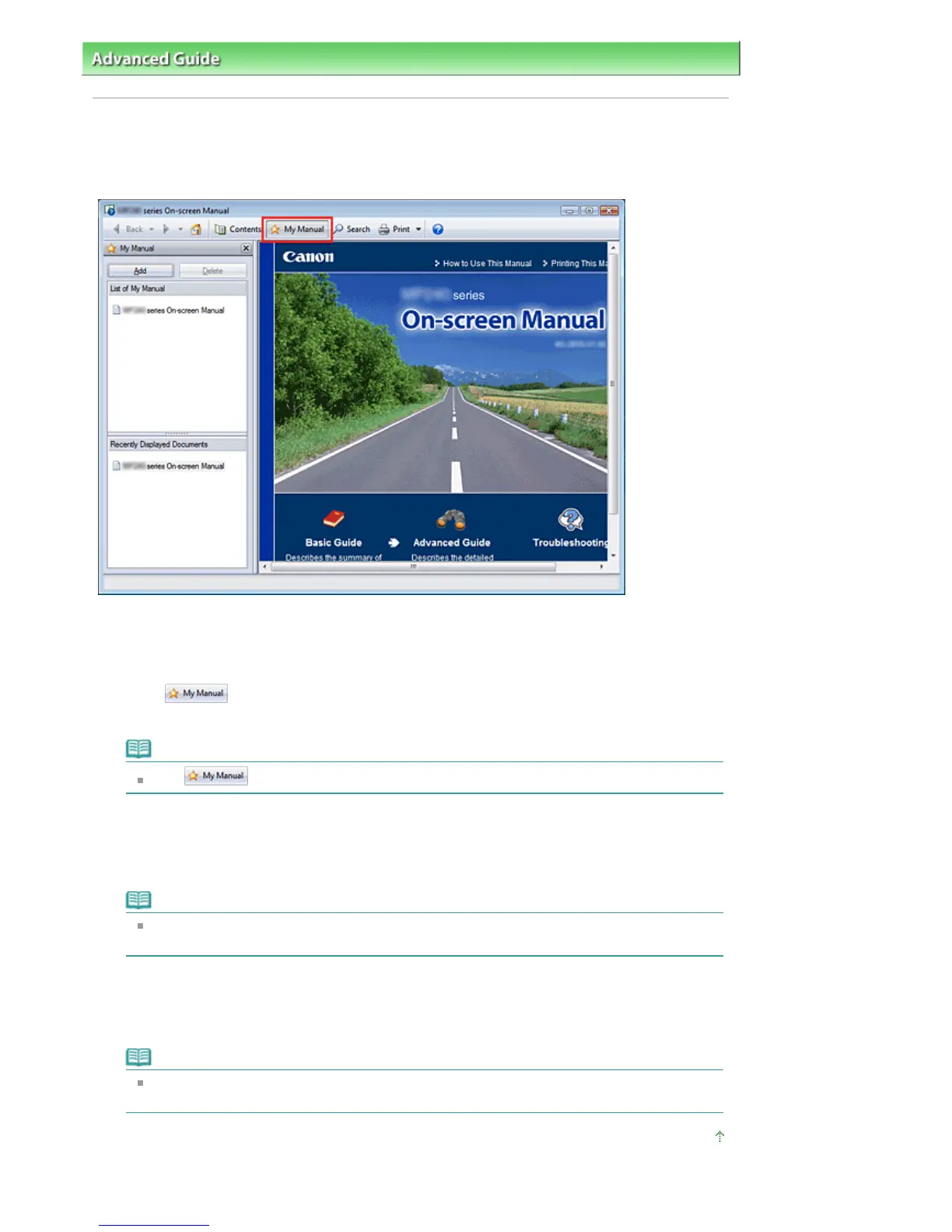
Click
The My Manual window is displayed to the left of the On-screen Manual.
Note
Click to close or display the My Manual window.
3.
Register the topic to My Manual
Click Add.
The currently displayed topic is added to List of My Manual.
Note
lternatively, from the Recently Displayed Documents list, double-click (or select and press
Enter) the topic to be added to My Manual to display that topic, and then click Add.
4.
Display My Manual
When you double-click (or select and press Enter) a topic displayed in List of My Manual, that topic is
displayed in the Description window.
Note
To delete a topic from List of My Manual, select that topic from the list, and then click Delete (or
press Delete).
Page top
Стр. 90 из 396 стр.Registering Topics to My Manual


 To Next Page
 Loading...