3. ERROR LIST
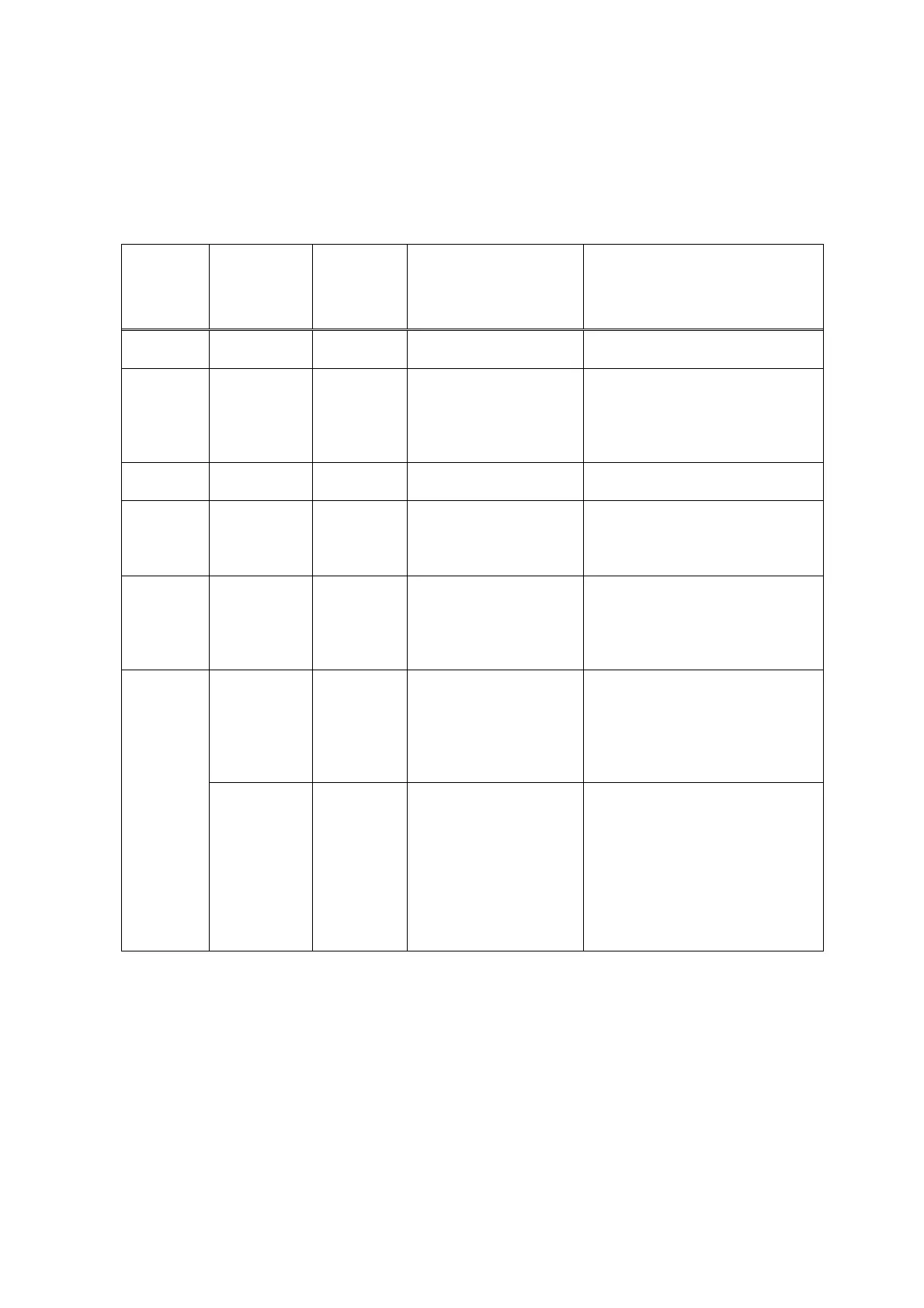
3.1. Errors by LED Blinking in Orange
User recoverable errors
LED
blinking in
orange
Panel display Error Code Error Solution
2 times 301 1000 No paper. Set the paper, and press the
Resume/Cancel button.
3 times 302 1300 Paper jam. Remove the jammed paper, and
press the Resume/Cancel button. If
the error is not resolved, check that
no foreign material is inside the
printer.
6 times 402 1401 The print head is not
installed.
Install the print head, and close the
access cover.
7 times 403 1405 The print head is not
installed properly.
(EEPROM data of the
print head is faulty.)
Re-install the print head, or with the
print head installed, turn the printer
off and on. If the error is not
resolved, replace the print head.
8 times 202 1700 Warning: The waste ink
absorber becomes almost
full (to approx. 95% to
100% of the maximum
capacity).
Pressing the Resume/Cancel button
will exit the error.
(The waste ink absorber full error
occurs at 100% capacity, making it
impossible to perform printing.
611 2001 Digital camera
transmission time-out
error (When the printer
cannot communicate with
a digital camera, the
time-out error occurs.)
Disconnect the USB cable to the
digital camera, and press the
Resume/Cancel button.
11 times
612 2001 Digital camera
non-supporting device
error (When a digital
camera or device other
than a digital camera, not
supporting Direct Printing
is connected to the printer
with the USB cable, the
error occurs.)
Disconnect the USB cable, and press
the Resume/Cancel button.
*1:The error code is stored in the operator / service call history of the EEPROM information.
5



 To Next Page