EasyManua.ls Logo

Canon CR-N500 - User Manual

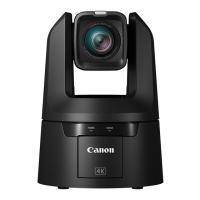
Canon CR-N500
119 pages
Print Icon
To Next Page IconTo Next Page
Loading...
This document should be read before using the product.
ENGLISH
Remote Camera
Settings Guide

Table of Contents

Other manuals for Canon CR-N500

Questions and Answers

  • J
    James JohnsonAug 19, 2025
    How to reset administrator password on Canon Digital Camera?
    • G
      Gregory BarnesAug 20, 2025
      To reset the administrator password, you can initialize all camera settings (excluding date and time) using the RESET switch. After initialization, use the Camera Search Tool to register the administrator account again. Please note that the IP address and subnet mask will also need to be reset.
  • A
    Allison DavisAug 21, 2025
    How to fix Canon CR-N500 unable to connect to wireless LAN?
    • W
      William JonesAug 21, 2025
      • Ensure you haven't exceeded the maximum number of devices that can connect via wireless LAN; disconnect unused devices. • Check for signal issues or interference from nearby electronic equipment. • Try resetting the camera and starting from the initial settings again.
  • S
    sramosAug 23, 2025
    What to do if the Settings Page is not displayed for my Canon Digital Camera?
    • M
      Mallory GarciaAug 25, 2025
      First, check if the LAN cable is correctly connected and that the network settings (IP address, subnet mask, and default gateway) are correct for your network. If you changed the IP address, reboot the camera. Verify the URI in your web browser. Also, check the Host Access Restrictions in [System] > [Security] and confirm your computer isn't blocked. Ensure the authentication method and user credentials match the network rules, and configure your security software to exclude the camera. Finally, verify the SERVICE switch is not set as a USB camera; switch it and restart the camera if needed.
  • M
    Matthew ClarkAug 26, 2025
    What to do if Canon Digital Camera does not launch?
    • K
      Kristin WhiteAug 26, 2025
      • If using a PoE+ hub, ensure the LAN cable is correctly connected. • If using a Compact Power Adapter, ensure it's correctly connected. • Try turning the camera off and restarting it. • If using a PoE+ supported hub, check its instructions for use, as some limit the power per port or total power consumed, which may prevent the camera from starting if exceeded.
  • J
    Joseph OlsonAug 27, 2025
    Why is there no audio from my Canon Digital Camera?
    • M
      Michael DorseyAug 27, 2025
      Ensure that the [Audio Input Mode] setting in [System] > [Video and Audio] > [Audio] > [General Audio] is correctly set for the connected microphone. If using an external microphone that requires phantom power, set [Audio Input Mode] to [INPUT Terminal/MIC+48V]. Note that when used as a USB camera, audio cannot be inputted from the camera; input the audio directly to the computer.
  • M
    Melissa KennedyAug 29, 2025
    What to do if there is no video or audio on the external monitor during HDMI/SDI output from Canon CR-N500 Digital Camera?
    • K
      Kelly CooleyAug 29, 2025
      Check that the camera is properly connected to the external monitor by verifying the cable connections. Reseat the cable, or turn the camera off and restart it. Also, ensure the external monitor is set according to the output signal of the camera.
  • V
    Vincent GrahamAug 31, 2025
    Why Canon Digital Camera cannot be operated from the IR remote controller?
    • K
      Kathleen FullerAug 31, 2025
      • Ensure the RS-422 connection is working correctly by checking the connection to the RS-422 terminal and the wiring of the RS-422 cable. • Verify that the remote controller settings match the serial connection settings on the Settings Page. Check [Serial Device Address] in [System] > [Communication] > [External Connection (Serial)] and set the camera number to match the remote controller. Also, ensure the Baud Rate (9600 bps or 38400 bps) is set the same on both.
  • K
    Keith CarrollSep 2, 2025
    Why is the STATUS lamp blinking on my Canon CR-N500?
    • C
      Christie MooreSep 2, 2025
      The firmware may be updating, which can take some time. Alternatively, the pan/tilt position may be shifted; execute [Pan/Tilt Initialization] in [System] > [Maintenance] > [General] > [Tool] or press the P/T INIT button on the IR remote. If the POWER lamp is also blinking, restart the camera. If the issue persists, contact your sales representative.
  • B
    Barry DavisSep 4, 2025
    How to enable IR remote controller on Canon CR-N500?
    • L
      lisa50Sep 4, 2025
      Go to [System] > [System] > [Camera] and select [Enable] for [IR Remote Controller]. Also, check the IR remote controller's CAMERA SELECT number and the setting of the SERVICE switch on the rear of the camera.
  • E
    elizabeth92Sep 6, 2025
    Why is there no audio during IP distribution from Canon CR-N500 Digital Camera?
    • A
      Angela SmithSep 6, 2025
      If there is no audio, check the settings in [System] > [Video and Audio] > [Audio] as well as the sound and audio device settings for the computer. Note that audio cannot be heard on the Settings Page.

Summary

Introduction to Canon Remote Camera Settings

Trademarks and Legal Information

Lists registered trademarks, software licenses, and legal disclaimers.

Document Usage Guidelines

Explains manual usage, notes, and software screenshot conventions.

Chapter 1 Before Use

System Layout and Configuration Examples

Illustrates system configurations and network connections for camera setup.

Software and Initial Setup Procedures

Details related software, security checks, and initial network settings.

Chapter 2 Camera Setup

Settings Page Navigation and Access

Guides on accessing and navigating the camera's web-based Settings Page.

Core Camera Configuration Settings

Covers exposure, white balance, color, image quality, and focus adjustments.

PTZ, Presets, and Advanced Camera Controls

Explains PTZ/IS settings, preset management, and digital zoom features.

System Configuration and Maintenance

Details system settings, network, security, and camera maintenance procedures.

Chapter 3 IR Remote Controller

IR Remote Controller Parts and Functions

Identifies buttons and describes the functions of the IR remote controller.

IR Remote Controller Handling and Precautions

Provides instructions for battery replacement and handling precautions.

Chapter 4 Appendix

USB Camera Functionality

Explains using the camera as a USB device and its control functions.

Troubleshooting Common Issues

Offers solutions for common camera problems and error messages.

Technical Specifications

Lists detailed technical specifications for the CR-N500 and CR-N300 cameras.

Security Measures and Best Practices

Details security hardening measures and recommendations for safe operation.

Canon CR-N500 Specifications

General IconGeneral
Megapixel- MP
Camera typeSingle camera
Sensor typeCMOS
Digital zoom20 x
Optical zoom15 x
White balanceAuto, Daylight, Manual, Tungsten
Zoom capabilityYes
Focus adjustmentAuto/Manual
Focal length range8.3 – 124.5 mm
Aperture range (F-F)2.8 - 4.5
Minimum illumination1.5 lx
Effective sensor resolution8.29 MP
Vertical field of view (tele)3.2 °
Vertical field of view (wide)45.2 °
Horizontal field of view (tele)5.7 °
Horizontal field of view (wide)73 °
Maximum frame rate59.94 fps
Maximum video resolution3840 x 2160 pixels
Pan range-170 - 170 °
Product colorBlack
Pan speed (max)100 °/sec
Pan speed (min)0.1 °/sec
Tilt angle range-30 - 90 °
USB 2.0 ports quantityUSB 2.0 ports have a data transmission speed of 480 Mbps, and are backwards compatible with USB 1.1 ports. You can connect all kinds of peripheral devices to them.
Power source typeDC, PoE
Power over Ethernet (PoE) voltage24 V
Operating temperature (T-T)0 - 40 °C
Operating relative humidity (H-H)10 - 90 %
Ethernet LAN data rates1000 Mbit/s
Weight and Dimensions IconWeight and Dimensions
Depth208 mm
Width200 mm
Height269 mm
Weight4100 g

Related product manuals