I h
I 4i'
.
Using
:ttle,
vi~Wfinder
.
V!Jhel''lJeCX)r<:iing··in··bright
places it
may
b~difficultto
use.
the
LCD
screen.
In
such case, change the
brightness
of
the LCD screen
(ED
25)
or
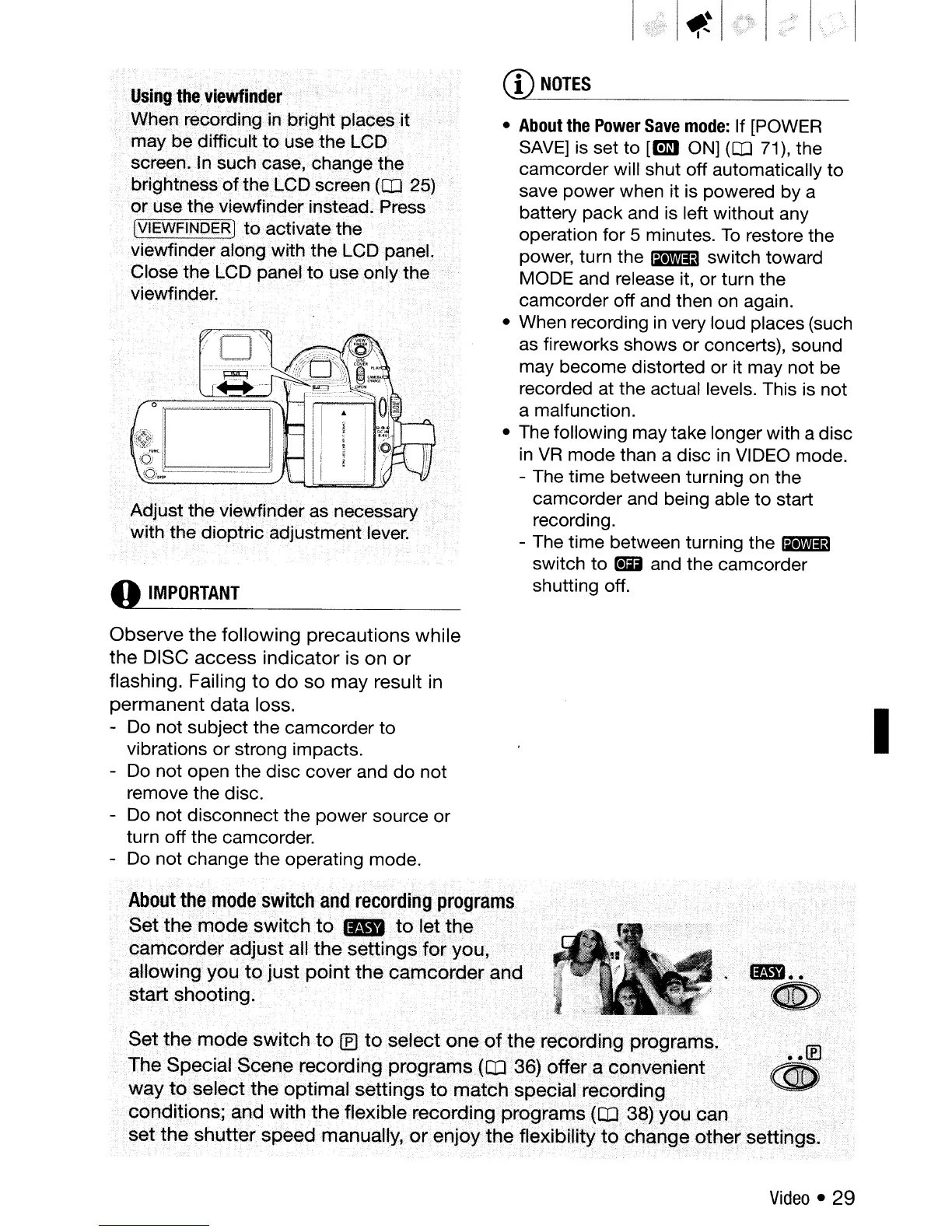
use the viewfinder instead. Press·
(VIEWFINDER]
to
activate the
vie'v\'finderalong·WiththeLGQpanel.
Close the LCD panel
to
use only
the
viewfinder.
Adjust the viewfinder.asnecessary
with
the dioptric adjustment lever.
o
IMPORTANT
Observe
the
following
precautions
while
the
DISC
access
indicator
is on
or
flashing. Failing
to
do
so
may
result in
permanent
data
loss.
- Do not subject the camcorder to
vibrations or strong impacts.
-
Do
not open the disc cover and do not
remove the disc.
-
Do
not disconnect the power source or
turn off the camcorder.
-
Do
not change the operating mode.
CD
NOTES
•
About
the
Power
Save
mode:
If [POWER
SAVE]
is
set to
[tm1
ON]
(CD
71), the
camcorder will shut off automatically
to
save power when it is powered by a
battery pack and is left without any
operation for
5 minutes.
To
restore the
power, turn the
Iii1I!iJ
switch toward
MODE and release it, or turn the
camcorder off and then
on
again.
• When recording
in
very loud places (such
as fireworks shows or concerts), sound
may become distorted or it may not be
recorded at the actual levels. This is not
a malfunction.
• The following may take longer with a disc
in
VR
mode than a disc
in
VIDEO
mode.
- The time between turning
on
the
camcorder and being able to start
recording.
- The time between turning the
~
switch to _ and the camcorder
shutting off.
I
About
t~e·
mode.'switcband
recordingprogram~
Set
the
mode
switch
fa
1&1.
to
letthe
.
camcorder
adjust
all
the
settings
for
you,
allowing
you
to
just
point
the
camcorder
and
start
shooting.
Set
the
mode
switch
to
(E1toselect
one
of
the
rec()rdingprogram~.
The Special
Scene
recording
programs
(ctJ36) offer.a
convenient
"
way
to
select
the
optimal
settings
to
match
special recording
..
.
<conditions;
and
withthe
flexible
recording
programs
(ED
38)youc;an
•
set
the
shutter
speed
manually,
orenjoythefle){ibUityt9ch~mg~oth~rsetti.ngs.·
'
Video
•
29



 To Next Page