EasyManua.ls Logo

Canon DC410 - Page 67

Canon DC410
103 pages
Print Icon
To Next Page IconTo Next Page
To Previous Page IconTo Previous Page
Loading...
101
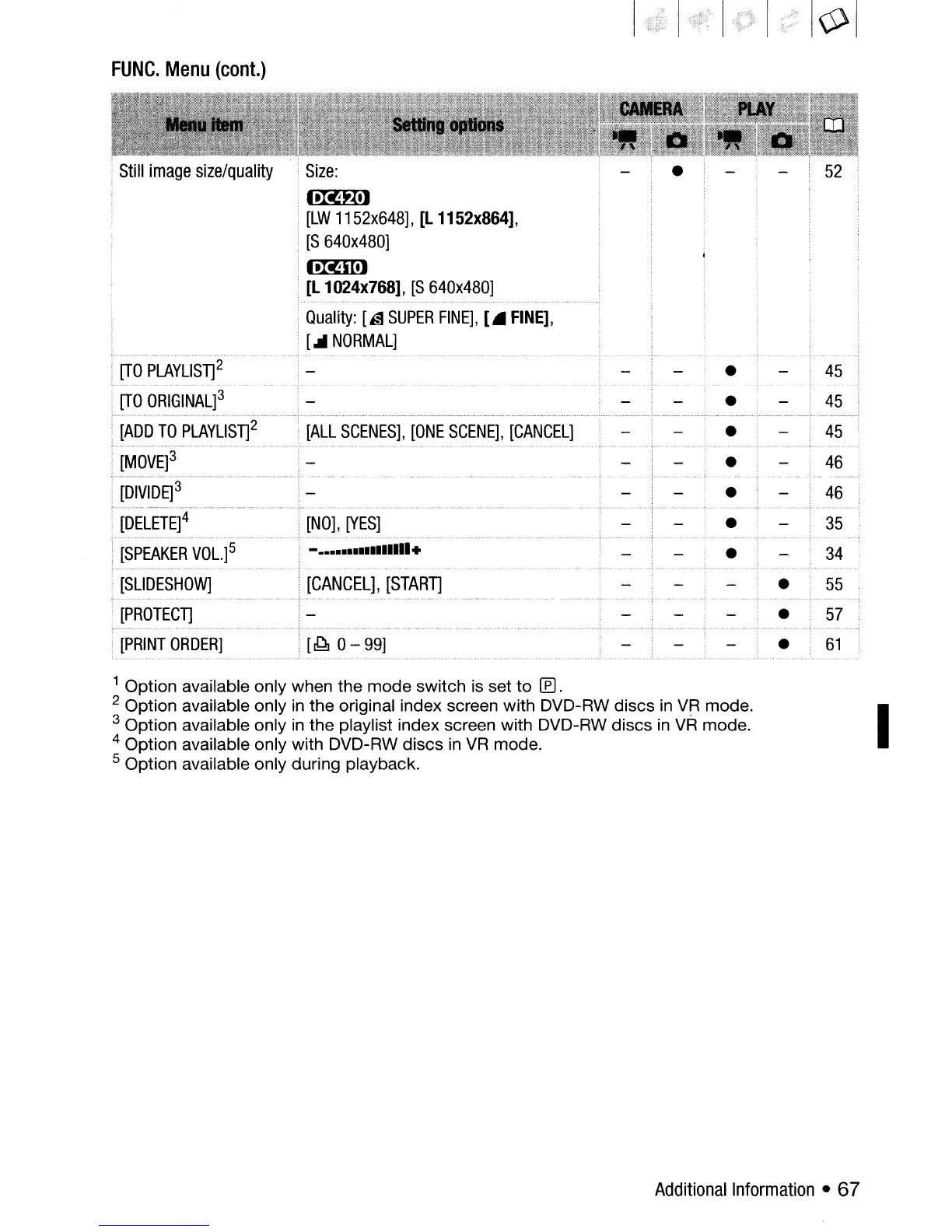
FUNC.
Menu
(cont.)
45
45
45
34
55
57
61
46
46
35
- ••••••••••••
1111.
[CANCEL],
[STARn
[~
0 -
99]
[NO],
[YES]
[ALL
SCENES],
[ONE
SCENE],
[CANCEL]
Size:
I·M"X,J
[LW
1152x648],
[L
1152x864],
[S
640x480]
I·Mml
[L
1
024x768],
[S
640x480]
Quality:
[is
SUPER
FINE],
[.
FINE],
[...
NORMAL]
[MOVE]3
[D1VI
DE]
3
[SPEAKER
VOL.]5
[SLIDESHOW]
[PROTECT]
[PRINT
ORDER]
[DELETE]4
[ADD
TO
PLAYLlST]2
[TO
PLAYLlST]2
[TO
ORIGINAL]3
1 Option available only when the mode switch
is
set
to
[E).
2 Option available only
in
the original index screen with DVD-RW discs
in
VR
mode.
3 Option available only
in
the playlist index screen with DVD-RW discs
in
VR
mode.
4 Option available only with DVD-RW discs
in
VR
mode.
5 Option available only during playback.
I
Additional
Information
67

Table of Contents

Related product manuals