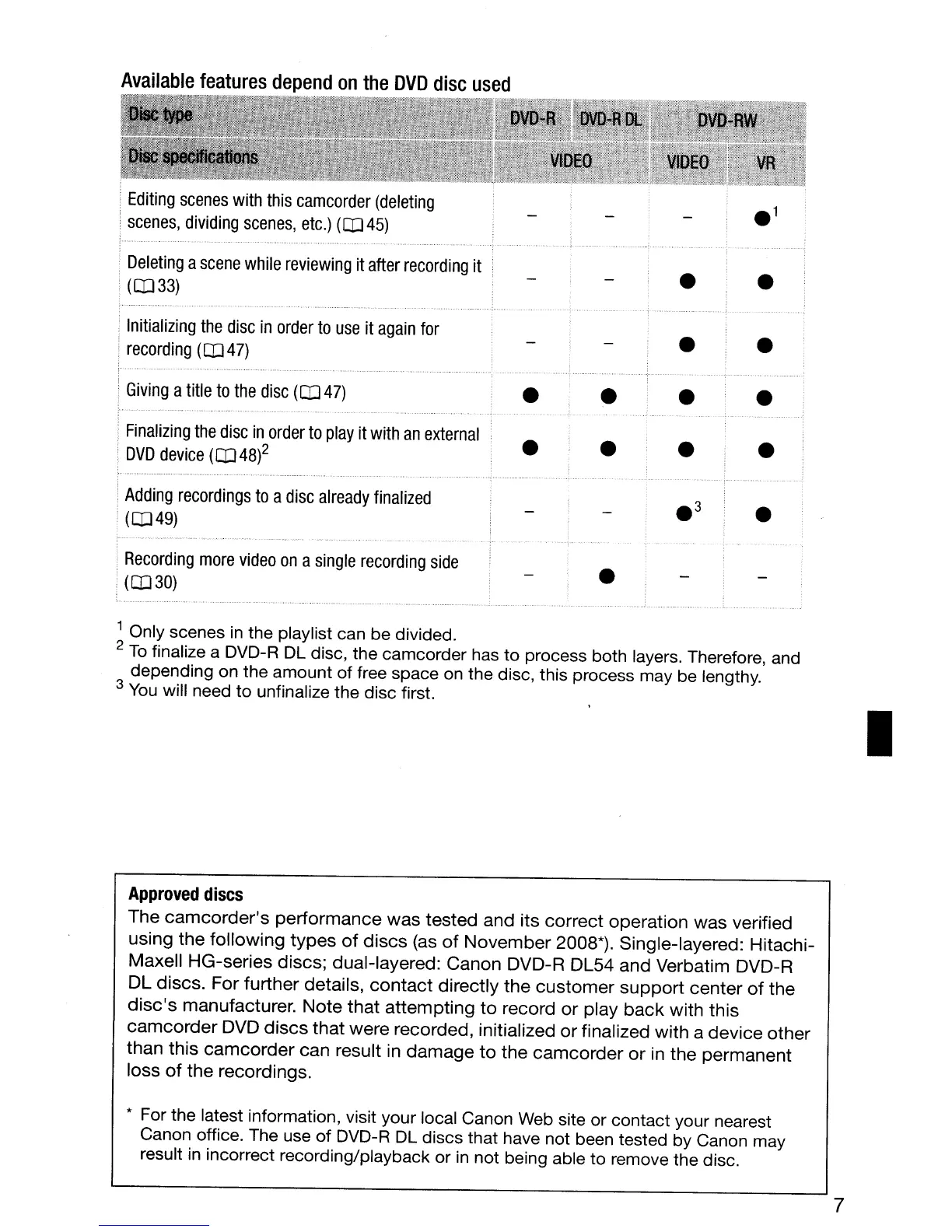
Available
features
depend
on
the
DVD
disc
used
,
Editing
scenes
with
this
camcorder
(deleting
.
scenes,
dividing
scenes,
etc.)
(CD
45)
Deleting
a
scene
while
reviewing
it
after
recording
it
(CD
33)
,
Initializing
the
disc
in
order
to
use
it
again
for
,
recording
(CD47)
Giving
a
title
to
the
disc
(CD
47)
Finalizing
the
disc
in
order
to
play
it
with
an
external
DVD
device
(CD
48)2
Adding
recordings
to
a
disc
already
finalized
(CD49)
Recording
more
video
on
a
single
recording
side
(CD
30)
•
•
•
1 Only scenes
in
the playlist can be divided.
2
To
finalize a DVD-R
DL
disc, the camcorder has
to
process both layers. Therefore, and
depending on the amount of free space
on
the disc, this process may
be
lengthy.
3
You
will need to unfinalize the disc first.
Approved
discs
The
camcorder's
performance
was
tested and its correct operation was verified
using the following
types
of
discs
(as
of
November
2008*). Single-layered: Hitachi-
Maxell HG-series discs; dual-layered: Canon DVD-R DL54 and Verbatim DVD-R
DL
discs. For further details,
contact
directly
the
customer
support
center
of
the
disc's
manufacturer.
Note
that
attempting
to
record
or
play
back
with this
camcorder
DVD
discs
that
were recorded, initialized
or
finalized with a
device
other
than this
camcorder
can result
in
damage
to
the
camcorder
or
in the permanent
loss
of
the
recordings.
* For the latest information, visit your local Canon
Web
site or contact your nearest
Canon office. The use
of
DVD-R
DL
discs that have not been tested by Canon may
result
in
incorrect recording/playback or
in
not being able to remove the disc.
7
•



 To Next Page