166
To blur the background or to make everything near and far look sharp,
set the Mode Dial to <f> (Aperture-priority AE) to adjust the depth of
field (range of acceptable focus).
*<f> stands for Aperture value (the size of the lens diaphragm opening).
1
Set the Mode Dial to <f>.
2
Set the desired aperture.
The higher the f/number, the wider
the depth of field where sharper focus
is obtained in both the foreground
and background.
Turning the <6> dial clockwise sets
a higher f/number (smaller aperture
opening), and turning it
counterclockwise sets a lower
f/number (larger aperture opening).
3
Take the picture.
When you focus and press the
shutter button completely, the picture
will be taken with the set aperture.
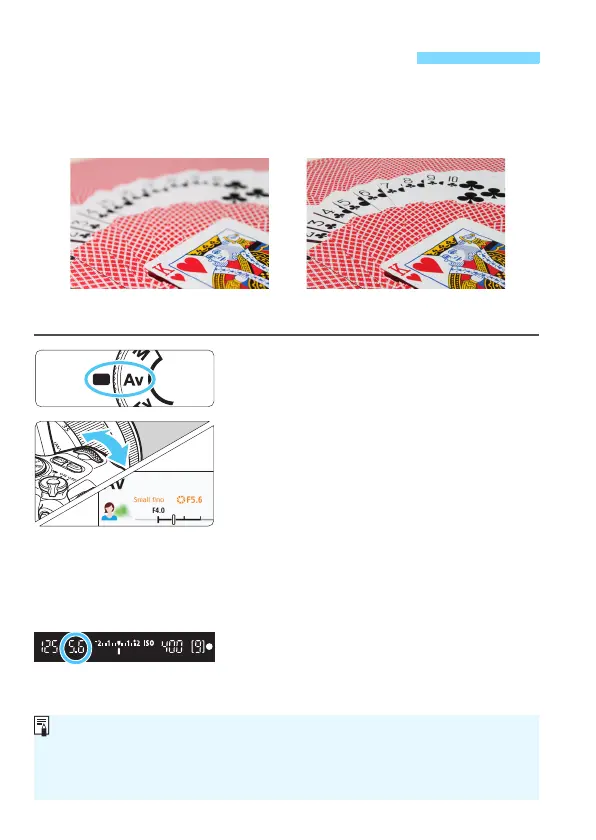
f: Changing the Depth of Field
Sharp foreground and background
(With a high aperture f/number: f/32)
Blurred background
(With a low aperture f/number: f/5.6)
Aperture Value Display
The higher the f/number, the smaller the aperture opening will be. The
f/number displayed will differ depending on the lens. If no lens is attached to
the camera, “00” will be displayed for the aperture.



 To Next Page