409
3 Menu Settings
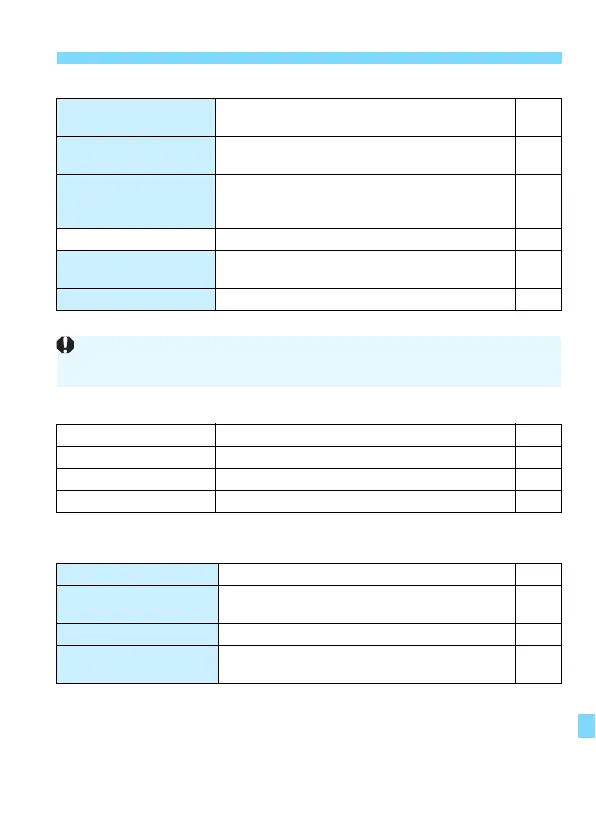
5: Set-up 4 (Yellow) Page
* Not displayed for Live View shooting or movie shooting.
s: Display level settings (Blue green)
* Cannot be set for Live View shooting or movie shooting.
9: My Menu* (Green)
* Not displayed when [s: Menu display] is set to [Guided].
Custom Functions
(C.Fn)
Customize camera functions as desired 366
Clear settings
Clear all camera settings / Clear all Custom
Functions (C.Fn)
298
Copyright information
Display copyright information / Enter author’s
name / Enter copyright details / Delete
copyright information
295
Manual/software URL
QR code for the download site 5
Certification Logo
Display
Displays some of the logos of the camera’s
certifications
379
z firmware ver.* For updating the firmware -
Shooting screen* Guided / Standard 52
Menu display
Guided / Standard 54
Mode guide*
Enable / Disable 55
Feature guide
Enable / Disable 56
Add My Menu tab Add My Menu tabs 1-5 373
Delete all My Menu
tabs
Delete all My Menu tabs 376
Delete all items Delete all items under My Menu tabs 1-5 376
Menu display
Normal display / Display from My Menu tab /
Display only My Menu tab
377
To prevent an inadvertent update of the firmware, selecting [z firmware
ver.] will disable touch control.


 To Next Page